Halloween Vtoo Prompt Guide, Part 2: Four Story-Driven Halloween Character Ideas
Use V2Fun's AI 3D Model Generator, part of its AI 3D creation platform, to turn four Halloween Vtoo prompts into 3D-friendly character concepts.

One Vtoo can become an entire universe of Halloween characters. Halloween 8K Universe Creator Challenge | V2FunWith a recognizable reference image, a focused prompt, and a clear silhouette, the same base character can transform into an eccentric alchemist, a gothic puppeteer, a supernatural clockmaker, or a mysterious raven courier.
V2Fun is an AI 3D creation platform for generating, animating, and controlling 3D characters, models, and motions. This tutorial focuses on the concept-image and model-generation stages: writing stronger Halloween prompts, preparing 3D-friendly references, and using the AI 3D Model Generator to turn a character idea into a complete model.
For the Halloween 8K Universe Creator Challenge, creators are invited to redesign the official Vtoo character with an original Halloween identity. The four concepts below—Cursed Alchemist, Spider Web Puppeteer, Haunted Clockmaker, and Raven Messenger—are starting points rather than fixed templates. Adapt their colors, materials, props, and stories to make your entry unmistakably yours.
Start With the Official Vtoo Reference Images
The official reference pack contains four 2048 × 2048 PNG images showing Vtoo from the front, left, back, and right.
A single front image is useful for exploring an initial design quickly. Multiple views provide more information about Vtoo's proportions, hairstyle, rabbit ears, clothing, and silhouette, especially when the redesigned costume includes important side or back details.
Use the official Vtoo image as the primary visual reference and describe only the elements you want to change. This gives the image generator a stable identity to preserve while your prompt defines the Halloween costume, materials, accessories, mood, and story.
Preserve Vtoo's Core Identity
Keep these recognizable features consistent:
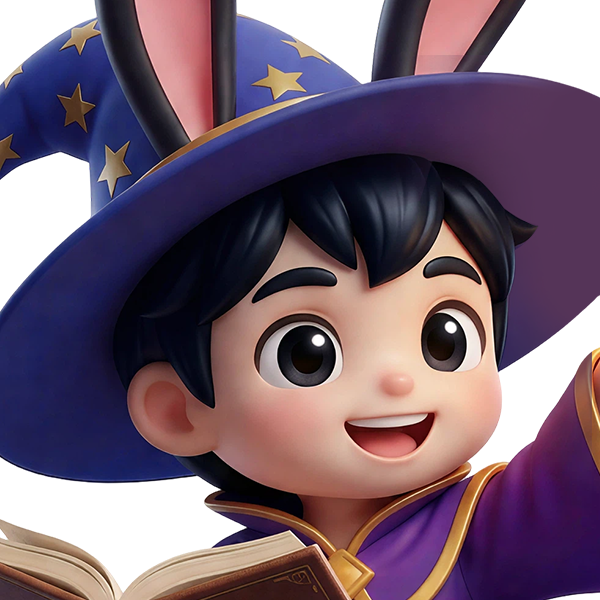
- Childlike proportions and a polished, stylized 3D appearance
- Black hair and expressive facial features
- Long black rabbit ears with pink inner details
- A full-body composition with visible arms, legs, hands, and feet
- A playful, approachable personality
- Similar head, hand, shoe, and body scale across every view
The goal is not to replace Vtoo with an unrelated fantasy character. It is to show what Vtoo could become on Halloween.
Use a Six-Part Halloween Character Prompt Formula
A reliable prompt can be organized into six parts:
Character identity + Halloween theme + costume structure + pose and expression + visual style + 3D-friendly presentation
For example:
> Vtoo transformed into a playful Halloween pumpkin spirit, wearing a carved pumpkin costume, cheerful expression, full-body front view, polished stylized 3D character design, clean background, even studio lighting, with the original face, rabbit ears, and childlike proportions preserved.
The most useful prompts describe both the creative idea and the structure that must remain visible. Include instructions such as:
- Show the full body from ears to feet
- Use a centered front-facing or three-quarter composition
- Keep both arms and legs clearly separated
- Do not crop the ears, hands, accessories, or feet
- Use a clean background with strong character separation
- Apply soft, even lighting without dramatic shadows
- Make fabrics, leather, metal, glass, and magical effects visually distinct
- Keep major accessories large enough to read in 3D
- Preserve the identity and proportions of the reference character
- Avoid dense clusters of tiny objects and overlapping shapes
V2Fun's AI Image Generator supports a reference image plus prompt workflow. The reference supplies the character structure, while the text prompt defines the costume, materials, atmosphere, and Halloween story.
1. Cursed Alchemist Vtoo
The Cursed Alchemist turns Vtoo into an eccentric fantasy adventurer. Potion bottles, brass goggles, stitched fabrics, and an ingredient backpack create a strong story without relying on familiar pumpkins, skeletons, vampires, or witch hats.
This idea also works well as a game-style character skin. Oversized accessories remain readable at a distance, while the asymmetrical coat and unusual potion colors create a distinctive silhouette.
Ready-to-Use Prompt
> Create a Halloween Cursed Alchemist outfit for the provided chibi boy. Strictly preserve his original face, black hairstyle, long black rabbit ears with pink inner details, childlike body proportions, hands, shoe scale, and T-pose. Replace the original suit with a dark teal and brown alchemist coat featuring an asymmetrical front opening, oversized rolled sleeves, leather straps, stitched fabric patches, and several large brass buckles. Add a cream shirt and a short dark leather vest under the coat. Give him cropped dark trousers and sturdy brown leather boots. Add a wide utility belt holding several simplified potion bottles in unusual shapes, filled with glowing green, purple, and cyan magical liquids. Include a few large cork bottles, rolled notes, herbs, and a compact ingredient pouch, keeping every prop readable in a stylized 3D model. Place oversized brass alchemist goggles on his forehead between the rabbit ears so both ears remain fully visible. Wrap one ear with a small leather strap holding a tiny potion bottle. Put a detachable glass-like potion flask in one hand and surround it with a subtle magical smoke effect shaped like a solid stylized spiral. Add a compact leather ingredient backpack with bottles and rolled parchment on the back. The result should resemble a premium Halloween RPG character skin: adventurous, eccentric, magical, slightly messy, cute, and child-friendly. Avoid traditional witch, vampire, pumpkin, skeleton, and devil elements.
Ways to Personalize the Alchemist
- Assign each potion color a different magical power.
- Replace the leather backpack with a small wooden portable laboratory.
- Add simplified glowing runes to the coat, boots, or potion belt.
- Create a forest, dream, moonlight, or crystal alchemist variation.
- Change the flask into a removable lantern, crystal, or ingredient container.
For cleaner 3D reconstruction, use a few large bottles instead of many tiny ones. Leave visible space between the belt accessories, arms, and coat.
2. Spider Web Puppeteer Vtoo
The Spider Web Puppeteer combines theatrical costume design with a restrained gothic mood. Instead of turning Vtoo into a frightening spider creature, the design uses silver threads, web embroidery, puppet strings, and mechanical accessories to communicate the theme.
Black, burgundy, charcoal gray, and antique silver create a controlled palette. A compact mechanical spider backpack gives the character a memorable profile from both the front and back.
Ready-to-Use Prompt
> Create a stylized Halloween costume for the chibi boy using the provided character reference images. Preserve his original face, short black hair, large black rabbit ears, childlike body proportions, facial expression, and T-pose. Do not redesign the character himself. Dress him as a mysterious Spider Web Puppeteer in a short asymmetrical black tailcoat with deep burgundy lining, layered pointed lapels, silver buttons, and thin embroidered spider-web patterns across the shoulders and sleeves. Add a fitted dark gray vest with several thin silver chains crossing the chest like puppet strings. Use trousers with subtle black-and-gray vertical stripes, slightly oversized ankle cuffs, and chunky black boots with silver buckles. Wrap a few decorative silver threads loosely around one rabbit ear and hang a tiny stylized spider ornament from the side. Add a compact mechanical spider backpack with four short decorative articulated legs extending outward without touching or obscuring the character's arms. Attach a small wooden marionette controller to the belt. Use black, charcoal gray, burgundy, and antique silver as the main colors. Keep the mood mysterious, theatrical, playful, and slightly gothic rather than frightening. Maintain a polished stylized 3D toy aesthetic with clear shapes, a readable silhouette, and practical geometry suitable for a game character.
Ways to Personalize the Puppeteer
- Give the mechanical spider an expressive face or brighter accent color.
- Replace the silver threads with thick, glowing magical strings.
- Add a small haunted marionette companion with a simple silhouette.
- Explore a circus puppeteer, royal theater master, or shadow performer.
- Use fabric web patterns instead of adding separate floating strands.
Keep the mechanical legs short, thick, and clearly separated from Vtoo's arms. This prevents the backpack and body from merging into one confusing shape.
3. Haunted Clockmaker Vtoo
The Haunted Clockmaker imagines Vtoo as a tiny inventor who repairs supernatural clocks after midnight. Victorian workshop clothing, brass mechanisms, miniature tools, and spectral clock fragments build a detailed Halloween story without using a conventional monster design.
The large clock backpack is the visual centerpiece. Its circular dial, winding key, exposed gears, and pendulum create structural features that can translate clearly into 3D when they remain large and simplified.
Ready-to-Use Prompt
> Transform the provided chibi boy into a whimsical Halloween Haunted Clockmaker. Preserve his original face, black hair, large rabbit ears, childlike proportions, and T-pose exactly as shown in the reference. Replace his clothing with a Victorian-inspired workshop outfit consisting of a dark brown cropped jacket, muted olive vest, cream shirt, rolled cuffs, fitted dark trousers, and heavy leather work boots. Add oversized brass buttons, stitched patches, leather straps, and a limited number of large gear decorations. Attach a large but compact antique clock mechanism to his back like a backpack. Give the clock a visible circular dial, oversized hands, several exposed gears, a winding key, and a small swinging pendulum. Keep the mechanism stylized and simplified rather than mechanically realistic. Add a leather tool belt carrying a few miniature gears, a tiny hammer, winding keys, large screws, and a pocket watch. Place round brass workshop goggles above his forehead between the rabbit ears. Add one unusual Halloween detail: several floating clock fragments and translucent ghost-like clock hands surrounding the backpack, represented as simple solid stylized shapes suitable for 3D. Use aged brass, dark brown leather, muted green, cream, and subtle blue-green supernatural accents. The character should feel like a cute inventor who repairs haunted clocks at midnight, combining steampunk mystery, Halloween storytelling, and stylized toy aesthetics.
Ways to Personalize the Clockmaker
- Change the clock face to display a symbol or an impossible time.
- Add a small ghost peeking through an opening in the mechanism.
- Replace brass gears with large magical crystal components.
- Create a time traveler, dream mechanic, or cursed toy repairer.
- Make the pendulum, winding key, or clock hands the main accent color.
If the concept looks crowded, reduce the number of gears. Three or four large components usually communicate the idea more clearly than dozens of tiny mechanisms.
4. Raven Messenger Vtoo
The Raven Messenger turns Vtoo into a mysterious courier carrying letters between the human and supernatural worlds. An old European postal uniform, sealed envelopes, wax stamps, dark feathers, and a friendly raven companion make the role immediately understandable.
The result should feel warm and storybook-like rather than aggressively dark. The satchel, letters, and bird also create a clear narrative that viewers can recognize from a single image.
Ready-to-Use Prompt
> Redesign the provided chibi boy as a Halloween Raven Messenger while keeping his original identity completely recognizable. Preserve the same cute face, black hairstyle, long black rabbit ears, childlike proportions, and T-pose. Give him a layered midnight-blue and black messenger outfit inspired by mysterious old European postal uniforms. Use a short fitted coat with a high collar, two rows of antique brass buttons, slightly oversized shoulder pieces, and feather-shaped fabric layers around the collar. Add dark shorts over fitted leggings and sturdy lace-up boots. Place a weathered brown crossbody satchel across his torso and fill it with mysterious sealed letters. Give several envelopes readable wax seals, strange stamps, crescent symbols, and simple feather decorations. Attach a bundle of rolled letters to his belt. Place a small stylized black raven companion between the backpack and shoulder area, with oversized expressive eyes and simplified rounded proportions that match the cute 3D style. Decorate one rabbit ear with a tiny brass mail tag and a dark blue ribbon. Add a few loose black feathers around the costume while keeping the silhouette clean. Use midnight blue, black, brown leather, antique brass, and small dark-red wax-seal accents. The final character should feel like a mysterious Halloween storybook courier who delivers letters between the human world and the supernatural world.
Ways to Personalize the Messenger
- Give the raven a miniature messenger bag or brass name tag.
- Turn the letters into magical invitations, warnings, or treasure maps.
- Add large glowing symbols to selected wax seals.
- Create a moonlight courier, dream messenger, or haunted postmaster.
- Replace the loose feathers with a feather-shaped cape or collar.
Place the raven where it does not overlap with Vtoo's face, rabbit ears, or arms. A clearly separated companion is easier to understand in the concept image and the resulting model.
Prepare Images for the AI 3D Model Generator
An attractive concept image is only the first stage. The image must also communicate the character's body, costume, and accessories clearly enough to support the 3D character generator workflow.
Before generating the model, confirm that:
- The entire character is visible from the tips of the ears to the feet.
- Both arms and both legs can be distinguished from the torso.
- Hands, shoes, and important joints are not hidden by accessories.
- The background is simple and visually separate from the character.
- Lighting is even enough to reveal shapes, colors, and materials.
- The pose avoids extreme perspective distortion.
- Costume parts look physically connected and understandable.
- Companion characters do not merge with the head, ears, or limbs.
- Effects such as smoke, threads, or ghost fragments use simple solid shapes.
- Important details remain consistent between every reference view.
A front-facing natural pose works well for quick exploration. For more precise reconstruction and easier rigging, generate a clear T-pose with the arms extended horizontally.
Plan for a Cleaner Animation Workflow
If you expect to rig or animate the character later, make production decisions at the image stage. Keep the arms away from the torso, show the hands, separate the legs, and avoid placing rigid props directly across major joints. These choices do not animate the model automatically, but they create a clearer foundation for the downstream animation workflow.
Choose Single-Image or Multi-View to 3D Model
V2Fun can generate a 3D model from a single character image, which is useful for previewing a concept quickly. A strong front or three-quarter view should show the face, costume structure, limbs, and primary accessories without heavy overlap.
Use the Multi-View to 3D Model workflow when important information is hidden from the front, such as:
- A clock mechanism or ingredient backpack
- Coat tails, capes, straps, or back decorations
- A raven or mechanical companion placed behind the shoulder
- Different materials or patterns on the side and back
- Accessories attached to one ear, hip, or boot
Keep the face, body proportions, costume colors, accessory scale, and material language consistent across front, side, and back views. If one view introduces a different buckle, backpack shape, or sleeve length, resolve the mismatch before generating the model.
Follow a Four-Stage V2Fun Workflow
- Download the official Vtoo references. Choose the clearest view for concept exploration or prepare all four views for a more structured workflow.
- Generate the Halloween design. Use a Vtoo reference image with your prompt in the V2Fun AI Image Generator. Compare multiple versions for identity, silhouette, costume readability, and structural clarity.
- Create the core 3D model. Use one strong image for fast iteration or consistent front, side, and back references with Multi-View to 3D Model.
- Review and publish the entry. Preview the model from different angles, correct unclear source shapes when necessary, and publish with the exact official Halloween activity tag.
If the model does not capture an important part of the design, return to the concept image. Enlarge the feature, simplify its shape, separate overlapping parts, or improve the contrast between the accessory and the body. Creating several controlled versions is often more useful than continually adding detail to one crowded image.
Make the Prompt Your Own
The four prompts are creative foundations, not final answers. Combine roles and themes to develop a more original character:
- Pumpkin vampire
- Ghost magician
- Zombie gardener
- Devil candy hunter
- Haunted toy maker
- Moonlight witch
- Skeleton astronaut
- Cursed forest guardian
You can also change the material language. A pumpkin costume might be carved wood, soft fabric, polished candy, worn leather, or glowing crystal. A ghost effect might appear as cloth, mist, moonlight, translucent jelly, or a solid stylized flame.
The strongest designs preserve Vtoo's identity while adding three things: a clear role, a memorable silhouette, and a consistent visual story. Every prop should support that story rather than filling empty space.
Join the Halloween 8K Universe Creator Challenge
According to the campaign details supplied for this article, the Halloween 8K Universe Creator Challenge offers more than US$10,000 in prizes, including gaming consoles, Amazon eGift Cards, V2Fun memberships, and participation rewards. Halloween 8K Universe Creator Challenge | V2Fun
As of October 23, 2026, the supplied schedule indicates that submissions remain open until October 31, 2026, at 23:59 EDT. Winners are scheduled to be announced on November 12, 2026, at 10:00 EST.
The source rules state that:
- The core 3D model must be generated with V2Fun.
- The entry must remain recognizably based on Vtoo.
- The redesign must use a clear Halloween theme.
- The work must be published with the official activity tag.
- The entry must remain public throughout the event.
Before submitting, check the official campaign page for the exact tag, final eligibility rules, required links, and any schedule updates.
Create Your Halloween Vtoo
Start with the official reference, choose one clear character role, and use the six-part prompt formula to define the costume, pose, style, and 3D presentation. Simplify anything that obscures the body or weakens the silhouette.
The AI 3D Model Generator is the bridge between your Halloween concept and a complete Vtoo model. Download the reference pack, generate a clean full-body design, compare single-image and multi-view options, and bring your story-driven character to life with V2Fun.
One Vtoo. Endless Halloween imagination.
FAQ
What makes a Halloween character image suitable for 3D generation?
Use a full-body image with visible limbs, a clean background, even lighting, readable materials, limited overlap, and no cropped ears, hands, or feet. Large, clearly separated accessories are generally easier to interpret than clusters of tiny details.
Can V2Fun generate a 3D model from one image?
Yes. A single character image can be used for quick concept generation. Front, side, and back references can provide more structural information when the costume includes important details that are hidden from the front.
Is a T-pose required for a Vtoo character?
No. A natural front-facing pose can work for early experiments, but a clear T-pose with separated arms and visible limbs can support more precise reconstruction and a cleaner downstream rigging or animation workflow.
How do I keep Vtoo recognizable after redesigning the costume?
Preserve Vtoo's face, black hairstyle, long black rabbit ears, childlike proportions, full-body silhouette, and playful personality. Describe the costume and accessories as changes layered onto the reference character rather than asking for a completely new character.
Related Articles

Halloween Vtoo Prompt Guide, Part 1: Four Classic Halloween Character Ideas
 V2Fun Team · Oct 22, 2026

From Photo to Hyper-Realistic Digital Human: Rapidly Build 3D Characters Using V2Fun + CC5
 Tammy · May 2, 2026

How to Generate an STL File from an Image Using V2Fun for 3D Printing
V2Fun Team · Jul 9, 2026