Halloween Vtoo Prompt Guide, Part 1: Four Classic Halloween Character Ideas
Use V2Fun’s AI 3D Model Generator to design Halloween Vtoo characters, create complete 3D models, and build a clean foundation for animation.

One Vtoo can become an entire universe of Halloween characters. 万圣节8K宇宙创作者挑战 |V2Fun
V2Fun is an AI 3D creation platform for generating, animating, and controlling 3D characters, models, and motions. For the Halloween 8K Universe Creator Challenge, creators can reinterpret the official Vtoo character with an original seasonal theme and turn the concept into a complete 3D model.
This guide provides four ready-to-use Halloween Vtoo prompts based on the official examples: Pumpkin Spirit, Little Devil, Zombie, and Ghost. It also explains how to preserve Vtoo’s identity, prepare a clear reference image, and use V2Fun’s AI 3D Model Generator more effectively.
Treat each prompt as a starting point. Adjust the costume, materials, expression, and story until the final character feels unmistakably yours.
Quick Workflow: From Vtoo Reference to 3D Model
Follow this four-stage workflow:
- Download the official Vtoo reference images.
- Create a Halloween concept with a reference image and a detailed prompt.
- Generate the core 3D model in V2Fun from one image or multiple views.
- Review the model, refine unclear details, and publish it with the official activity tag.
The quality of the final model begins with the clarity of the reference. A visually appealing image is helpful, but a readable pose, complete silhouette, and understandable costume structure are just as important.
Start With the Official Vtoo Reference Images
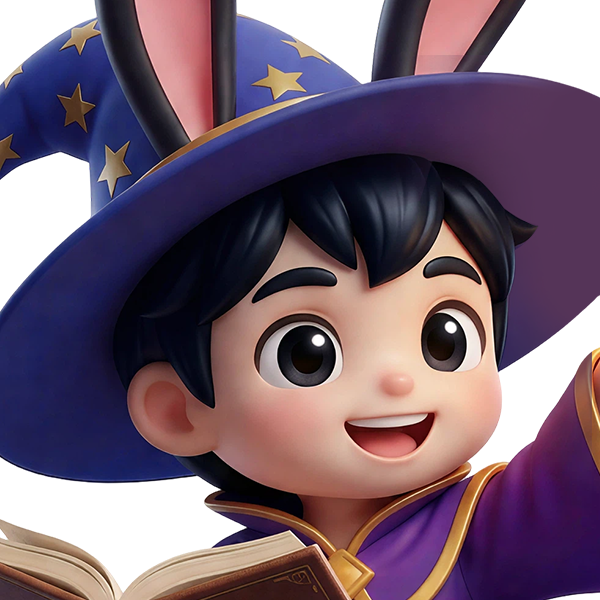
The official reference pack contains four 2048 × 2048 PNG images showing Vtoo from the front, left, back, and right.
A single front or three-quarter image is usually enough for early concept exploration. Multiple views provide more information about the character’s body proportions, black hairstyle, rabbit ears, clothing, rear structure, and overall silhouette. They can therefore improve consistency when you move from a reference image to a 3D model.
Use the official Vtoo image as the primary reference and describe only the elements you want to transform. This gives the image generator a clearer instruction: preserve the character while changing the Halloween theme.
Keep these recognizable features whenever possible:
- Childlike proportions and a stylized 3D appearance
- Black hair and expressive facial features
- Long black rabbit ears with pink inner details
- A full-body composition with visible hands, feet, and limbs
- A playful, approachable personality
The goal is not to replace Vtoo with an unrelated character. It is to imagine a Halloween version of Vtoo with a new costume, mood, and story.
Build a 3D-Friendly Halloween Prompt
A useful character prompt can be organized into six parts:
Character identity + Halloween theme + costume details + pose and expression + visual style + 3D-friendly presentation
For example:
> Vtoo transformed into a playful Halloween pumpkin spirit, wearing a carved pumpkin costume, cheerful expression, full-body front view, polished stylized 3D character design, clean background, and even studio lighting.
V2Fun’s AI Image Generator supports a reference image plus prompt workflow. The image supplies the recognizable structure, while the prompt defines the costume, materials, mood, pose, and seasonal concept.
Add practical presentation instructions such as:
- Full body visible from ears to feet
- Centered composition
- Front-facing or three-quarter view
- Arms and legs clearly separated
- No cropped ears, hands, or feet
- Clean background with strong subject separation
- Soft, even lighting
- Clear costume materials and surface details
- Preserved facial identity and body proportions
These instructions reduce ambiguity and make the result easier to interpret during 3D generation.
Prompt Idea 1: Pumpkin Spirit Vtoo
Pumpkins are one of Halloween’s most recognizable symbols. A rounded jack-o’-lantern costume, autumn colors, leaf accessories, and a cheerful trick-or-treat pose can turn Vtoo into a lively pumpkin spirit. Keep the rabbit ears visible so the design remains recognizable.
Ready-to-Use Prompt
> Using the official Vtoo character image as the main reference, transform Vtoo into a playful Halloween pumpkin spirit. Preserve the original childlike proportions, black hair, facial identity, and long black rabbit ears with pink inner details. Dress the character in a rounded orange pumpkin costume with a friendly carved jack-o’-lantern face, a green leaf collar, a small curling vine, black sleeves, dark leggings, and orange boots. Give Vtoo a joyful smile and an energetic trick-or-treat pose, with one hand reaching forward and the feet clearly separated. Create a polished stylized 3D character design with soft rounded shapes, detailed fabric and pumpkin textures, full body visible, centered composition, a clean dark-neutral background, and even studio lighting.
Ways to Personalize It
- Replace the orange pumpkin with a white ghost pumpkin.
- Add glowing carved symbols or magical green vines.
- Create a pumpkin knight, wizard, or candy collector.
- Change the expression from cheerful to mysterious or mischievous.
- Explore carved wood, soft fabric, candy, or glowing crystal materials.
For easier 3D reconstruction, avoid a costume shape that completely hides the arms or legs.
Prompt Idea 2: Little Devil Vtoo
A little devil theme works well with Vtoo’s playful appearance. The contrast between a cute character and classic devil details creates a mischievous design without making it excessively frightening.
Red horns, a pointed tail, a compact trident, and a black-and-red costume communicate the concept quickly. Keep accessories away from the face, torso, and major joints so the body remains easy to interpret.
Ready-to-Use Prompt
> Using the official Vtoo character image as the main reference, redesign Vtoo as a mischievous little Halloween devil. Preserve the recognizable face, black hairstyle, childlike body proportions, and long black rabbit ears. Add two small glossy red devil horns between the rabbit ears, a thin red pointed tail that curves clearly away from the body, and a fitted black-and-red Halloween costume while retaining elements of Vtoo’s original teal jacket. Give the character a playful, confident grin and a dynamic full-body pose. Add a small red trident held to the side without covering the torso or limbs. Use polished stylized 3D character rendering, soft rounded forms, clean material definition, centered composition, complete hands and feet, a dark burgundy background, and even cinematic studio lighting.
Ways to Personalize It
- Add a pumpkin-shaped treat bag for a candy-loving devil.
- Replace the trident with a small spellbook or lantern.
- Add glowing red stitching to the jacket.
- Create a royal devil prince or magical fire spirit.
- Change the tail shape while keeping it separate from the legs.
If the trident creates inconsistent anatomy or overlaps, generate the character without it and add the accessory during a later iteration.
Prompt Idea 3: Zombie Vtoo
A successful zombie design balances an undead theme with Vtoo’s friendly visual style. Instead of realistic horror or gore, use stylized details such as pale skin, glowing eyes, worn clothing, cartoon stitches, messy hair, and a slightly unsteady pose.
Ready-to-Use Prompt
> Using the official Vtoo character image as the main reference, transform Vtoo into a cute stylized Halloween zombie. Preserve the original facial structure, black hair, long rabbit ears, and childlike proportions. Give the character pale gray-green skin, softly glowing green eyes, a few subtle cartoon stitches, slightly messy hair, and a playful undead expression. Distress the original teal jacket with small tears, worn edges, faded fabric, and patchwork details. Add dark pants and scuffed brown shoes. Pose the character with both arms extended slightly forward, keeping the arms separated from the torso and all fingers visible. Create a polished, family-friendly 3D character design with no realistic gore, full body visible, centered front-facing composition, a clean dark-green background, a clear silhouette, and soft even lighting.
Ways to Personalize It
- Reimagine Vtoo as a zombie student or forgotten explorer.
- Add mushrooms, magical moss, or glowing patches.
- Use purple or blue undead skin instead of green.
- Create a recently awakened zombie with a confused expression.
- Use visible fabric patches to create a stronger handmade story.
Keep the design playful and readable so the final model preserves Vtoo’s personality.
Prompt Idea 4: Ghost Vtoo
A ghost concept supports a simple silhouette and flowing shapes. A white sheet costume communicates the theme immediately, but Vtoo’s face, hair, rabbit ears, and hands should remain visible.
The costume’s lower edge can curve into a soft floating tail to create the impression that the character is hovering.
Ready-to-Use Prompt
> Using the official Vtoo character image as the main reference, redesign Vtoo as an adorable floating Halloween ghost. Preserve the recognizable face, black hair, expressive eyes, and long black rabbit ears with pink inner details. Wrap the body in a soft white ghost-sheet costume with wide flowing sleeves, a friendly black ghost-face symbol on the front, and gently curved fabric folds. Keep Vtoo’s head, face, hands, and rabbit ears clearly visible. Shape the lower part of the costume into a smooth floating ghost tail with a clean, readable silhouette. Give the character a playful surprised smile and raised hands. Create a polished stylized 3D character design, full body centered in the frame, soft cloth material, a clean purple-black background, subtle rim lighting, and no cropped details.
Ways to Personalize It
- Add translucent fabric and a soft blue glow.
- Create a moonlit ghost, library ghost, or candy-shop ghost.
- Add embroidered stars or small spectral flames.
- Use a shy expression instead of a playful one.
- Explore cloth, mist, moonlight, or translucent jelly materials.
Flowing fabric can produce complicated geometry. Start with a simple main costume shape, then add secondary folds and decorative details in later versions.
Prepare the Image for Better 3D Results
Before using the AI 3D Model Generator, confirm that the reference image communicates the character’s structure clearly:
- The complete character is visible from the tips of the ears to the feet.
- Arms, legs, and hands are not hidden behind the torso or costume.
- Accessories do not cover important body parts.
- The background is simple and visually separate from the character.
- Lighting reveals the costume’s shapes and materials evenly.
- The pose avoids extreme perspective distortion.
- Costume details are consistent and physically understandable.
- Thin elements such as tails, vines, and tridents remain visually separate.
A front-facing natural pose works well for quick experiments. For more precise reconstruction and easier rigging, consider generating a T-pose with the arms extended horizontally and the legs slightly separated.
Use the AI 3D Model Generator to Build the Character
V2Fun can generate a 3D model from a single character image, making it useful for quickly previewing a Halloween concept. If the model does not capture an important feature, return to the image and simplify unclear shapes, strengthen material boundaries, or separate overlapping limbs.
For more structural information, prepare consistent front, side, and back images and use V2Fun’s Multi-View to 3D Model workflow. Multiple views are especially useful for features that may not be visible from the front, including:
- The back of a pumpkin costume
- The complete curve of a devil tail
- Rear tears or patches on a zombie jacket
- The side profile of a ghost costume
- Rabbit-ear thickness and rear hair structure
Keep costume colors, proportions, accessories, and material details consistent across every view. If one view introduces a different sleeve, tail shape, or costume pattern, the final model may receive conflicting visual information.
After generation, preview the character from multiple angles. Compare several versions for facial identity, silhouette, costume readability, complete geometry, and accessory placement before selecting the strongest result.
A clear body structure and separated limbs also provide a better starting point for downstream rigging and a later 3D character animation workflow.
Make the Prompt Your Own
The four prompts are creative starting points, not fixed templates. Combine themes to create a more distinctive character:
- Pumpkin vampire
- Ghost magician
- Zombie gardener
- Devil candy hunter
- Haunted toy maker
- Moonlight witch
- Skeleton astronaut
- Cursed forest guardian
Material choices can change the personality just as much as the costume. A pumpkin can be carved wood, soft fabric, polished candy, or glowing crystal. A ghost can be cloth, mist, moonlight, or translucent jelly.
The strongest entry will preserve Vtoo’s identity while adding a clear concept, coherent details, and a memorable personality.
Join the Halloween 8K Universe
As of October 22, 2026, the Halloween 8K Universe Creator Challenge is accepting submissions. The supplied campaign information lists more than US$10,000 in prizes, including gaming consoles, Amazon eGift Cards, V2Fun memberships, and participation rewards.
Submissions close on October 31, 2026, at 23:59 EDT. Winners are scheduled to be announced on November 12, 2026, at 10:00 EST.
Before submitting, confirm that your entry meets the campaign requirements:
- The core 3D model is generated with V2Fun.
- The character remains recognizably based on Vtoo.
- The design uses a clear Halloween theme.
- The work is published with the official activity tag.
- The post remains public throughout the event.
Verify the official campaign page, tag, prize information, and dates immediately before publication or submission, because event details can change.
Create Your Halloween Vtoo With V2Fun
Start with the official reference images, choose a Halloween personality, and adapt one of the four prompts to your style. Keep the silhouette readable, prepare consistent views when needed, and use V2Fun’s AI 3D Model Generator to bring the character into 3D.
Download the references, write your prompt, generate the model, and create a Halloween Vtoo that is unmistakably yours.
FAQ
What prompt structure works best for a Halloween Vtoo design?
Use six parts: character identity, Halloween theme, costume details, pose and expression, visual style, and a 3D-friendly presentation. Add framing, lighting, limb separation, and background instructions to reduce ambiguity.
Should I use one reference image or multiple views?
Use one clear front or three-quarter image for fast concept testing. Use consistent front, side, and back references when you need more reliable information about the costume, hair, ears, tail, or rear structure.
Does the character need to be in a T-pose?
No. A natural full-body pose is suitable for early experiments. A T-pose can make the arms, torso, and joints easier to interpret when you want cleaner reconstruction or a stronger starting point for rigging.
How do I keep the Halloween design recognizable as Vtoo?
Preserve the facial identity, childlike proportions, black hair, long black rabbit ears with pink inner details, and playful personality. Change the costume and theme without replacing the core character design.
What are the challenge deadline and submission rules?
The supplied information lists a deadline of October 31, 2026, at 23:59 EDT and a winner announcement on November 12, 2026, at 10:00 EST. The core model must be generated with V2Fun, use a recognizable Vtoo design and Halloween theme, carry the official activity tag, and remain public throughout the event.
Related Articles

Halloween Vtoo Prompt Guide, Part 2: Four Story-Driven Halloween Character Ideas
 V2Fun Team · Oct 23, 2026

From Photo to Hyper-Realistic Digital Human: Rapidly Build 3D Characters Using V2Fun + CC5
 Tammy · May 2, 2026

How to Generate an STL File from an Image Using V2Fun for 3D Printing
V2Fun Team · Jul 9, 2026