Build a Western Saloon Miniature with GPT-6 Astra and V2Fun
See how a detailed Western saloon reference becomes a component-based 3D scene, combining GPT-6 Astra planning, procedural Three.js construction, a V2Fun-generated clock, and final GLB assembly.
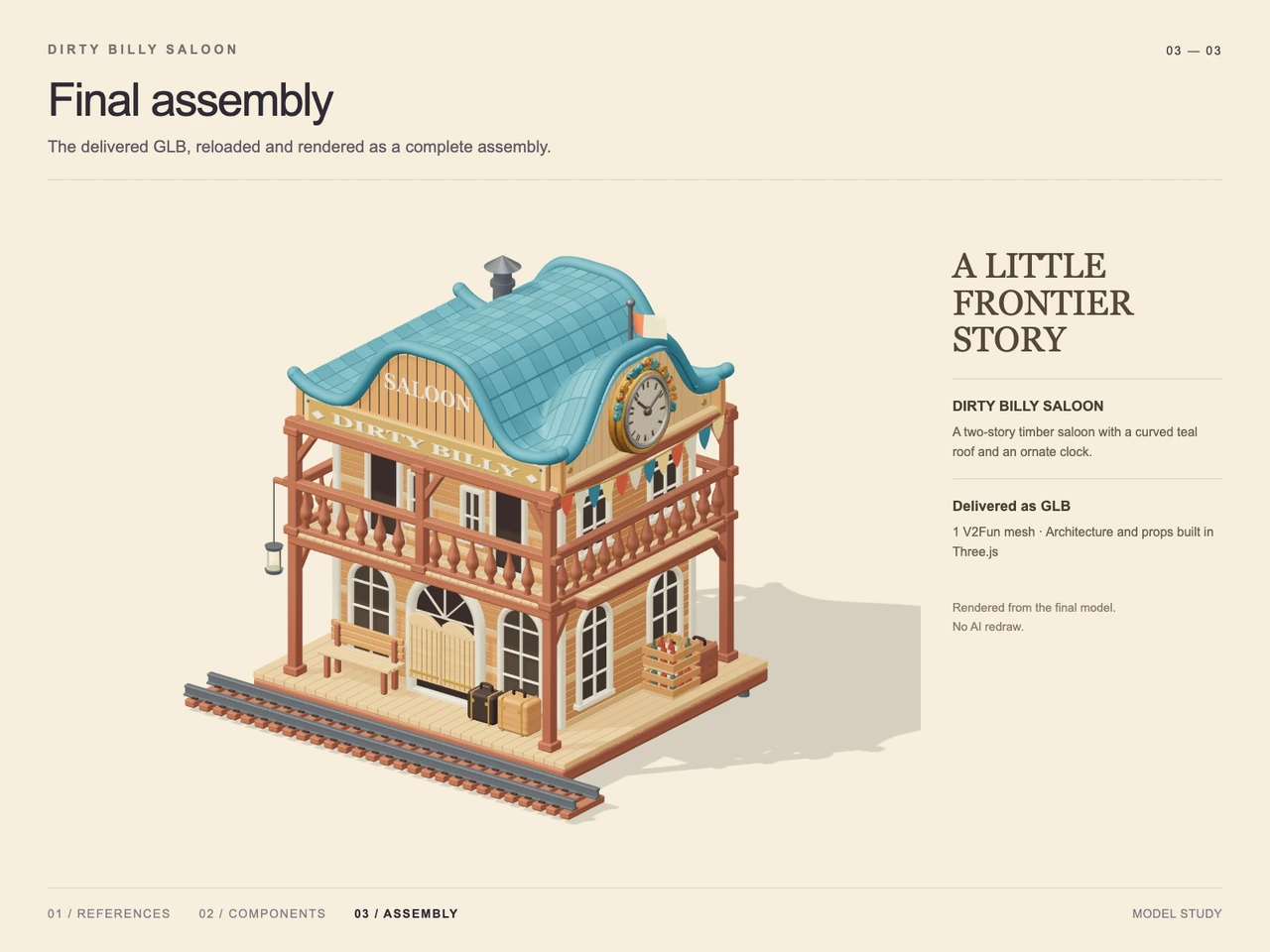
Interactive 3D preview · Build a Western Saloon Miniature with GPT-6 Astra and V2FunDrag to rotate · Scroll to zoom
Take a Closer Look
-
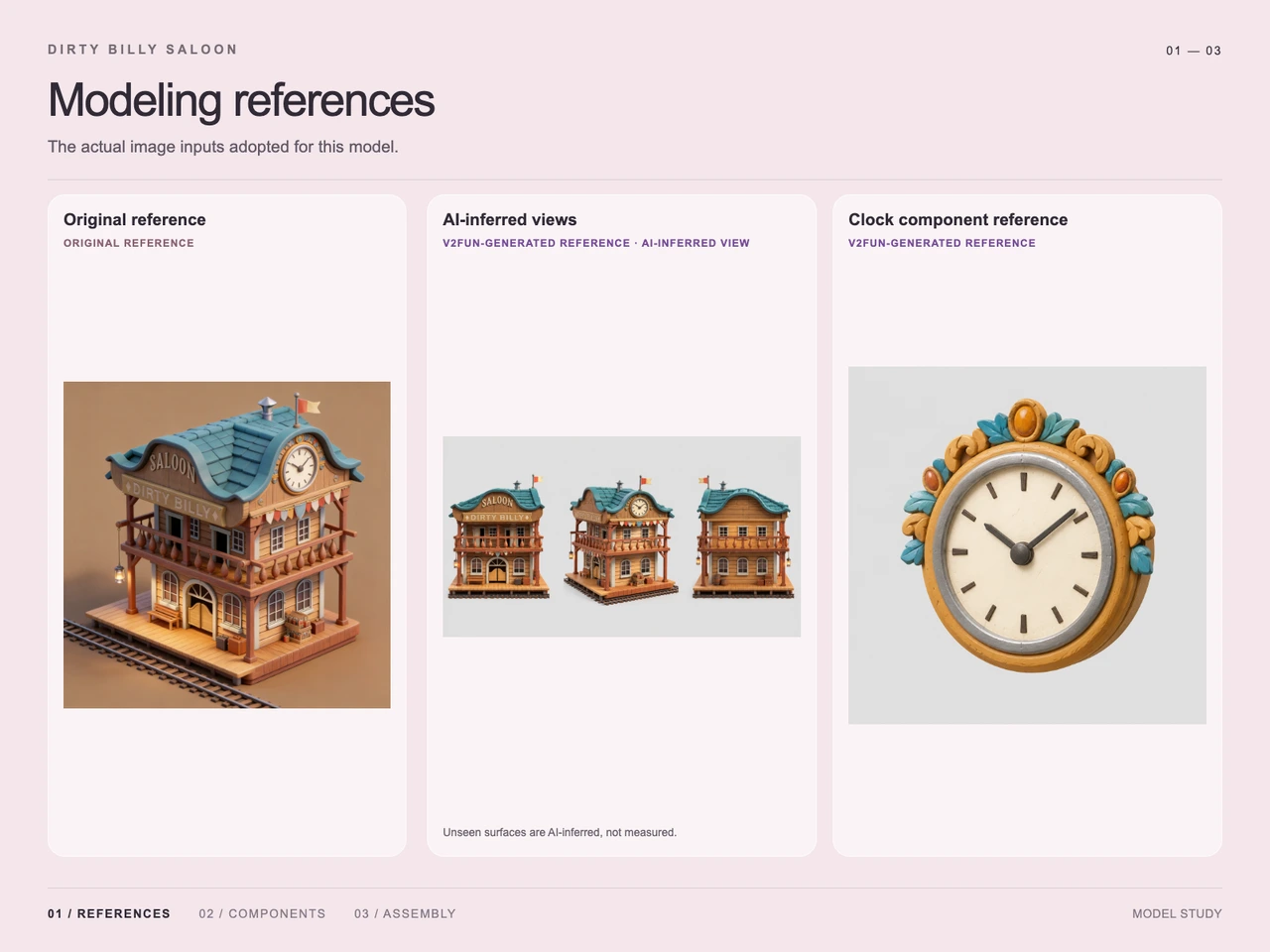 01 / Input
Input · Build a Western Saloon Miniature with GPT-6 Astra and V2Fun
-
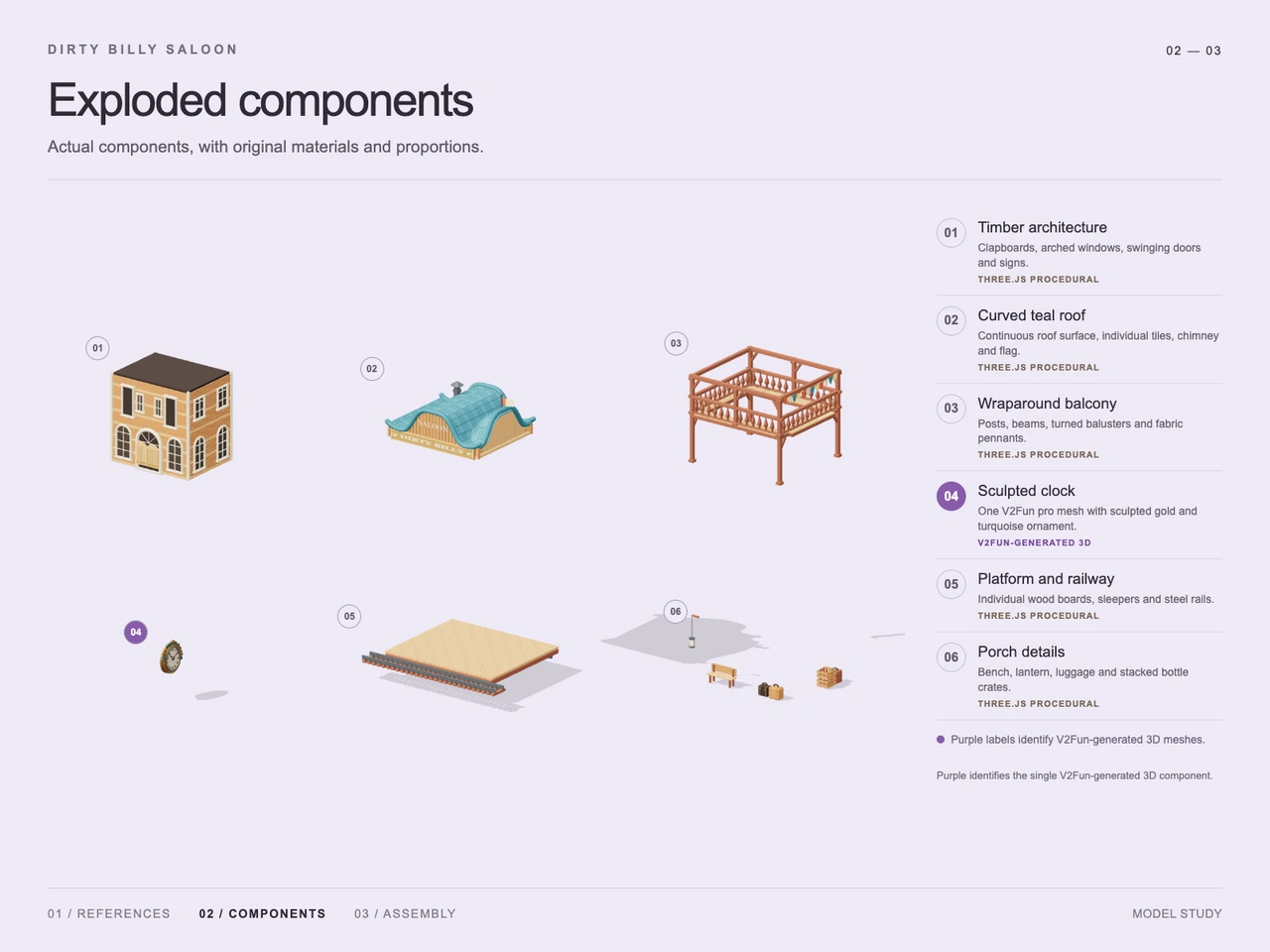 02 / Process
Process · Build a Western Saloon Miniature with GPT-6 Astra and V2Fun
-
03 / Final
Final · Build a Western Saloon Miniature with GPT-6 Astra and V2Fun
Overview
This case turns a square reference image of a stylized, two-story Western saloon miniature into an assembled 3D scene. The visual target combines honey-colored timber walls, red-brown structural posts, cream doors and windows, a curved teal tiled roof, an ornate clock, bunting, a wraparound balcony, porch props, and a short diagonal railway track.
Rather than treating every feature as one opaque generation task, the demonstrated workflow separates the building into components. GPT-6 Astra interprets the reference and coordinates their placement; regular architectural elements are constructed procedurally in Three.js; and V2Fun supplies the sculpted clock component. This division reflects the broader GPT-6 Astra and V2Fun model-collaboration workflow.
Tools Used
- GPT-6 Astra: visual analysis, component planning, spatial relationships, and assembly coordination.
- V2Fun: generation of the ornate clock as a dedicated 3D component.
- Three.js / procedural code: timber architecture, roof, balcony, platform, railway, and small porch details.
- Visual references: the original image, AI-inferred alternate views, and an isolated clock reference.
- GLB: the supplied final delivery format.
For related creation routes, see the V2Fun image-to-3D model generator and the single-view versus multi-view input guide.
Step 1 — Read the Design Intent
The prompt establishes both the saloon's identity and its visual hierarchy. The broad teal roof and curled eaves define the silhouette, while the SALOON and DIRTY BILLY signs, ornate side clock, balcony, bunting, lantern, luggage, crates, and railway establish its frontier character. The requested three-quarter elevated view also makes the front and right elevations important simultaneously.
Step 2 — Expand the Available Reference
The original image provides one approved view. The process material also shows AI-inferred front, angled, and rear studies, which offer hypotheses for surfaces that are not visible in the original. These inferred views help planning, but they are not measurements and should not be treated as proof of hidden geometry.
Step 3 — Decompose the Saloon
The scene is divided into six visible groups: timber architecture; curved teal roof; wraparound balcony; sculpted clock; platform and railway; and porch details. This makes it possible to choose an appropriate construction method for each group while preserving the relationships seen in the reference.
Step 4 — Build the Regular Structures
The evidence labels the architecture, roof, balcony, platform, railway, and porch props as Three.js procedural work. Repeated boards, window arches, posts, rails, balusters, roof tiles, sleepers, and track rails are suited to coded placement because their spacing and relationships can be adjusted as structured scene elements.
Step 5 — Generate the Ornate Clock
The clock is isolated as its own reference and identified as the single V2Fun-generated 3D component. Its round cream face, gold-toned sculpted surround, turquoise leaf motifs, hour markers, and hands make it visually distinct from the repeated architectural geometry. It is then positioned in the right gable as a focal detail.
For projects using a similarly detailed brief, the AI 3D prompting guide explains how subject, silhouette, materials, viewing context, and constraints can be organized clearly.
Step 6 — Assemble and Review
GPT-6 Astra coordinates scale, orientation, and placement across the generated and procedural parts. The final render shows the teal roof seated above the timber facade, the clock fitted into the right gable, the balcony wrapping the upper story, bunting beneath the eaves, props arranged on the platform, and the track crossing the foreground. The final image is described as a render from the delivered model rather than an AI redraw.
Workflow
Reference image → Visual analysis → Inferred-view study → Component decomposition → Procedural construction and clock generation → Spatial assembly → Render review → GLB delivery
Prompt
Create an exquisite miniature of a two-story American Old West timber saloon. Use light honey-colored horizontal plank walls, red-brown posts and railings, and cream door and window frames. Add a teal tiled roof with an exaggerated wavy gable profile and curled eaves. Place a wooden “SALOON” sign above a long “DIRTY BILLY” sign, and set a large round clock with a cream face and gold surround into the right gable. Hang red, white, blue, and yellow triangular bunting beneath the eaves. Add a silver chimney and a small red-and-cream flag to the roof. Wrap a spindle-railed balcony around the front and right sides of the second floor, with open doors and gridded windows. On the ground floor, include arched glass windows, an arched entrance with paired saloon doors, heavy porch posts, and a warm hanging lantern on the left. Arrange a bench, vintage suitcases, wooden crates, and small jars on the base platform, with a short railway track crossing diagonally in front. Use a rounded, finely detailed stylized 3D look with visible wood grain, roof seams, and hardware, warm soft lighting, shallow depth of field, an elevated front three-quarter view, centered composition, a warm brown background, a square frame, no people, and no extra watermark.
Result
The result is a complete stylized saloon assembly delivered as final.glb (model/gltf-binary, 65,085,708 bytes). The supplied evidence demonstrates the building, roof, balcony, clock, platform, railway, and porch details assembled into one rendered scene. It does not establish topology quality, polygon count, physical dimensions, printability, engine readiness, commercial rights, or measured generation time.
Frequently Asked Questions
What was generated with V2Fun in this saloon workflow?
The process evidence identifies the ornate gable clock as the single V2Fun-generated 3D component. The remaining listed component groups are labeled as procedural Three.js work.
Why was the saloon divided into separate components?
Decomposition lets GPT-6 Astra coordinate the building, roof, balcony, clock, platform, railway, and props while selecting a suitable construction method for each group.
How were hidden sides of the saloon handled?
AI-inferred front, angled, and rear reference studies were used to support planning. Because those surfaces were inferred rather than measured, they should be treated as design hypotheses rather than verified reconstruction data.
Which details from the prompt are visible in the final assembly?
Visible details include the honey-toned timber facade, red-brown frame, teal curved roof, SALOON and DIRTY BILLY signs, ornate clock, balcony, bunting, lantern, platform props, and diagonal railway track.
What file was delivered?
The supplied output is `final.glb`, a GLB file with MIME type `model/gltf-binary` and a recorded size of 65,085,708 bytes.
Is the saloon proven ready for games or 3D printing?
No. The supplied render and metadata demonstrate an assembled GLB, but they do not verify topology, scale, collision, runtime performance, wall thickness, watertightness, or other game and print requirements.
Explore More
-
GPT-6 Astra x V2Fun - From Code Generation to Model Collaboration | V2Fun
See how GPT-6 Astra and V2Fun combine agent reasoning, code generation, and AI 3D foundation models to build complex, structured 3D assets.
View page → -
V2Fun - AI 3D Model Generator
Create 3D models from text prompts or images with V2Fun's AI 3D model generator. Generate characters, props, game assets, and 3D-printable models faster.
View page → -
AI 3D Model Generator Input Guide: Single vs. Multi-View | V2Fun
Learn how to prepare photos, multi-view references, and sketches for an AI 3D Model Generator, then inspect geometry and textures before export.
View page → -
AI 3D Model Generator Prompting Guide for Reusable Assets | V2Fun
Use an AI 3D Model Generator to create reusable low-poly assets with stronger prompts, consistent styles, practical validation, and faster iteration.
View page →