Build a Toolbox Racer with GPT-6 Astra and V2Fun
See how a white-bearded mechanic and a red toolbox racer become one assembled 3D asset through reference analysis, component generation, procedural construction, and spatial calibration.
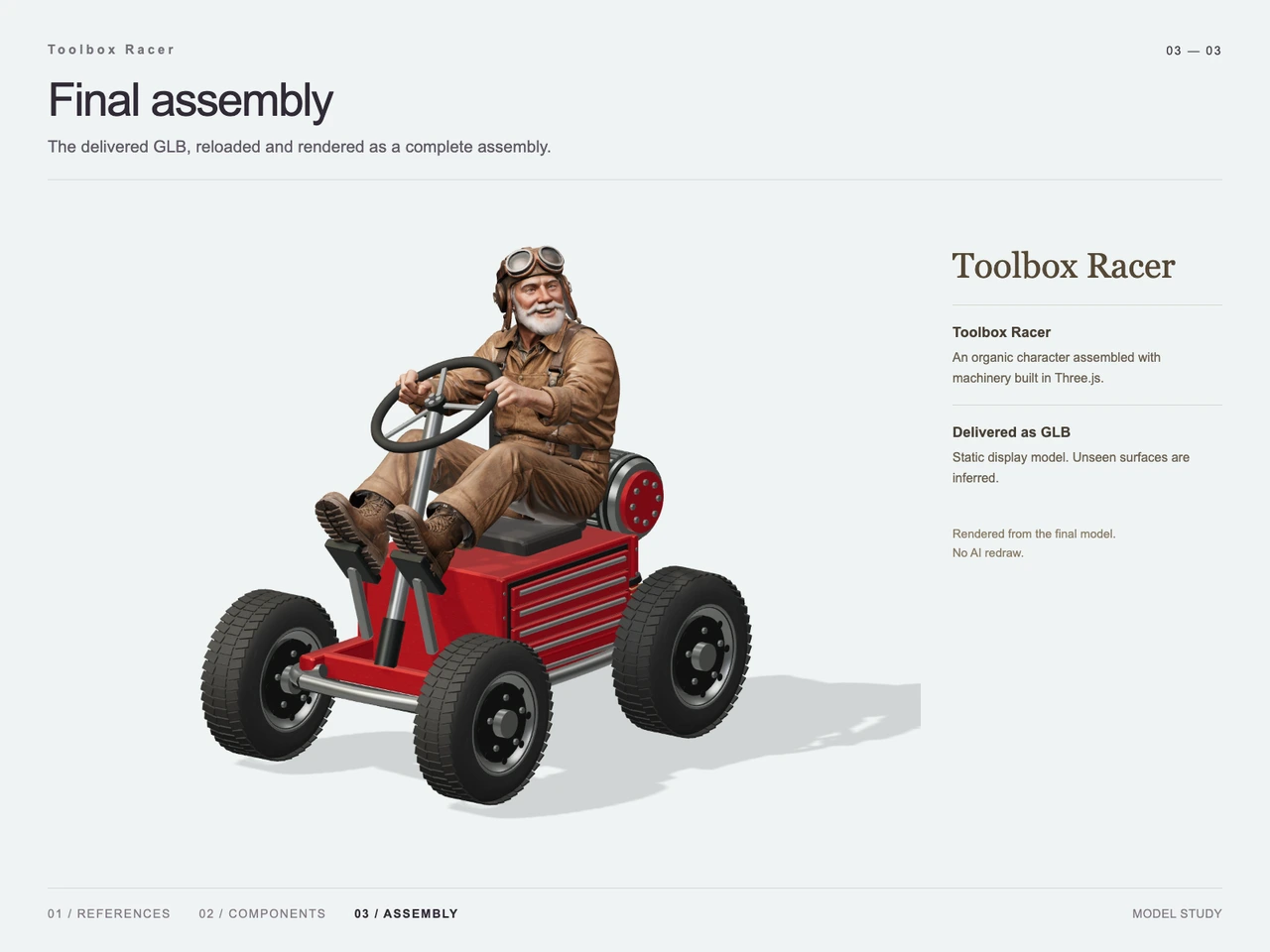
Interactive 3D preview · Build a Toolbox Racer with GPT-6 Astra and V2FunDrag to rotate · Scroll to zoom
Take a Closer Look
-
 01 / Input
Input · Build a Toolbox Racer with GPT-6 Astra and V2Fun
-
 02 / Process
Process · Build a Toolbox Racer with GPT-6 Astra and V2Fun
-
03 / Final
Final · Build a Toolbox Racer with GPT-6 Astra and V2Fun
Overview
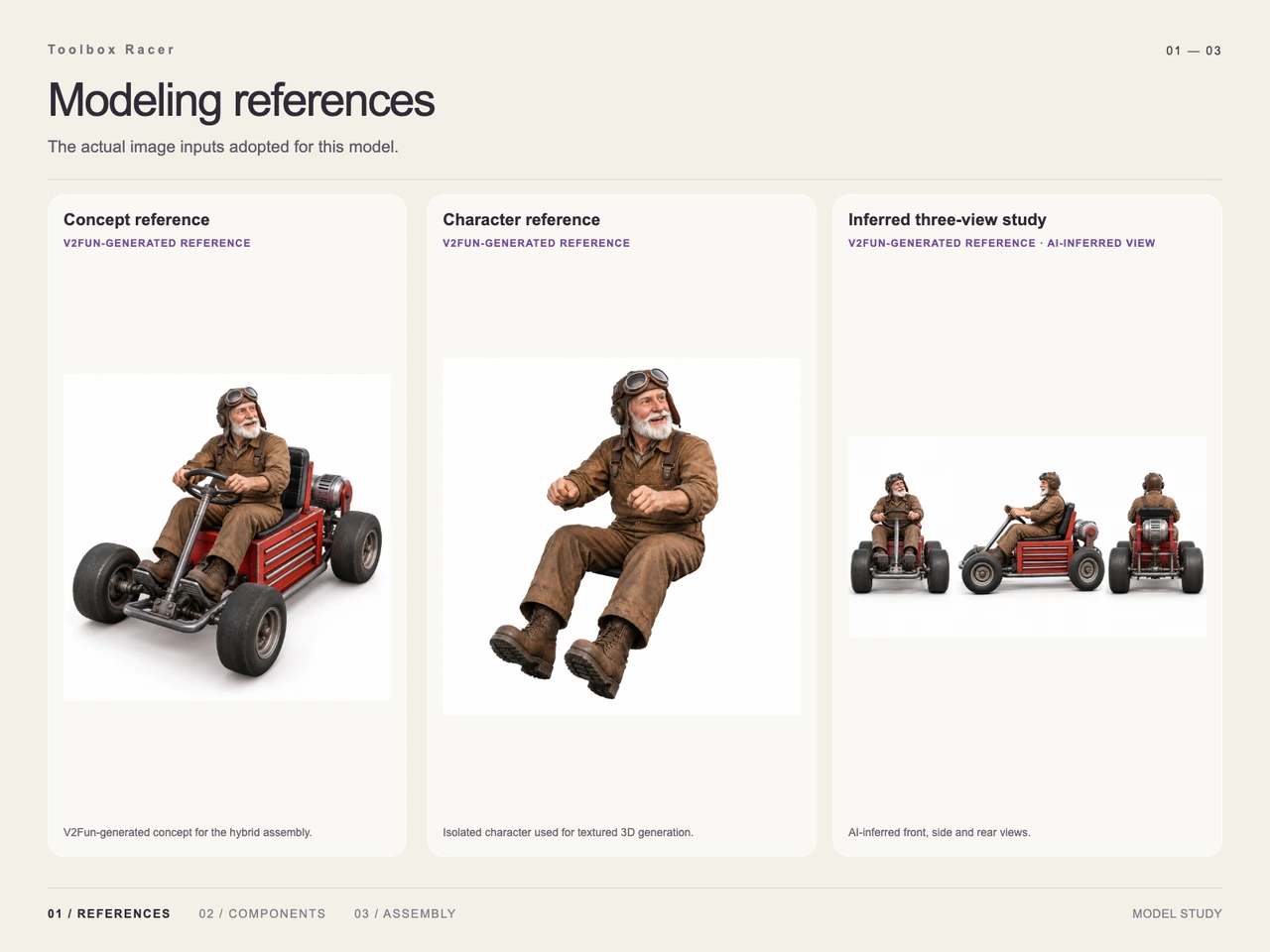
This case turns a single collectible-style concept into a complete 3D asset: an expressive white-bearded mechanic seated on a small racer built around a red metal toolbox. The supplied studies show the concept reference, an isolated character reference, inferred front-side-rear views, an exploded component layout, and the final assembled model.
The approach follows the GPT-6 Astra and V2Fun model-collaboration workflow: Astra interprets the subject hierarchy and plans the assembly, while V2Fun handles the visually complex character. Regular mechanical parts are constructed procedurally and then calibrated around the seated pose.
Tools Used
- GPT-6 Astra: reference interpretation, component planning, spatial relationships, and assembly calibration.
- V2Fun: generation of the textured mechanic character from visual references. The platform’s image-to-3D model generator is the relevant generation route for this type of supplied concept.
- Three.js / procedural construction: the frame, wheels and axles, toolbox body and seat, cylindrical rear equipment, steering assembly, supports, and pedals shown in the component study.
- Visual references: the concept, isolated character, and inferred three-view study used to clarify appearance and placement.
- GLB: the supplied final binary 3D asset format; see the GLB export format guide for broader format context.
Step 1 — Interpret the Reference
The target is read as two tightly connected layers: a seated human character and a compact machine. Important visual cues include the mechanic’s white beard, leather goggles, old flight cap, brown workwear, forward-reaching hands, and raised feet, together with the racer’s red drawer cabinet, tubular frame, four wide tires, exposed axles, steering wheel, pedals, seat, and rear cylindrical equipment.
Step 2 — Clarify Hidden Structure
A single three-quarter concept leaves the side and rear partly unresolved. The supplied reference sheet therefore includes inferred front, side, and rear studies. This resembles a multi-view 3D modeling workflow, although the additional views here are explicitly labeled as AI-inferred rather than independently photographed evidence.
Step 3 — Decompose the Asset
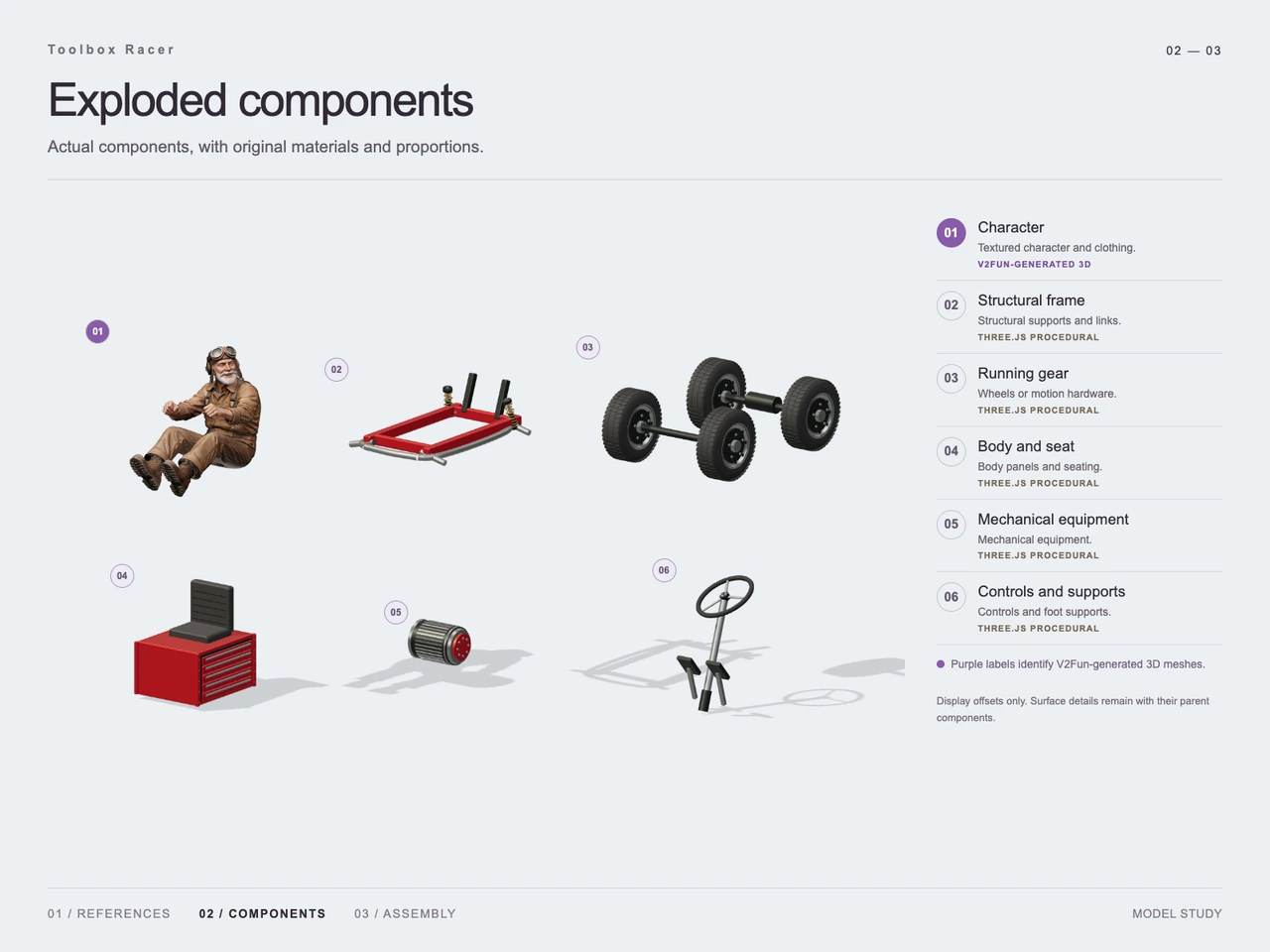
The exploded study separates the build into six visible groups: character, structural frame, running gear, body and seat, mechanical equipment, and controls and supports. This makes it possible to adjust the mechanic, chassis, wheels, toolbox, rear cylinder, steering column, pedals, and support rods without treating the design as one indivisible shape.
Step 4 — Generate the Character with V2Fun
The organic portion—the mechanic’s face, beard, hands, clothing, folds, boots, and seated silhouette—is generated as a textured 3D character. Isolating it from the vehicle lets the workflow preserve the pose while avoiding a long procedural description of irregular human surfaces.
Step 5 — Construct the Mechanical Components
The component study identifies the remaining groups as procedural. Rectangular panels establish the toolbox body and chassis; cylinders and discs form the wheels, axles, rear equipment, and steering wheel; straight rods and limited curved tubing create the steering column, supports, and foot controls. The drawer divisions remain visible on the red cabinet.
Step 6 — Calibrate Contact and Assembly
Astra-side assembly aligns scale, rotation, and placement across the generated character and procedural machine. The key visual checks are the character’s seated position, both hands meeting the steering wheel, both feet resting near the independent pedals, the seat remaining above the toolbox, and the four wheels aligning with the exposed running gear.
Workflow
Concept reference → Structure analysis → Inferred view study → Component decomposition → V2Fun character generation → Procedural mechanical construction → Contact-point calibration → Final assembly → GLB delivery
Prompt
Create a complete standalone collectible-style 3D asset featuring an elderly white-bearded mechanic wearing leather goggles, an old aviator cap, and brown work clothes. He sits on a small racer converted from a large red toolbox, holds the steering wheel with both hands, and places his feet on separate front pedals. Build the vehicle from a rectangular metal toolbox body, tubular chassis, four wide rubber tires, exposed axles, a seat mounted above the cabinet, and a rear cylindrical motor. Preserve the toolbox drawer seams and use red painted metal with dark gray mechanical parts and subtle wear. Combine realistic proportions with mild stylization, an expressive face, natural fabric folds, clear component boundaries, and convincing contact between the character, seat, steering wheel, and pedals. Show the complete subject from a slightly elevated front three-quarter view on a white background with soft studio lighting, contact shadows, and all parts in focus. Exclude text, numbers, logos, watermarks, complex scenery, motion blur, collages, and exploded-view presentation.
Result
The final study shows the mechanic, toolbox body, wide wheels, steering controls, pedals, and rear cylindrical unit assembled into one static display model. The delivered file is 74-v2-final.glb, supplied as model/gltf-binary, with a recorded size of 56,026,752 bytes (about 53.43 MiB).
The evidence demonstrates the intended visual assembly and component relationships. It does not establish polygon count, topology or UV quality, real-world dimensions, animation readiness, engine performance, printability, or commercial-use rights.
Frequently Asked Questions
What is the subject of this GPT-6 Astra and V2Fun case?
It is a complete 3D asset of an elderly white-bearded mechanic driving a compact racer built around a red metal toolbox.
Which part was generated with V2Fun?
The exploded component study labels the textured mechanic character as V2Fun-generated. His face, beard, workwear, boots, and seated pose form the organic component of the hybrid asset.
Which components were built procedurally?
The supplied study identifies the structural frame, running gear, toolbox body and seat, rear mechanical equipment, and steering controls and supports as Three.js procedural components.
Why were inferred front, side, and rear views included?
They help clarify proportions and partially hidden structure before assembly. Because the sheet labels them as AI-inferred, they should be treated as modeling guidance rather than independent observations of an existing object.
How were the character and vehicle aligned?
The assembly stage calibrated their scale, rotation, and position, with particular attention to the character’s contact with the seat, steering wheel, and separate foot pedals.
What was delivered?
The supplied deliverable is `74-v2-final.glb`, a GLB file with a recorded size of 56,026,752 bytes. No additional production-readiness properties are established by the row.
Explore More
-
GPT-6 Astra x V2Fun - From Code Generation to Model Collaboration | V2Fun
See how GPT-6 Astra and V2Fun combine agent reasoning, code generation, and AI 3D foundation models to build complex, structured 3D assets.
View page → -
V2Fun - AI 3D Model Generator
Create 3D models from text prompts or images with V2Fun's AI 3D model generator. Generate characters, props, game assets, and 3D-printable models faster.
View page → -
V2Fun - Multi-View to 3D Model AI
Generate accurate 3D models from multiple reference images with V2Fun's multi-view to 3D model AI. Create structured assets with better shape consistency and detail.
View page → -
AI 3D Model Generator Export Guide: FBX, GLB, OBJ, or USDZ? | V2Fun
Use an AI 3D Model Generator with the right export format. Compare FBX, GLB, OBJ, and USDZ for Blender, game engines, animation, web, and AR.
View page →