Shiba Warrior 3D Workflow with GPT-6 Astra and V2Fun
Follow a cute Shiba adventurer from visual references to three generated components and a final GLB assembly, with a curved blade, leather armor, and an illustrated wooden shield.
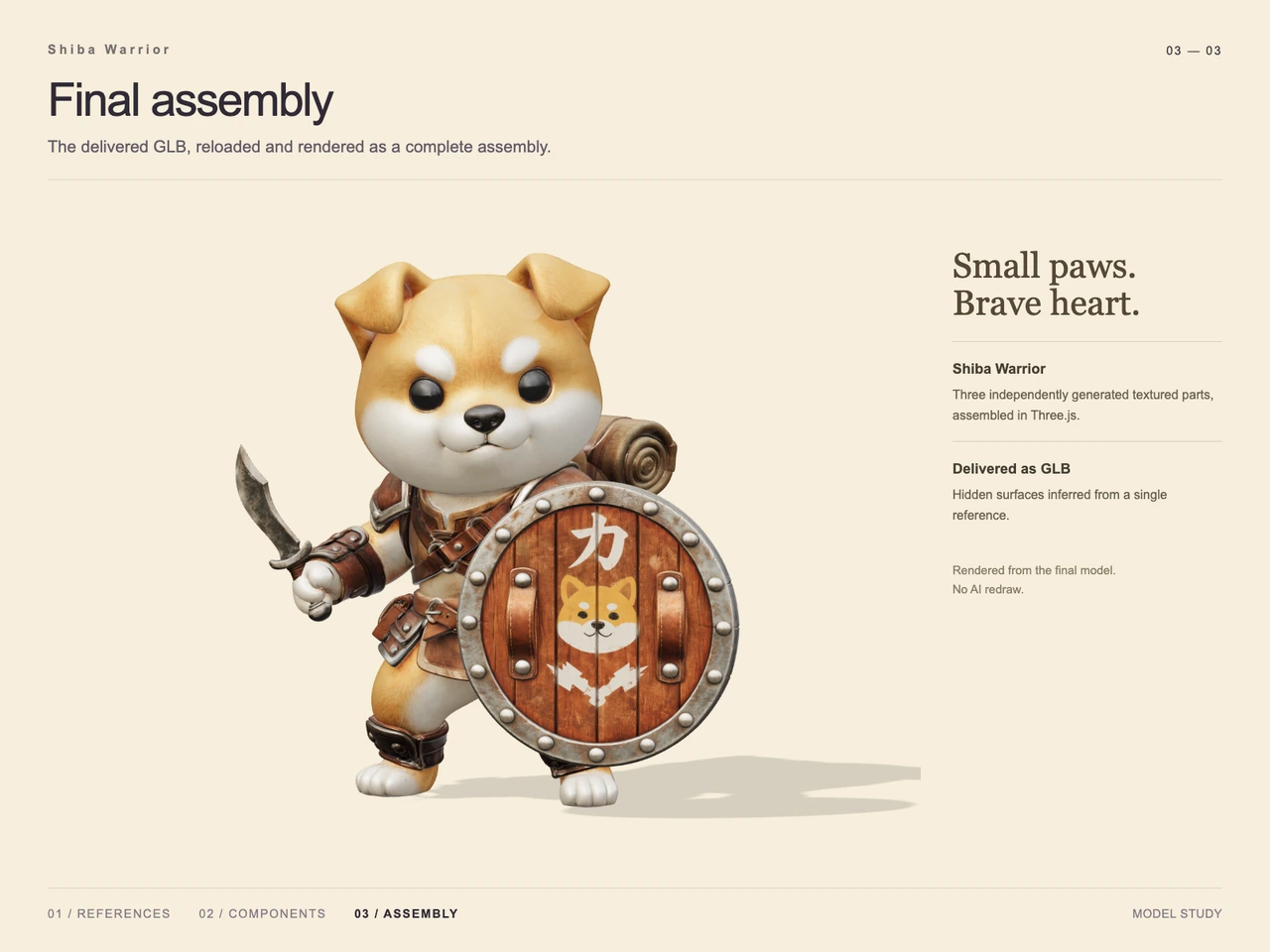
Interactive 3D preview · Shiba Warrior 3D Workflow with GPT-6 Astra and V2FunDrag to rotate · Scroll to zoom
Take a Closer Look
-
 01 / Input
Input · Shiba Warrior 3D Workflow with GPT-6 Astra and V2Fun
-
 02 / Process
Process · Shiba Warrior 3D Workflow with GPT-6 Astra and V2Fun
-
03 / Final
Final · Shiba Warrior 3D Workflow with GPT-6 Astra and V2Fun
Overview
This case turns an anthropomorphic Shiba adventurer reference into a three-part 3D assembly. The design centers on an oversized round head, short limbs, golden fur, brown leather armor, a curved blade, and a wooden shield carrying a Shiba emblem and the white character “力.”
The technical account assigns visual analysis and component planning to GPT-6 Astra, complex form and surface generation to V2Fun, and assembly adjustments to the agent. The supplied images document reference preparation, three separate generated components, and a final presentation identified as a render of the reloaded GLB. The broader GPT-6 Astra and V2Fun collaboration workflow explains this division of work.
Tools Used
- GPT-6 Astra: visual hierarchy analysis, component decomposition, and agent-side assembly coordination, as described in the technical account.
- V2Fun: generated reference imagery and three textured 3D components, as labeled in the reference and process images.
- Three.js: assembly of the generated character, weapon, and shield, as documented in the final presentation.
- GLB: the supplied output format, with filename and size recorded in the delivery metadata.
Step 1 — Prepare the Modeling References
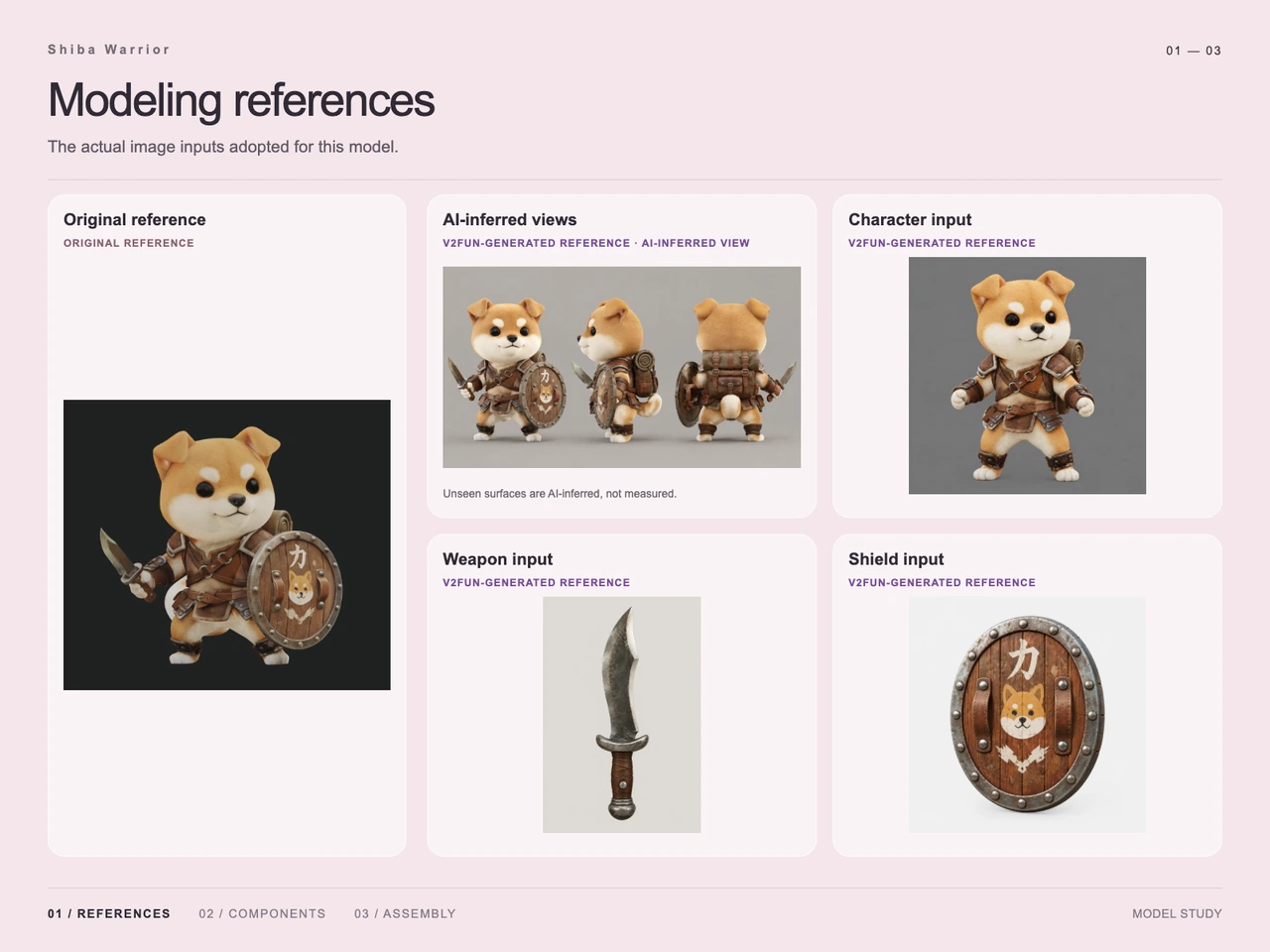
The input sheet combines the original armed Shiba reference with generated front, side, and rear studies. It also shows isolated character, weapon, and shield inputs. The character input exposes the torso and hands without the large shield covering them, while each prop receives its own clear silhouette.
The additional views are explicitly labeled as AI-inferred. They supply proposed hidden forms rather than measured evidence of the original subject. This distinction matters especially for the travel pack and rear armor. The single-image and multi-view input guide provides related guidance on reference coverage and occlusion.
Step 2 — Divide the Character into Three Components
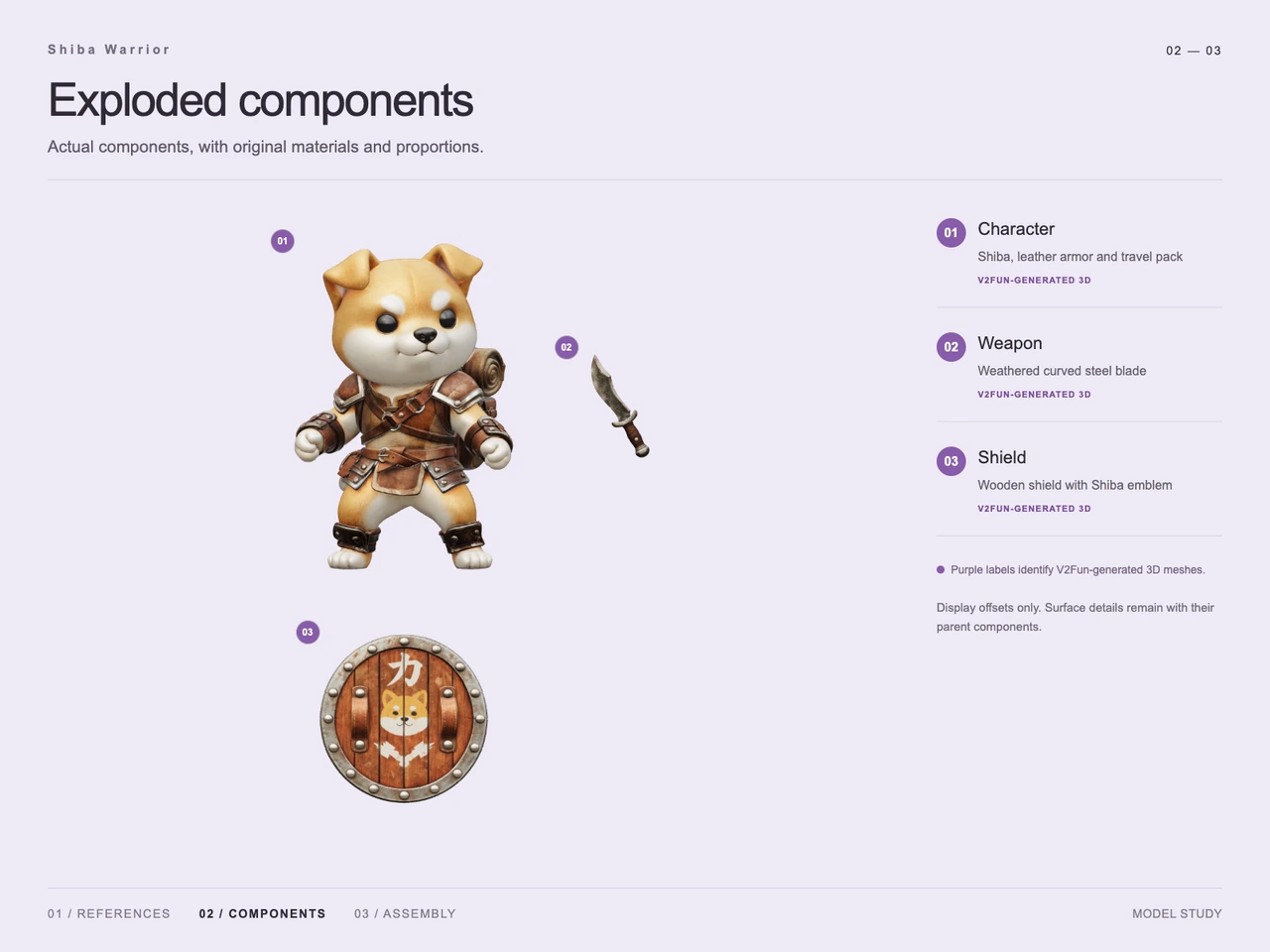
The process image shows three independently generated parts:
- Character: the Shiba body and head, leather armor, straps, ankle guards, and travel pack.
- Weapon: a weathered curved blade with a brown grip.
- Shield: a wooden face with vertical planks, metal rim, rivets, leather strips, and painted decoration.
The head is part of the character component. Armor, straps, and other surface details remain with their parent component; the exploded presentation does not establish them as separate modeled objects.
Step 3 — Generate the Textured Parts
All three components carry V2Fun-generated 3D labels in the process sheet. Their visible finishes distinguish golden and cream fur, worn brown leather, mottled silver-gray metal, and warm wood grain. The shield preserves the main decorative arrangement: white lettering above a Shiba face, with a pale crossed motif below.
This stage relates directly to V2Fun’s image-to-3D model generator. The case demonstrates textured component output, but supplies no texture resolution or PBR channel inspection results.
Step 4 — Assemble and Present the GLB
The final presentation documents the three parts assembled in Three.js, then exported as GLB and reloaded for rendering. The blade sits at the hand on the viewer’s left; the large shield occupies the viewer’s right and overlaps the torso. Both feet remain visible, and the rolled bedroll rises behind the shoulder.
The presentation uses a pale cream background and a cast ground shadow. This differs from the dark charcoal background requested for the original reference while retaining the full-body warrior composition.
Workflow
Original reference → AI-inferred views and isolated part references → Three V2Fun-generated textured components → Agent-coordinated assembly in Three.js → GLB export → Reloaded model render.
Prompt
English translation of the design brief:
A cute anthropomorphic Shiba adventurer with an enormous round head, a short body and limbs, golden-brown short fur, a creamy white muzzle and belly, white eyebrow spots, glossy round black eyes, a small black nose, and a slight smile. Both triangular ear tips fold forward. Dress the character in brown leather chest armor, metal-trimmed shoulder armor, crossed shoulder straps, a belt and small pouch, leather wrist guards, and ankle straps. A rolled brown sleeping mat is visible behind the shoulders. Give the character a steady little-warrior stance, holding a short curved blade on the viewer’s left with aged silver metal and a brown leather grip. On the viewer’s right, raise a large round wooden shield with vertical plank grain, a silver-gray metal rim and rivets, and two brown leather strips. Paint a white “力” at the top, a Shiba face in the center, and pale crossed bones below. Use a polished, cute 3D game-character render style with fine fur, leather stitching and wear, and distinct wood and metal finishes. Show the entire body from a slightly angled front view against a plain dark charcoal background with soft studio lighting. Keep the blade, shield, and both feet fully visible, center the subject, and use a near-square frame without extra characters, interface elements, or watermarks.
Result
The final image retains the character’s defining silhouette, cream muzzle, white eyebrow spots, folded ears, layered leather outfit, curved weapon, and decorated shield. It supports a visual comparison with the reference rather than a measured prompt-alignment score.
Delivered file: shiba-warrior.glb.
Supplied size: 85,915,344 bytes, approximately 85.92 MB in decimal units. Supplied MIME type: model/gltf-binary.
The documented outcome is an assembled, textured character shown in a render identified as coming from the reloaded final model. No generation-time or token-saving measurements are supplied. For subsequent format decisions, see the FBX, GLB, OBJ, and USDZ export guide.
Frequently Asked Questions
Which parts were generated separately for the Shiba warrior?
The process sheet identifies three V2Fun-generated components: the character with armor and travel pack, the curved weapon, and the decorated wooden shield. The head remains part of the character component.
What did GPT-6 Astra and Three.js do in this case?
The technical account describes GPT-6 Astra analyzing visual hierarchy, planning the component split, and coordinating assembly adjustments. The final presentation identifies Three.js as the tool used to assemble the three generated parts.
Were the side and rear references measured views?
No. The reference sheet explicitly labels the additional views as AI-inferred. Hidden surfaces were proposed from the original reference rather than established through measured views.
Which shield details are visible in the final assembly?
The final render shows vertical wooden planks, a metal rim with rivets, two brown leather strips, a white “力” above a Shiba face, and a pale crossed motif beneath it.
What file was delivered, and what does the final image establish?
The supplied metadata lists shiba-warrior.glb at 85,915,344 bytes with MIME type model/gltf-binary. The final presentation identifies its image as a render of the reloaded GLB; it does not establish topology quality, rigging, engine readiness, or printability.
Explore More
-
GPT-6 Astra x V2Fun - From Code Generation to Model Collaboration | V2Fun
See how GPT-6 Astra and V2Fun combine agent reasoning, code generation, and AI 3D foundation models to build complex, structured 3D assets.
View page → -
AI 3D Model Generator Input Guide: Single vs. Multi-View | V2Fun
Learn how to prepare photos, multi-view references, and sketches for an AI 3D Model Generator, then inspect geometry and textures before export.
View page → -
V2Fun - AI 3D Model Generator
Create 3D models from text prompts or images with V2Fun's AI 3D model generator. Generate characters, props, game assets, and 3D-printable models faster.
View page → -
AI 3D Model Generator Export Guide: FBX, GLB, OBJ, or USDZ? | V2Fun
Use an AI 3D Model Generator with the right export format. Compare FBX, GLB, OBJ, and USDZ for Blender, game engines, animation, web, and AR.
View page →