Create a Selfie Bunny with GPT-6 Astra and V2Fun
Follow a seated zodiac rabbit from visual references to a static GLB assembly, combining a V2Fun-generated character with a procedural pink smartphone and drink cup.
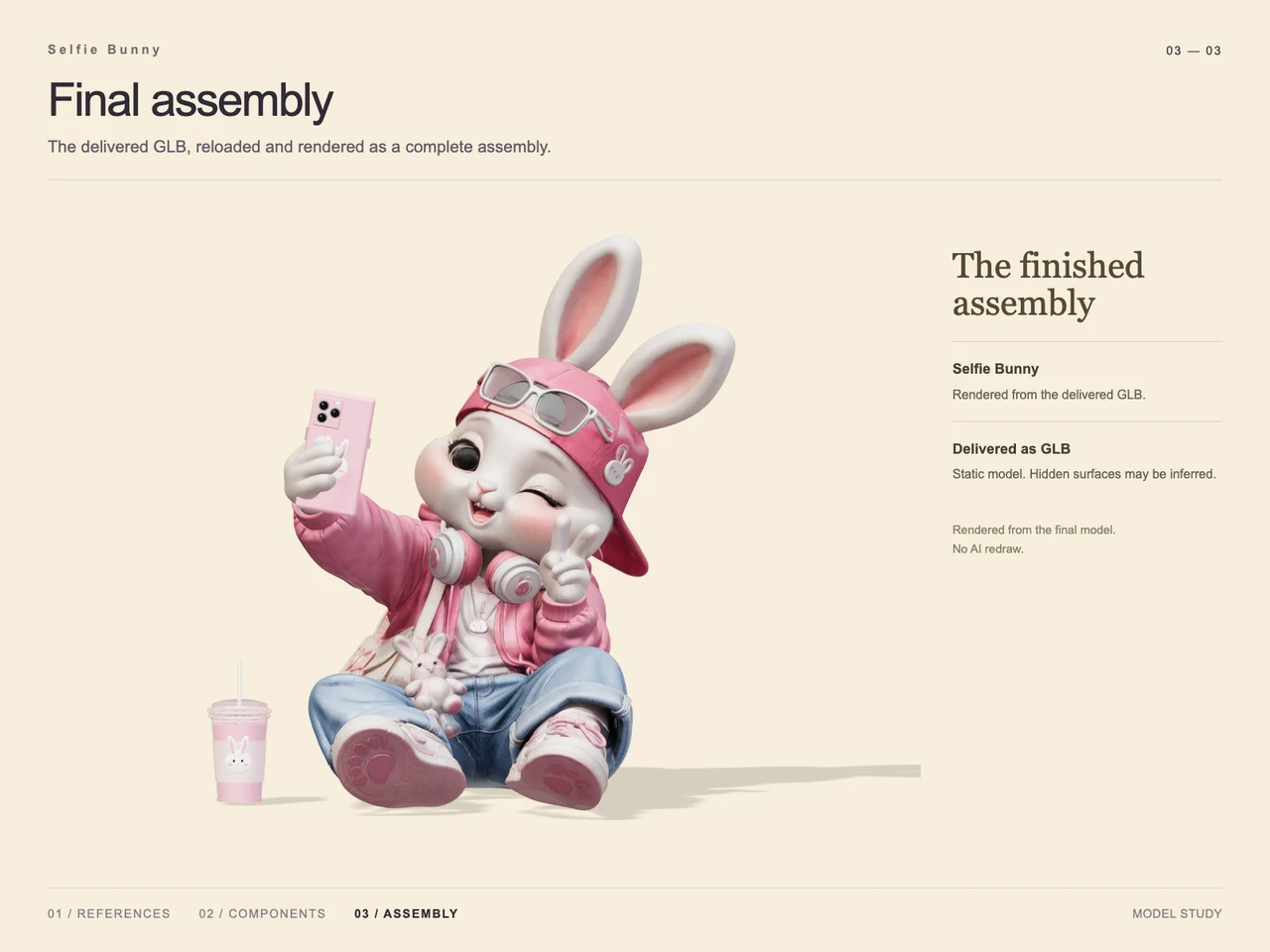
Interactive 3D preview · Create a Selfie Bunny with GPT-6 Astra and V2FunDrag to rotate · Scroll to zoom
Take a Closer Look
-
 01 / Input
Input · Create a Selfie Bunny with GPT-6 Astra and V2Fun
-
 02 / Process
Process · Create a Selfie Bunny with GPT-6 Astra and V2Fun
-
03 / Final
Final · Create a Selfie Bunny with GPT-6 Astra and V2Fun
Overview
Selfie Bunny turns an anthropomorphic zodiac rabbit brief into a seated character holding a phone for a selfie. The reference establishes long white ears, a wink, a raised peace sign, a pink jacket and cap, sunglasses, headphones, loose blue jeans, and pink sneakers. A shoulder bag, small bunny charm, and drink cup complete the accessory-rich design.
The case uses a hybrid construction approach: the bunny and worn accessories form one continuous character component, while the smartphone and drink cup are separate procedural props. This illustrates the division of work described in GPT-6 Astra and V2Fun model collaboration.
Tools Used
- GPT-6 Astra: interpreting the rabbit design, seated selfie pose, and relationships between accessories, as described in the case notes.
- V2Fun: generated character references and the complex bunny-and-outfit 3D component.
- Three.js: procedural construction of the smartphone and drink cup, identified in the component study.
- GLB: the supplied final asset format.
The character-generation stage relates directly to V2Fun’s image-to-3D model generator.
Step 1 — Prepare the Character Reference
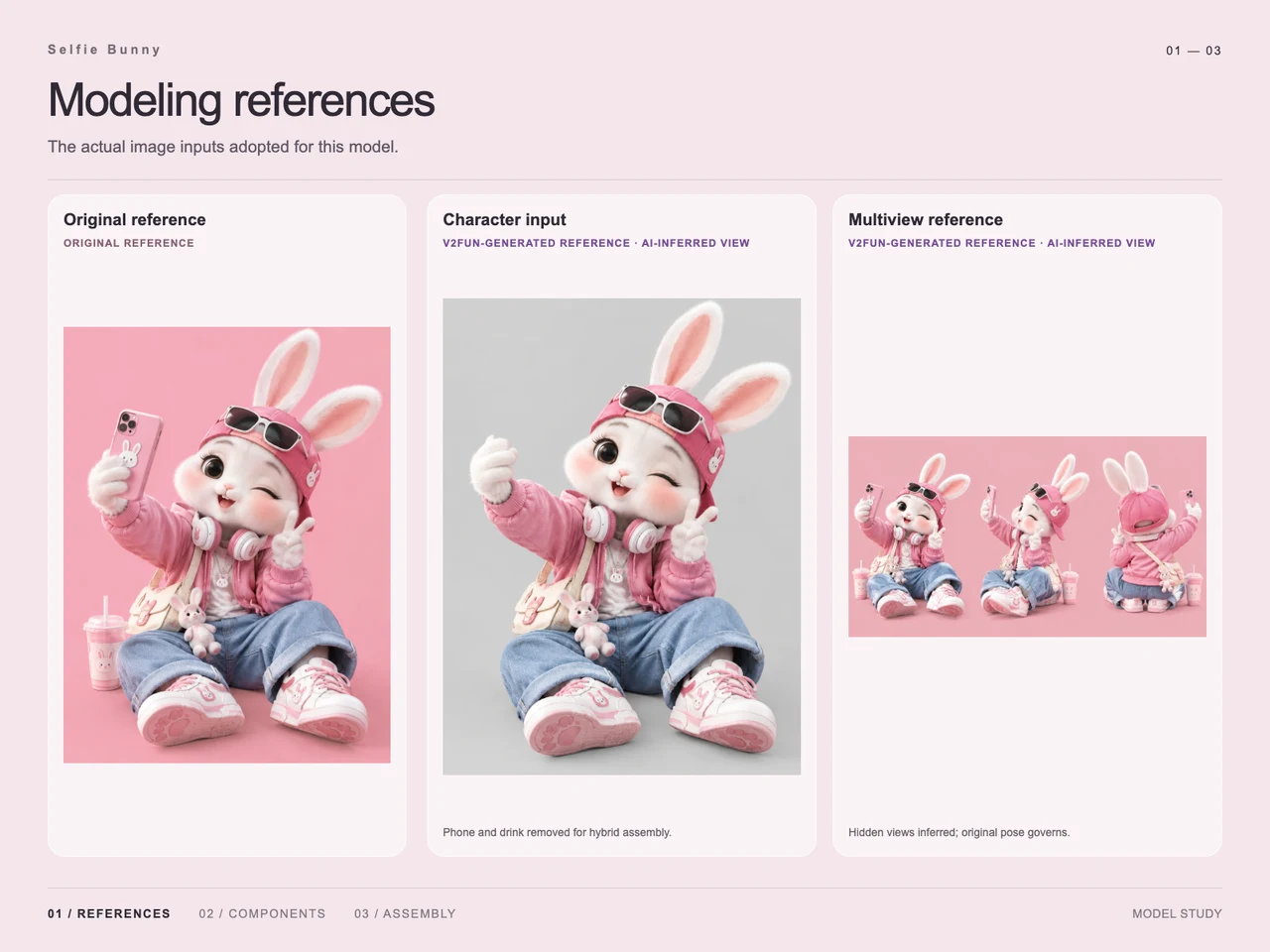
The input study shows the original pink-background composition beside a prepared character image. In the prepared image, the phone and drink have been removed while the seated pose, raised hand, clothing, and worn accessories remain. This establishes the character input for the hybrid assembly.
A separate multiview sheet supplies additional angles. Its hidden views are explicitly labeled as AI-inferred, with the original pose governing the design. These views provide modeling guidance rather than independently observed evidence of the rabbit’s back. The single-image and multiview input guide provides related reference-preparation guidance.
Step 2 — Generate the Bunny and Outfit Together
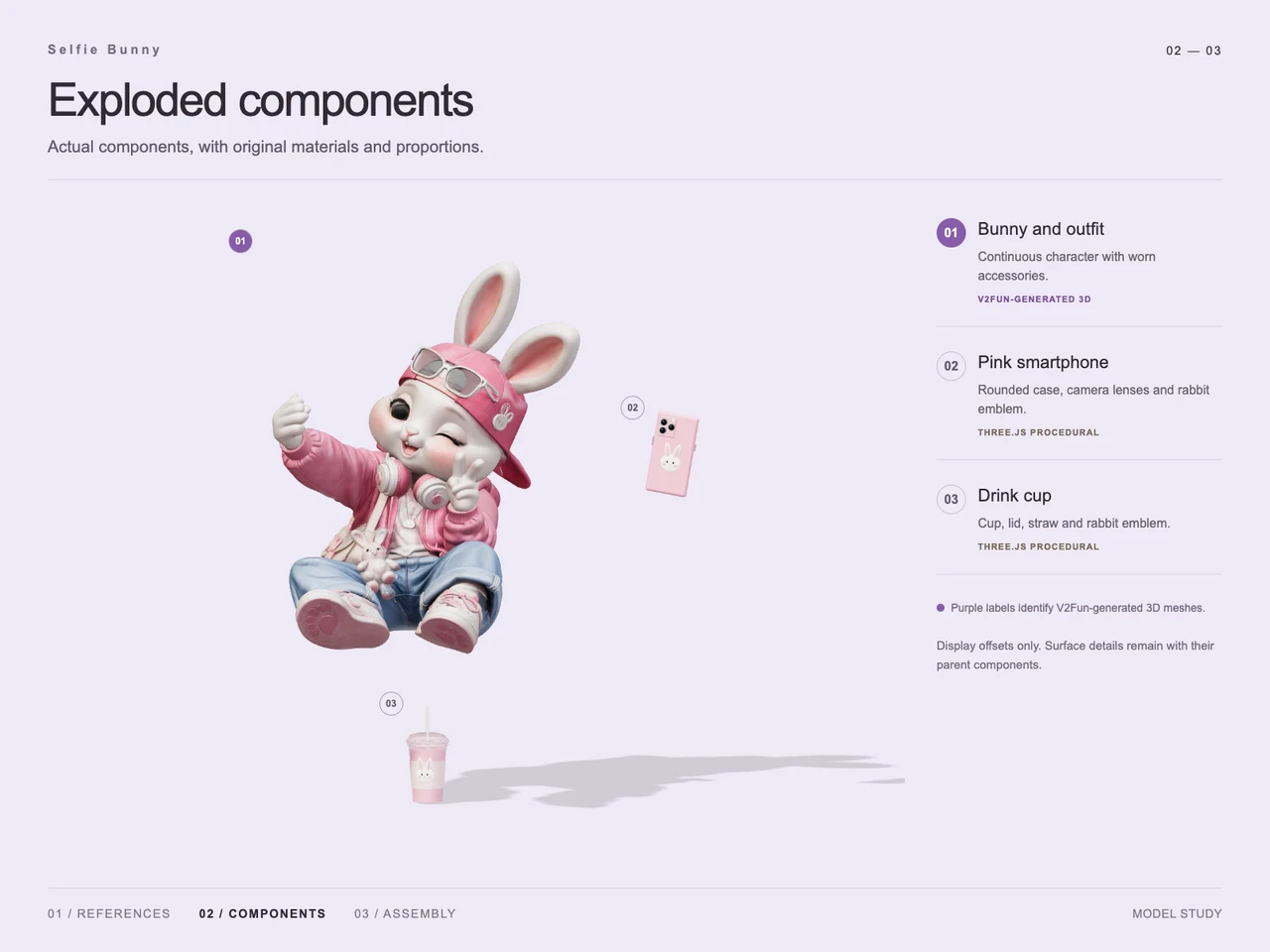
The process image identifies the bunny and outfit as a V2Fun-generated 3D component. The face, ears, clothing, shoes, headphones, bag, and worn decorative details remain with that character component. The exploded study does not present each visible accessory as an independently generated asset.
This grouping keeps the expressive pose and layered outfit together while reserving two external props for procedural construction.
Step 3 — Build the Phone and Drink Cup
The component study identifies two Three.js props: a pink smartphone with a rounded case, camera lenses, and rabbit emblem; and a drink cup with a lid, straw, and matching emblem.
Both appear offset from the bunny in the exploded view. Those offsets explain the components and are presentation positions rather than the final arrangement.
Step 4 — Assemble and Render the Delivered Asset
The final image places the phone in the raised hand and the drink cup on the ground beside the seated bunny. The wink, peace sign, pink outfit, and blue jeans remain visible against a pale, plain background.
The final presentation states that the delivered GLB was reloaded and rendered as a complete assembly. It identifies the result as a static model and the image as a model render, with no AI redraw.
Workflow
Original reference → prepared character input and inferred views → V2Fun bunny-and-outfit generation → Three.js phone and cup → final assembly → GLB reload and render.
Prompt
English translation of the design brief: “An anthropomorphic zodiac rabbit, in a 3D-rendered style, shown full body with plenty of accessories, against a solid-color background, sitting on the ground taking a selfie.”
The source also includes a presentation note: “Just change the font to a bolder, brighter style.” This is a typography request; it does not establish an additional modeling step.
Result
The documented output is selfie-bunny.glb, with a supplied size of 54,563,044 bytes and MIME type model/gltf-binary. The final render shows the character and both external props assembled into the selfie composition. Hidden surfaces may be inferred.
No case-specific timing or token measurements are supplied, so the workflow supports a qualitative account of task division without a measured efficiency claim. For related format considerations, see the GLB and other 3D export formats guide.
Frequently Asked Questions
Which Selfie Bunny components were generated with V2Fun?
The component study identifies the bunny and outfit, including worn accessories, as one continuous V2Fun-generated character component. The phone and drink cup are listed separately as Three.js procedural props.
Why were the phone and drink removed from the character input?
The reference study states that they were removed for hybrid assembly. The process image then shows them as separate props, and the final image restores the phone to the raised hand and places the cup beside the bunny.
Are the additional rabbit views original reference images?
No. The additional character and multiview references are labeled as V2Fun-generated, with hidden views inferred by AI. The original reference governs the pose.
What does the final Selfie Bunny deliverable contain?
The final presentation shows a static bunny assembly with its outfit, a pink smartphone, and a drink cup. The supplied file is selfie-bunny.glb, sized 54,563,044 bytes, with MIME type model/gltf-binary.
Does this case demonstrate faster generation or lower token use?
The technical notes describe those intended benefits of dividing work between Astra and V2Fun, but provide no case-specific measurements. No numerical speed or token savings can be established.
Explore More
-
GPT-6 Astra x V2Fun - From Code Generation to Model Collaboration | V2Fun
See how GPT-6 Astra and V2Fun combine agent reasoning, code generation, and AI 3D foundation models to build complex, structured 3D assets.
View page → -
V2Fun - AI 3D Model Generator
Create 3D models from text prompts or images with V2Fun's AI 3D model generator. Generate characters, props, game assets, and 3D-printable models faster.
View page → -
AI 3D Model Generator Input Guide: Single vs. Multi-View | V2Fun
Learn how to prepare photos, multi-view references, and sketches for an AI 3D Model Generator, then inspect geometry and textures before export.
View page → -
AI 3D Model Generator Export Guide: FBX, GLB, OBJ, or USDZ? | V2Fun
Use an AI 3D Model Generator with the right export format. Compare FBX, GLB, OBJ, and USDZ for Blender, game engines, animation, web, and AR.
View page →