Build a Quadruped Explorer with GPT-6 Astra and V2Fun
A seated explorer meets a four-legged walking platform in this hybrid 3D case. V2Fun generates the textured character, while Three.js supplies the exposed mechanical structure for assembly with GPT-6 Astra.
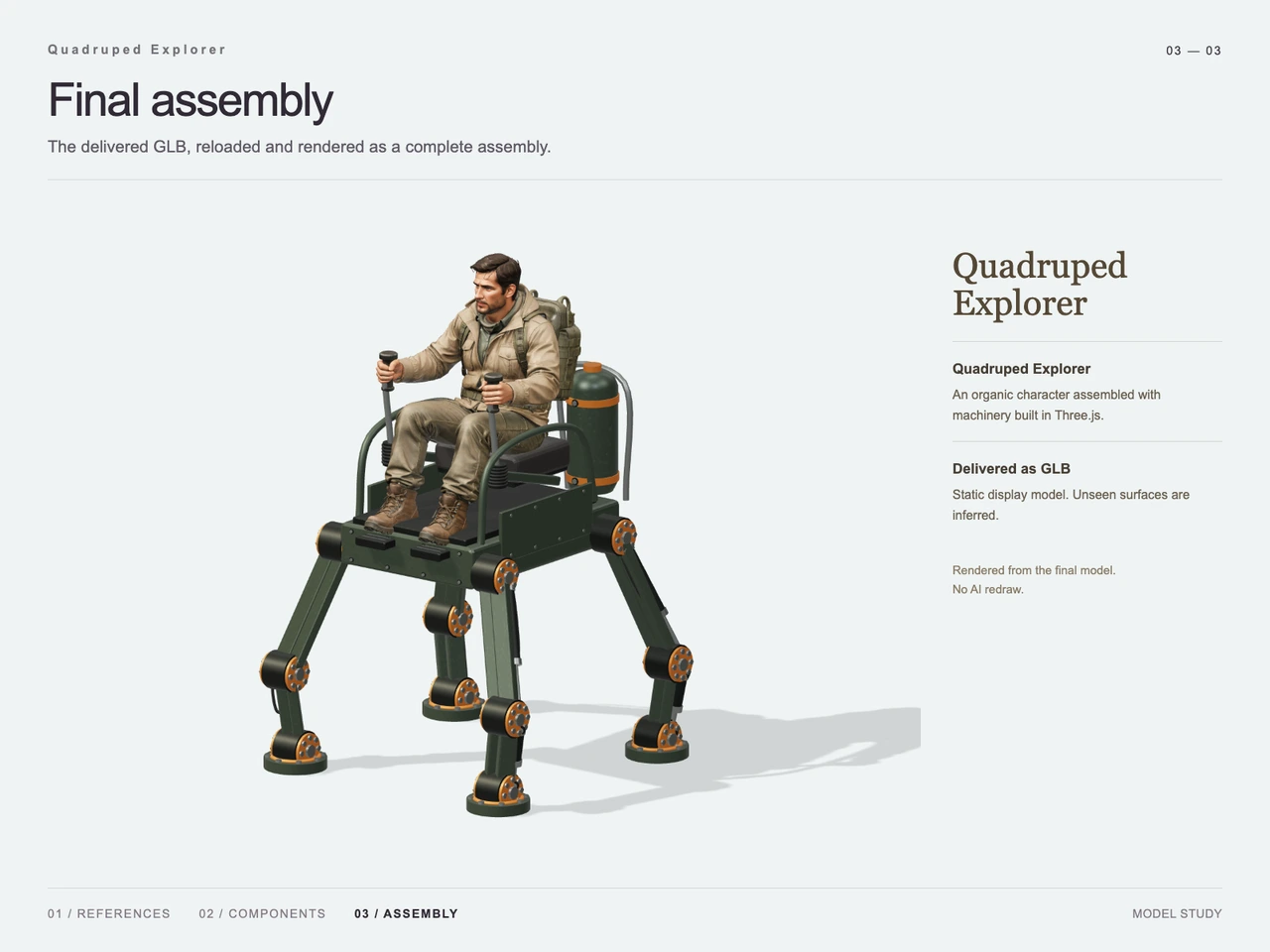
Interactive 3D preview · Build a Quadruped Explorer with GPT-6 Astra and V2FunDrag to rotate · Scroll to zoom
Take a Closer Look
-
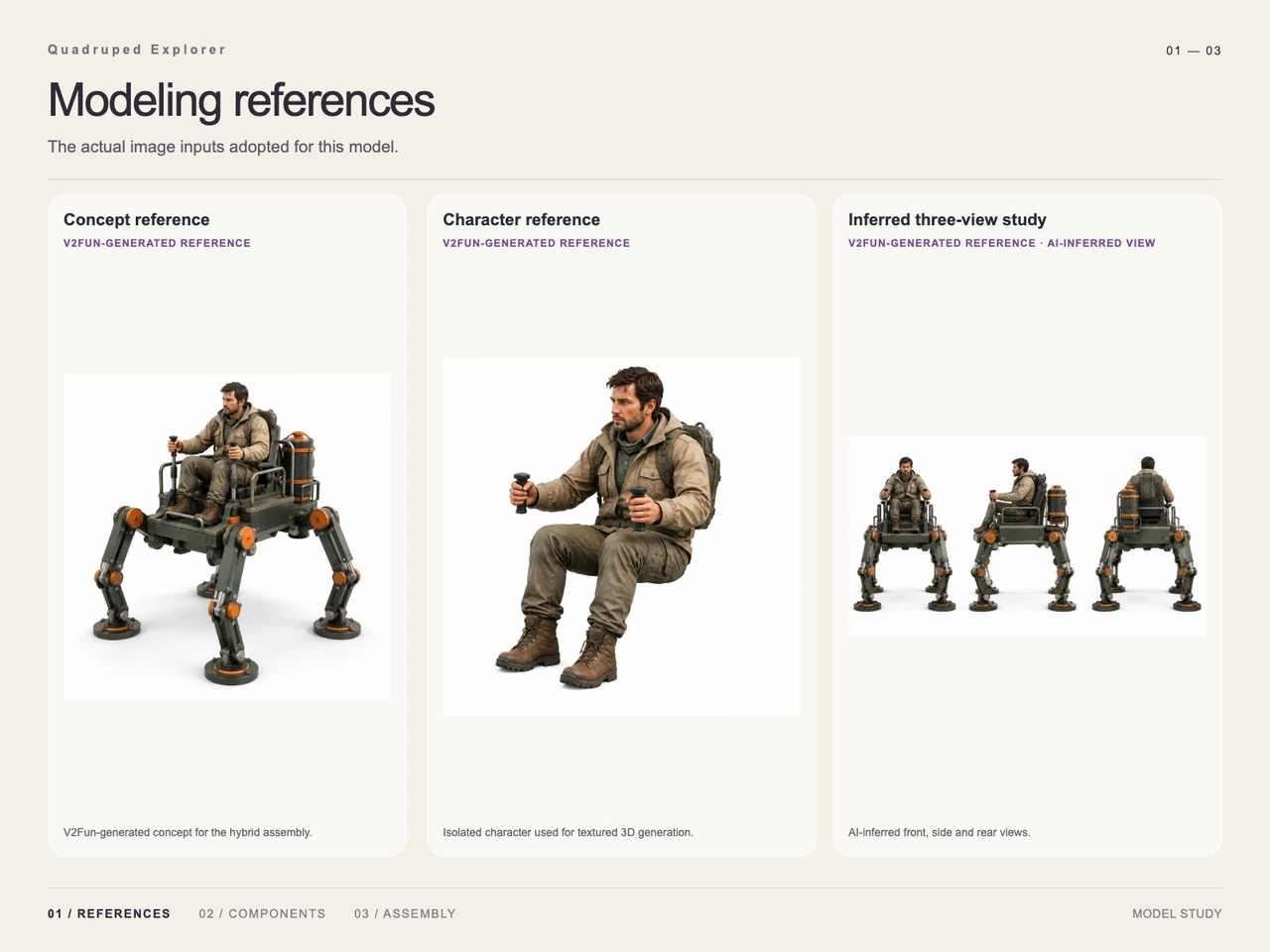 01 / Input
Input · Build a Quadruped Explorer with GPT-6 Astra and V2Fun
-
 02 / Process
Process · Build a Quadruped Explorer with GPT-6 Astra and V2Fun
-
03 / Final
Final · Build a Quadruped Explorer with GPT-6 Astra and V2Fun
Overview
Quadruped Explorer combines one adult adventurer with one square walking platform. The design pairs a short beard, khaki field clothing, and a small backpack with dark green machinery, orange joint covers, and four exposed articulated legs.
The central modeling challenge is the relationship between the human pose and the machine: the explorer sits above the platform, holds two control levers, and places his boots at the front foot supports. The supplied breakdown separates the textured character from the regular mechanical geometry, making these assembly relationships easy to follow. This case illustrates the division of work described in the GPT-6 Astra and V2Fun agent workflow.
Tools Used
- GPT-6 Astra: subject interpretation, component planning, and assembly calibration, as described in the case notes.
- V2Fun: generated visual references and the textured explorer character, identified in the reference and component images.
- Three.js: procedural construction of the frame, mechanical legs, seating, rear canister, controls, and foot supports.
- GLB: the supplied final delivery format.
Step 1 — Establish the Reference and Seated Pose
The input board presents a complete concept, an isolated seated explorer, and an inferred front, side, and rear study. The concept establishes the overall silhouette and green-and-orange palette. The isolated character reference retains bent knees, forward boots, and hands positioned to grip the controls.
The images identify these as V2Fun-generated references. The AI image generator for 3D creation provides related background on preparing concept and character imagery. The three-view study is explicitly AI-inferred; it should be understood as a design aid rather than measured evidence of hidden surfaces.
Step 2 — Separate the Character from the Machine
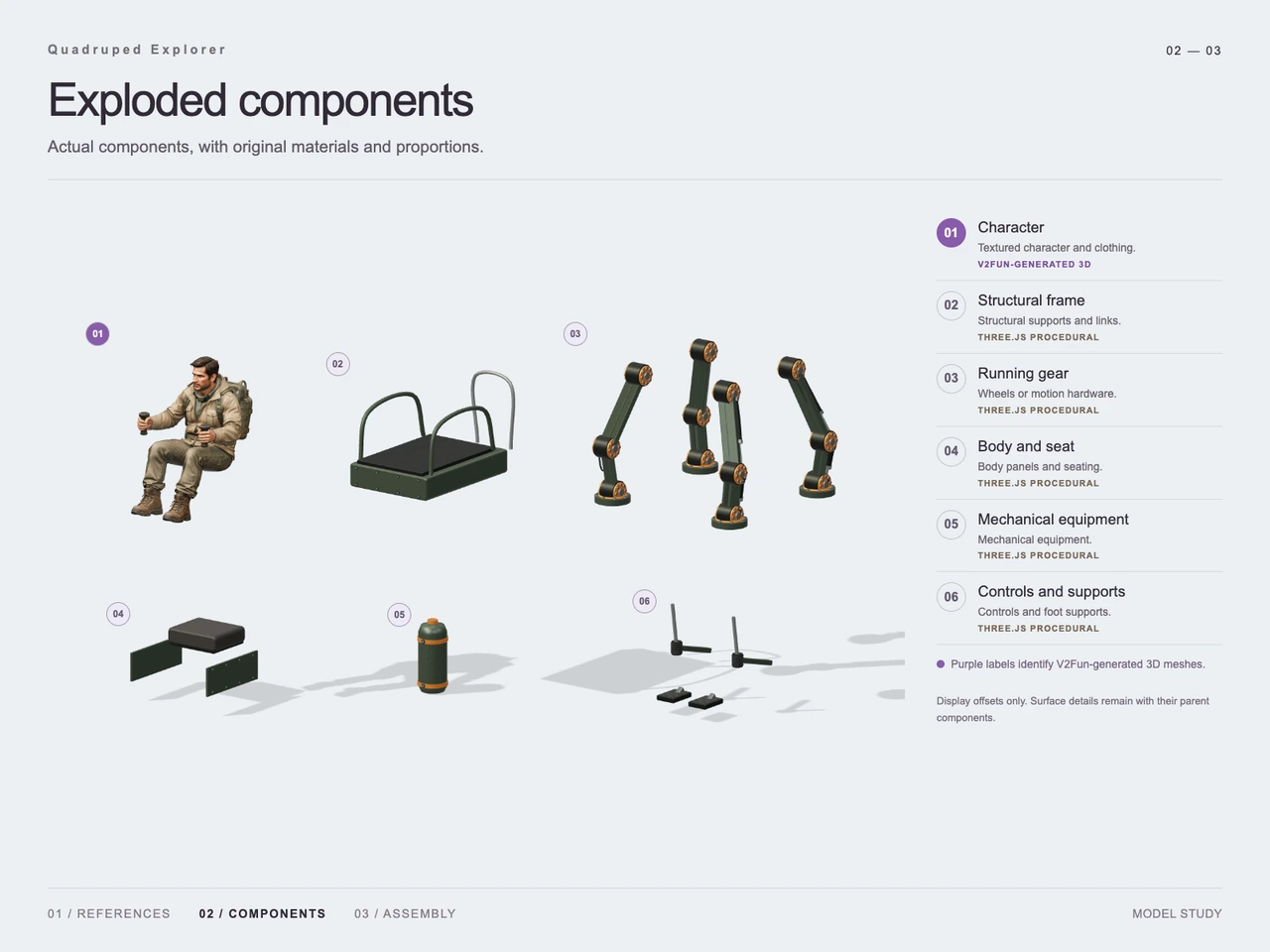
The exploded component image organizes the asset into six groups:
- Character: the seated explorer, clothing, boots, and backpack.
- Structural frame: the platform base and tubular rails.
- Running gear: four mechanical leg assemblies with exposed links, cylindrical joints, and circular foot pads.
- Body and seat: the cushion and side panels.
- Mechanical equipment: the cylindrical rear canister.
- Controls and supports: paired levers and foot supports.
These are presentation groups, not a verified count of meshes in the delivered file. The exploded layout uses display offsets to reveal the components.
Step 3 — Generate the Explorer and Build the Machinery
The component board identifies the character as V2Fun-generated 3D and the five mechanical groups as procedural Three.js work. The explorer carries the irregular surface detail visible in the face, jacket folds, trousers, and boots. The machinery uses repeated rectangular links, round pivot housings, plates, and curved rails.
This makes the character a focused image-to-3D generation task while the platform remains a construction task built around regular shapes. The case provides no measured generation time or token comparison.
Step 4 — Assemble and Present the Complete Asset
The final image brings the explorer and platform together in a front three-quarter view. The hands sit around the lever grips, the seat supports the figure, and the boots align with the front supports. Four splayed legs terminate in round pads at the ground plane, while the canister stands behind the seat.
The final presentation identifies the image as a render of the delivered GLB after reloading. It documents a static display assembly; it does not demonstrate a walking mechanism or animation.
Workflow
Concept reference → isolated character and inferred view study → component planning → V2Fun character generation and Three.js mechanical construction → assembly calibration → GLB export → reloaded assembly render.
Prompt
English translation of the design brief:
An adult explorer with a short beard, wearing a khaki field jacket and carrying a small fabric backpack, sits on a square four-legged walking platform, holding control levers with both hands. Install one mechanical leg at each corner. Each leg consists of two rectangular-section links, cylindrical hinges, and a circular foot pad. All four feet rest firmly on the ground, with links and joints exposed rather than covered by armor.
Place a seat and simple guardrails on top of the platform, with a cylindrical energy canister fixed at the rear. Use dark green metal with orange joint covers. Create one complete standalone asset comprising a single character and a single machine, in a collectible model style combining realistic proportions with mild exaggeration. Give the character an expressive face and natural clothing folds.
Build the machinery from clearly defined cylinders, discs, rectangular plates, straight rods, and a few regular curved tubes. Keep major component boundaries clear and connections plausible. Preserve contact between the character and the seat, grips, and footrests.
Show the complete character and machine from a front three-quarter view, slightly from above, centered with surrounding space. Use a white background, soft studio lighting, contact shadows, sharp focus across all components, and refined PBR materials. Include no text, numbers, logos, watermarks, complex scenery, or motion blur. Produce one finished reference image, not a collage or exploded view.
Result
The final render shows a seated explorer on a dark green quadruped platform, with orange pivot covers, uncovered leg links, simple rails, paired controls, and a rear cylindrical canister. It preserves the main visual relationships of the brief while presenting the machine as a static model. Unseen surfaces are identified as inferred.
Supplied output metadata: 82-v2-final.glb, 42,952,660 bytes, MIME type model/gltf-binary. For context on this delivery format, see the AI 3D export format guide.
Frequently Asked Questions
Which part of the quadruped explorer was generated with V2Fun?
The component board identifies the seated, textured explorer as V2Fun-generated 3D. It labels the frame, legs, seat and panels, rear canister, and controls as procedural Three.js components.
Why separate the explorer from the walking platform?
The explorer contains irregular facial and clothing surfaces, while the platform consists mainly of repeated links, cylinders, plates, and rails. Separating them also makes the seat, handgrip, and foot-support relationships easier to address during assembly.
Were the front, side, and rear references measured views?
No. The reference board explicitly identifies the three-view study as AI-inferred. It supports design interpretation but does not establish exact hidden geometry or dimensions.
Does the final quadruped model walk?
The supplied final presentation describes a static display model. The exposed joints and four-legged stance are visible design features; no rig, walking animation, or mechanical simulation is demonstrated.
What file was delivered for this case?
The supplied metadata lists 82-v2-final.glb at 42,952,660 bytes with MIME type model/gltf-binary. The final presentation states that the delivered GLB was reloaded and rendered as a complete assembly.
Explore More
-
GPT-6 Astra x V2Fun - From Code Generation to Model Collaboration | V2Fun
See how GPT-6 Astra and V2Fun combine agent reasoning, code generation, and AI 3D foundation models to build complex, structured 3D assets.
View page → -
V2Fun - AI Image Generator for 3D Creation
Create concept images, character references, and visual assets with V2Fun's AI image generator. Turn ideas into 3D-ready images for modeling, animation, and game design.
View page → -
V2Fun - AI 3D Model Generator
Create 3D models from text prompts or images with V2Fun's AI 3D model generator. Generate characters, props, game assets, and 3D-printable models faster.
View page → -
AI 3D Model Generator Export Guide: FBX, GLB, OBJ, or USDZ? | V2Fun
Use an AI 3D Model Generator with the right export format. Compare FBX, GLB, OBJ, and USDZ for Blender, game engines, animation, web, and AR.
View page →