Pirate Captain 3D Workflow with GPT-6 Astra and V2Fun
Follow a stylized pirate captain from visual references to a complete GLB assembly, combining V2Fun character and pistol generation with a Three.js saber and local coat repair.
Interactive 3D preview · Pirate Captain 3D Workflow with GPT-6 Astra and V2FunDrag to rotate · Scroll to zoom
Take a Closer Look
-
 01 / Input
Input · Pirate Captain 3D Workflow with GPT-6 Astra and V2Fun
-
 02 / Process
Process · Pirate Captain 3D Workflow with GPT-6 Astra and V2Fun
-
03 / Final
Final · Pirate Captain 3D Workflow with GPT-6 Astra and V2Fun
Overview
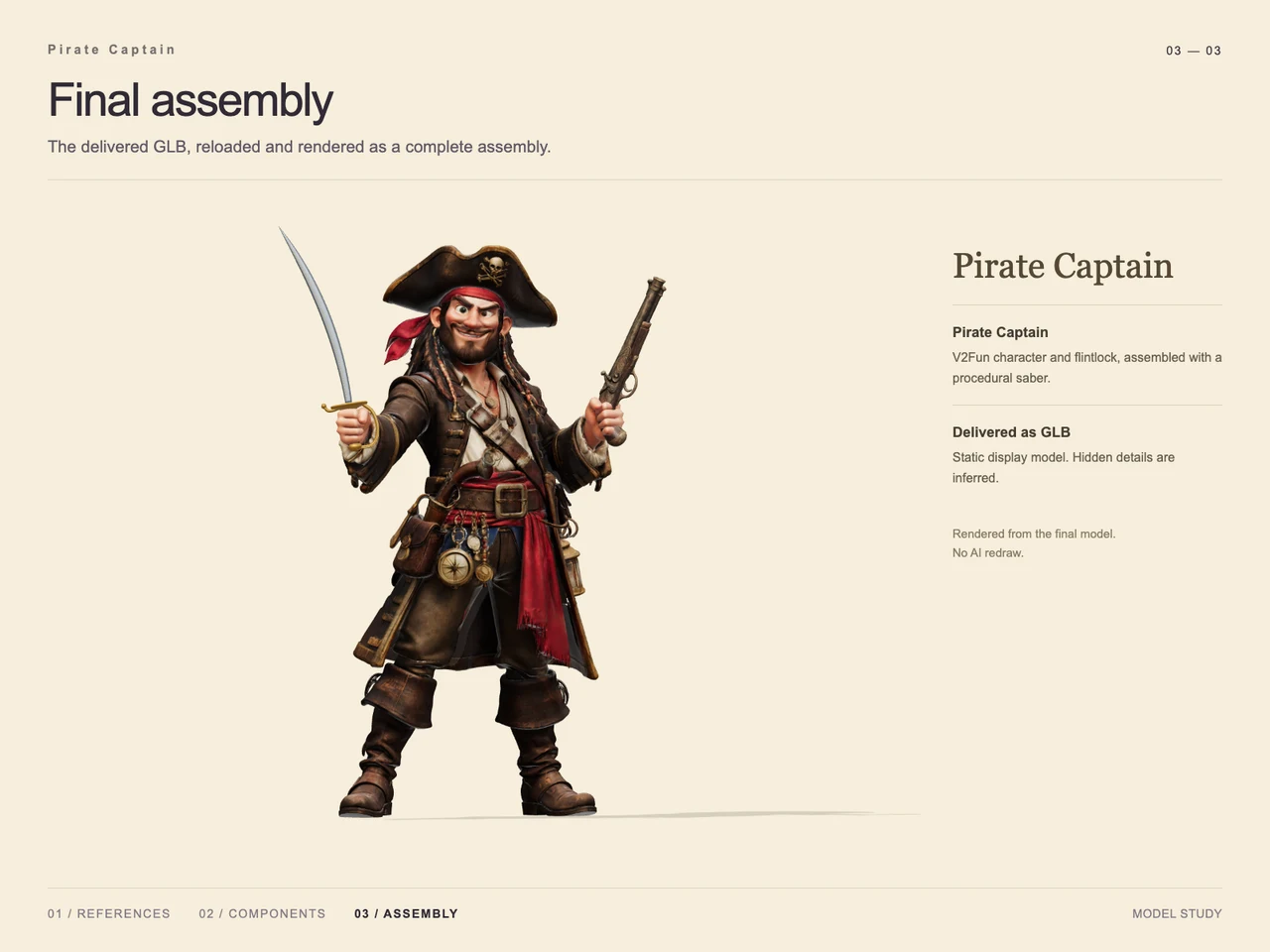
This case turns a full-body pirate concept into a static 3D display model. The design features an expressive face, a broad pirate hat, a red bandana and sash, layered clothing, tall boots, and numerous belt accessories. A curved saber and flintlock pistol complete the silhouette.
The technical account positions GPT-6 Astra as the planner for reference interpretation and task decomposition, with V2Fun generating complex assets. The component sheet makes the hybrid approach concrete: V2Fun supplies the character and pistol, while Three.js supplies the saber and a small coat repair. This division connects to the broader GPT-6 Astra and V2Fun 3D agent workflow. No case-specific token or timing measurements are supplied.
Tools Used
- GPT-6 Astra: structural understanding and task planning, as described in the technical account.
- V2Fun: generated reference studies and textured character and flintlock meshes, identified in the supplied sheets.
- Three.js: procedural saber construction and local coat surface restoration.
- Visual references: original character artwork, a three-view study, a character reference without handheld weapons, and an isolated pistol reference.
- GLB: the supplied final delivery format.
Step 1 — Establish the Character References
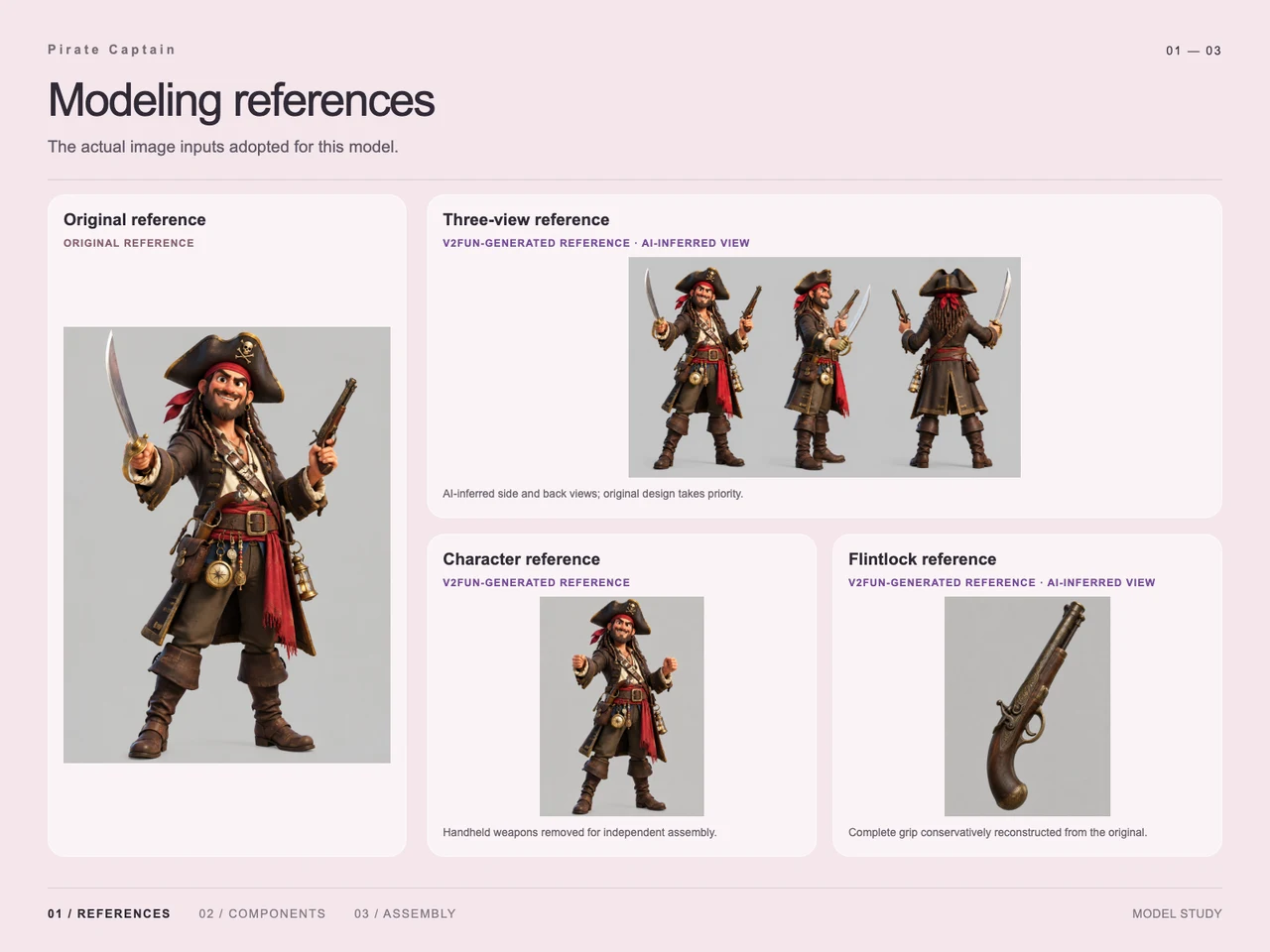
The input sheet presents the original armed pirate alongside generated front, side, and back views. Its annotations identify the side and back as AI-inferred, with the original design taking priority. These views provide a modeling interpretation of unseen areas rather than independent evidence of their appearance.
The character reference removes the handheld weapons for independent assembly. A separate flintlock study exposes the grip, which the sheet describes as conservatively reconstructed from the original. The single-image and multi-view input guide provides related guidance on complete framing and overlapping parts.
Step 2 — Separate the Character and Weapons
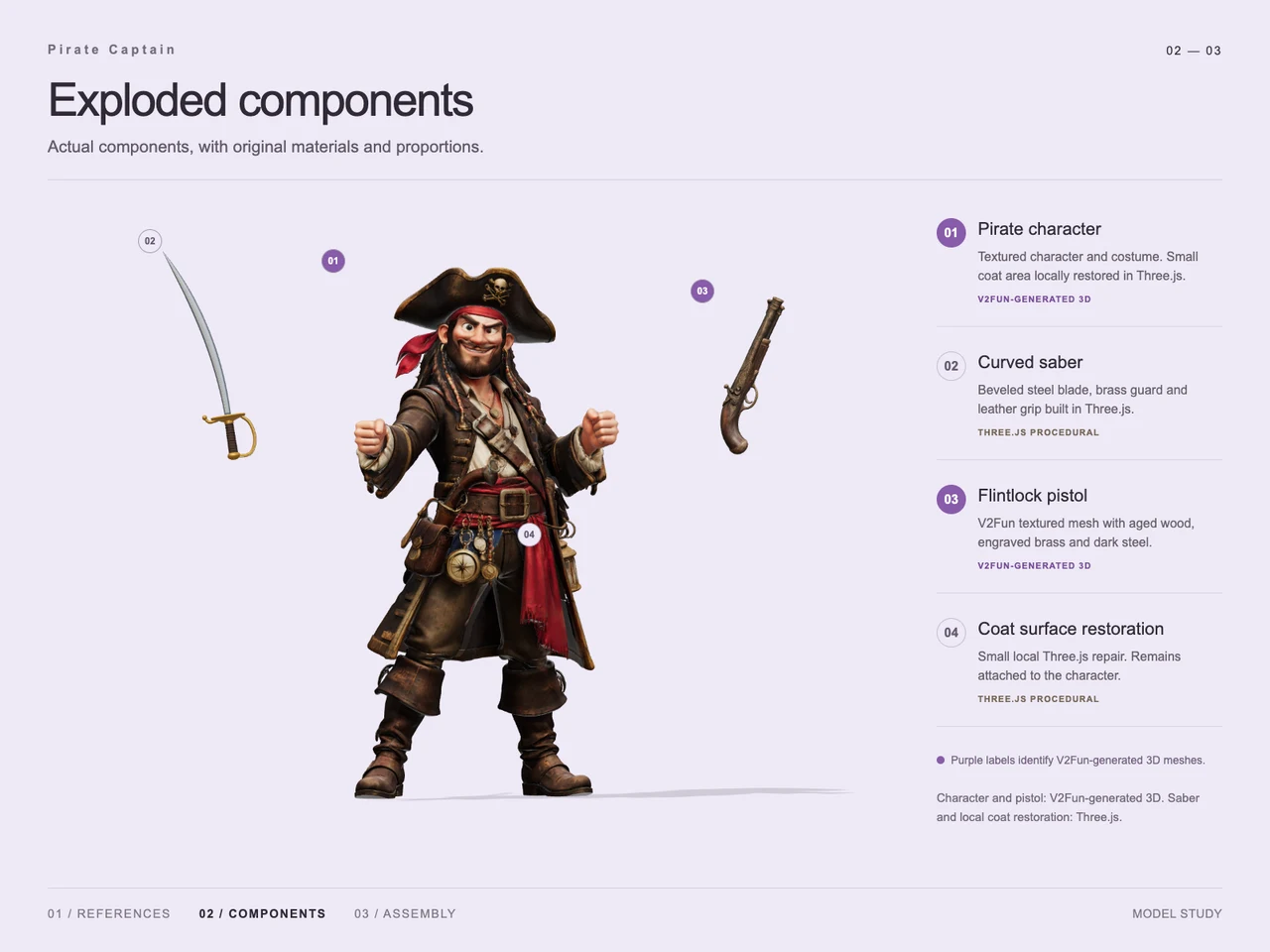
The process sheet shows three principal elements: the clothed pirate character, curved saber, and flintlock pistol. A fourth annotation marks a local coat restoration that remains attached to the character.
The hat, hair, costume, belts, and hanging accessories appear with the character component; the evidence does not establish them as individually generated assets. Separating the weapons allows their placement to be handled during assembly. For broader context, see the 2D image to 3D character workflow.
Step 3 — Combine Generated Meshes and Procedural Work
The component sheet identifies the pirate and flintlock as V2Fun-generated textured 3D meshes. The pistol has the appearance of aged wood, engraved brass, and dark steel.
The saber is identified as a Three.js procedural component with a beveled blade, brass guard, and leather grip. Three.js also restores a small area of the coat. These are the documented procedural contributions; the case does not establish additional mesh optimization or texture-processing stages.
Step 4 — Assemble and Present the Final Model
The final image shows the saber and pistol placed in the pirate’s hands, restoring the armed pose while retaining the layered costume and hanging accessories. The presentation identifies this image as a render of the delivered GLB after reloading, without an AI redraw.
Workflow
Original reference → inferred view studies and isolated references → character and weapon decomposition → V2Fun mesh generation → Three.js saber and coat repair → assembly → GLB export and reload render.
Prompt
Translated design brief: “A pirate, a Pixar-style character, full-body view, with more accessories.”
The row also includes a presentation note: “Just switch to a bolder, brighter font.” This concerns typography rather than the character’s geometry.
Result
The delivered asset is pirate-captain.glb, with a supplied size of 88,106,384 bytes, approximately 88.11 MB, and MIME type model/gltf-binary.
The final presentation documents a static pirate captain assembly with both weapons attached. Hidden details are inferred, and rigging or animation is not demonstrated. The 3D export format guide offers context for subsequent file handoffs; this case establishes the GLB delivery and its presented reload render.
Frequently Asked Questions
Which pirate captain components were generated with V2Fun?
The component sheet identifies the textured pirate character and flintlock pistol as V2Fun-generated 3D meshes. It does not identify the hat, belts, or smaller costume accessories as separate generation tasks.
What was built or repaired with Three.js?
Three.js was used for the curved saber and a small local coat surface restoration. The coat repair remains attached to the character.
Were the pirate’s side and back views original references?
No. The reference sheet labels them as AI-inferred views and states that the original design takes priority. The isolated pistol grip also includes reconstructed detail.
Why were the weapons removed from the character reference?
The reference sheet states that the handheld weapons were removed for independent assembly. The process image shows them separately, and the final image shows them placed in the pirate’s hands.
What was delivered, and is the pirate animated?
The supplied output is pirate-captain.glb, sized 88,106,384 bytes. The final sheet describes a static display model rendered after reloading the delivered GLB; animation and rigging are not demonstrated.
Explore More
-
GPT-6 Astra x V2Fun - From Code Generation to Model Collaboration | V2Fun
See how GPT-6 Astra and V2Fun combine agent reasoning, code generation, and AI 3D foundation models to build complex, structured 3D assets.
View page → -
AI 3D Model Generator Input Guide: Single vs. Multi-View | V2Fun
Learn how to prepare photos, multi-view references, and sketches for an AI 3D Model Generator, then inspect geometry and textures before export.
View page → -
How to Turn a 2D Image into a 3D Character Using AI: Workflow, Challenges, and V2Fun Use Cases | V2Fun
Use an AI 3D creation platform to turn a 2D image into a rigged 3D character for games, animation, virtual avatars, and 3D content.
View page → -
AI 3D Model Generator Export Guide: FBX, GLB, OBJ, or USDZ? | V2Fun
Use an AI 3D Model Generator with the right export format. Compare FBX, GLB, OBJ, and USDZ for Blender, game engines, animation, web, and AR.
View page →