Build a Little Witch in 3D with GPT-6 Astra and V2Fun
Follow a stylized witch from character reference to four generated components and a final GLB assembly, complete with a curled hat, lantern broom, and black cat.
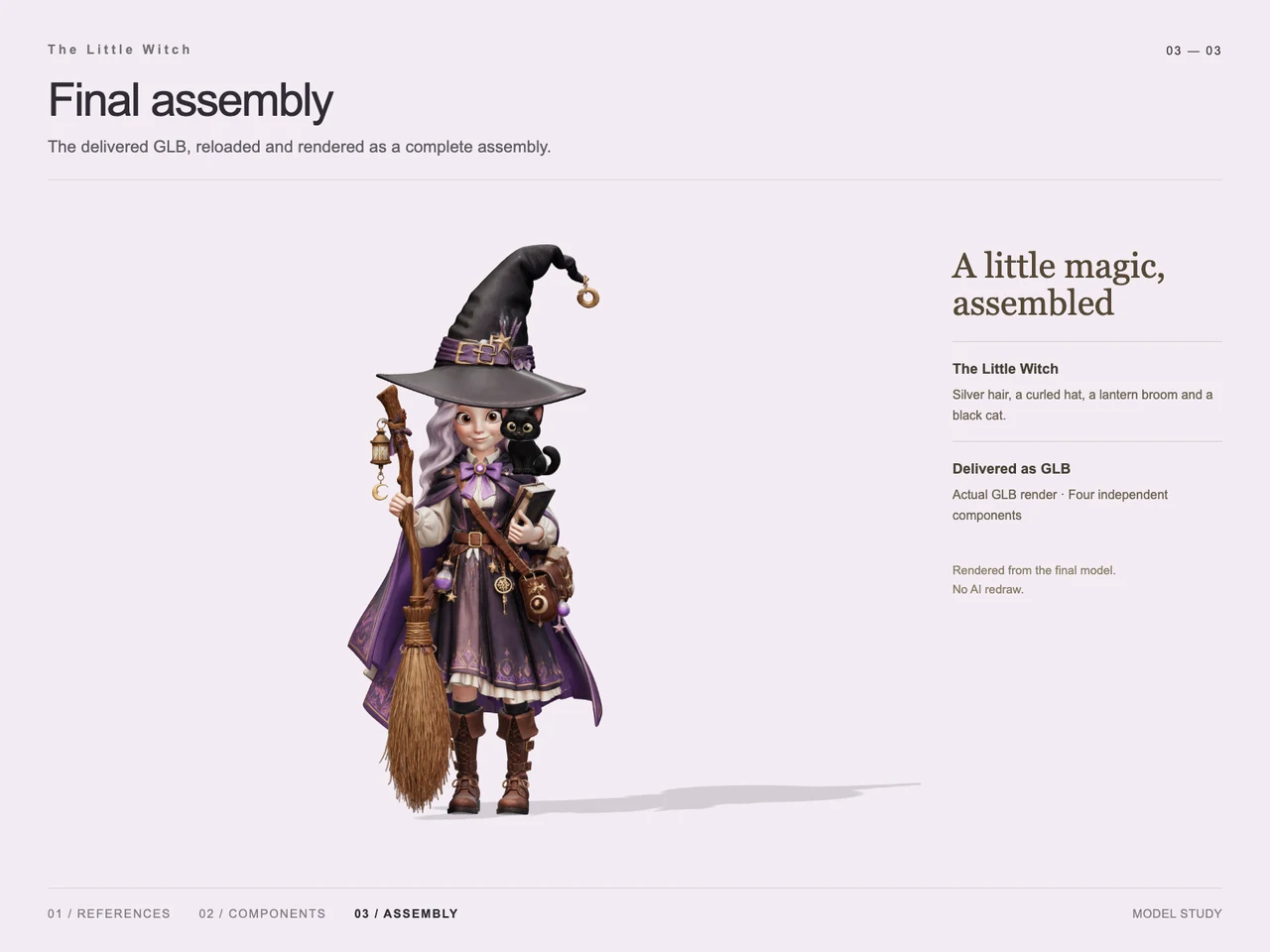
Interactive 3D preview · Build a Little Witch in 3D with GPT-6 Astra and V2FunDrag to rotate · Scroll to zoom
Take a Closer Look
-
 01 / Input
Input · Build a Little Witch in 3D with GPT-6 Astra and V2Fun
-
 02 / Process
Process · Build a Little Witch in 3D with GPT-6 Astra and V2Fun
-
03 / Final
Final · Build a Little Witch in 3D with GPT-6 Astra and V2Fun
Overview
The Little Witch case turns a full-body fantasy character reference into an assembly of four independently generated 3D components. Silver hair, a purple outfit, books, a satchel, a lantern broom, and a black cat give the character the accessory-rich appearance requested in the brief.
The case notes assign structural understanding and task decomposition to GPT-6 Astra, with V2Fun handling complex model generation. The supplied boards document the reference studies, separated components, and final assembly. This division of work follows the broader GPT-6 Astra and V2Fun 3D agent workflow. No token savings or generation-time measurements are supplied for this case.
Tools Used
- GPT-6 Astra: structural interpretation and task planning, as described in the case notes.
- V2Fun: generated reference studies and four textured 3D components, as labeled in the supplied boards.
- Three.js: assembly of the generated parts, as documented on the component board.
- GLB: the supplied final asset format.
Step 1 — Establish the Character Reference
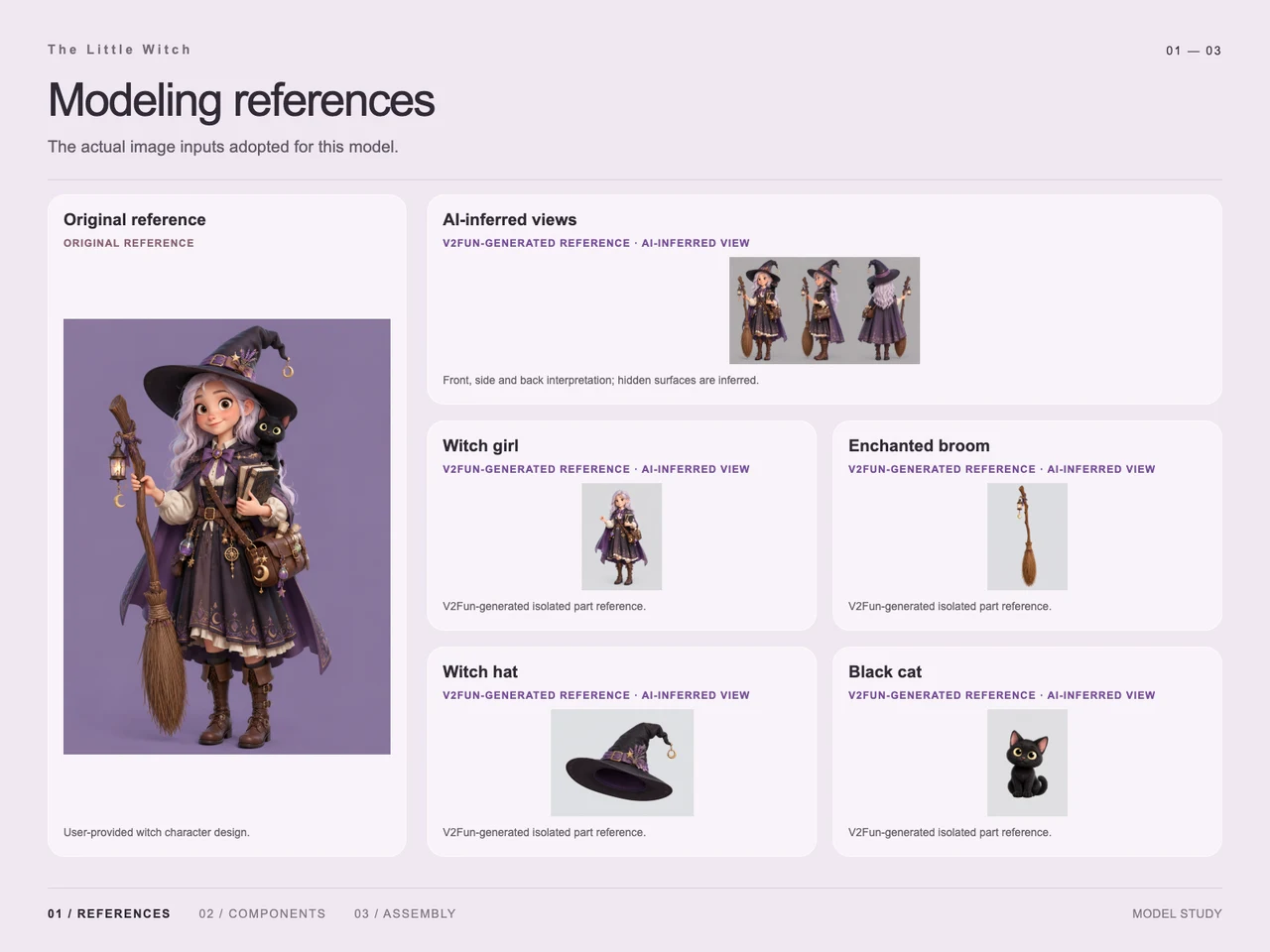
The input board pairs the original witch illustration with generated front, side, and back interpretations. It also shows isolated references for the girl, broom, hat, and cat. The alternate views are explicitly labeled as AI-inferred: they propose hidden surfaces rather than establish independently observed details.
The wide hat, shoulder cat, and broom overlap the character in the original illustration. Isolated studies make those component silhouettes easier to distinguish. The single-image and multi-view input guide provides related guidance on framing and occlusion.
Step 2 — Divide the Design into Four Components
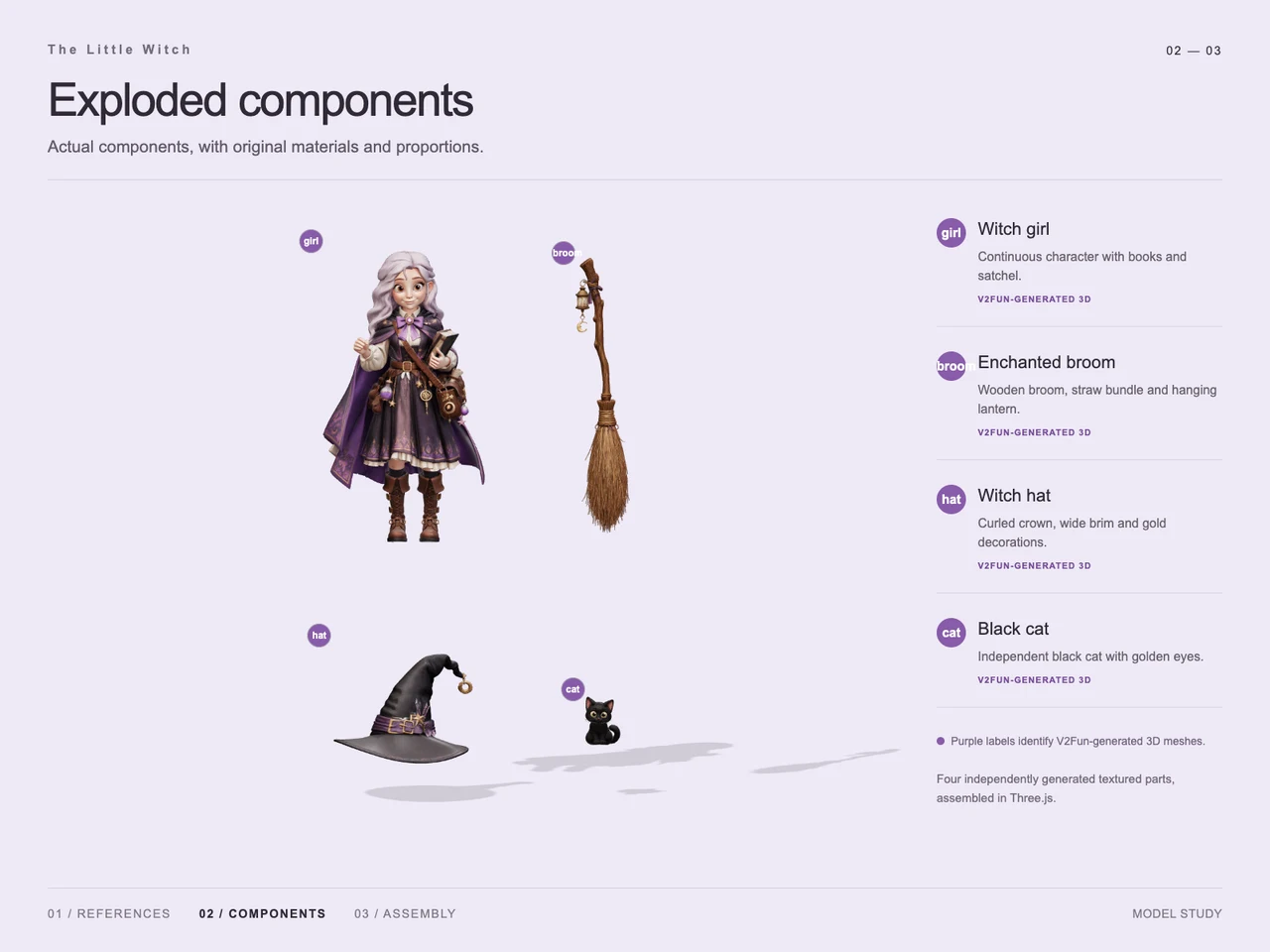
The exploded view identifies four generated parts:
- Witch girl: the character with hair, clothing, boots, books, and satchel.
- Enchanted broom: the wooden shaft, straw bundle, hanging lantern, and ornaments.
- Witch hat: the wide brim, curled crown, band, and gold decorations.
- Black cat: a separate seated companion with golden eyes.
This grouping keeps the clothing and carried accessories within the girl component while separating three prominent elements that need their own placement. The boards do not show every small ornament as an independent asset.
Step 3 — Generate the Detailed Parts
The process board labels all four components as V2Fun-generated 3D meshes and displays them separately before assembly. Visible details include the girl's layered purple clothing, the broom's straw silhouette, the hat's bent tip, and the cat's rounded face.
These parts illustrate the role of V2Fun's AI 3D model generator in the case. The evidence does not identify a separate procedural modeling or retexturing pass.
Step 4 — Assemble and Present the GLB
The component board documents assembly in Three.js. In the final view, the hat sits over the girl's hair, the cat rests at her shoulder, and the broom aligns with her raised hand. The books and satchel remain visible across the front of the outfit.
The final board identifies its image as a render of the delivered GLB after reloading. It provides a view of the combined character, while the exploded board explains how the four major parts relate.
Workflow
Original character reference → AI-inferred views and isolated references → Four V2Fun-generated components → Three.js assembly → GLB export → Reloaded assembly render.
Prompt
Character brief, translated from Chinese: “A witch, a Pixar-style character, full-body view, with more accessories.”
The row also includes a presentation note: “Just change the font to something bolder and brighter.” This concerns typography; it does not establish an additional modeling step.
Result
The final presentation shows a complete standing witch with silver hair, a decorated purple outfit, an oversized curled hat, a lantern broom, and a black cat at her shoulder.
Supplied asset metadata:
- Filename:
witch-girl.glb - File size: 186,484,820 bytes, approximately 186.48 MB in decimal units.
- MIME type:
model/gltf-binary
The demonstrated outcome is a four-component character assembly with a documented GLB render. Rigging, animation, and downstream performance are not established by the supplied evidence. For subsequent format decisions, consult the AI 3D export guide.
Frequently Asked Questions
Which parts were generated separately for the Little Witch?
The component board shows four independently generated parts: the witch girl, enchanted broom, witch hat, and black cat. The girl's clothing, books, and satchel belong to the character component.
What did GPT-6 Astra and V2Fun each contribute?
The case notes describe GPT-6 Astra handling structural understanding and task decomposition. The boards attribute the generated reference studies and four 3D components to V2Fun, and document assembly in Three.js.
Are the side and back references original views?
No. The input board labels them as AI-inferred interpretations. They suggest hidden surfaces based on the original character design.
How are the witch's separate accessories positioned in the final assembly?
The final view places the curled hat over her hair, the black cat at her shoulder, and the broom alongside her body with its shaft aligned to her raised hand.
What file was delivered, and what does the final image demonstrate?
The supplied metadata identifies witch-girl.glb at 186,484,820 bytes with MIME type model/gltf-binary. The final board describes its image as a render of the reloaded GLB assembly; it does not establish animation or engine readiness.
Explore More
-
GPT-6 Astra x V2Fun - From Code Generation to Model Collaboration | V2Fun
See how GPT-6 Astra and V2Fun combine agent reasoning, code generation, and AI 3D foundation models to build complex, structured 3D assets.
View page → -
AI 3D Model Generator Input Guide: Single vs. Multi-View | V2Fun
Learn how to prepare photos, multi-view references, and sketches for an AI 3D Model Generator, then inspect geometry and textures before export.
View page → -
V2Fun - AI 3D Model Generator
Create 3D models from text prompts or images with V2Fun's AI 3D model generator. Generate characters, props, game assets, and 3D-printable models faster.
View page → -
AI 3D Model Generator Export Guide: FBX, GLB, OBJ, or USDZ? | V2Fun
Use an AI 3D Model Generator with the right export format. Compare FBX, GLB, OBJ, and USDZ for Blender, game engines, animation, web, and AR.
View page →