Insect Cafe Racer 3D Workflow with GPT-6 Astra and V2Fun
Explore a hybrid motorcycle build that combines a V2Fun-generated insect fairing with Three.js mechanical components, from reference studies to an assembled GLB.
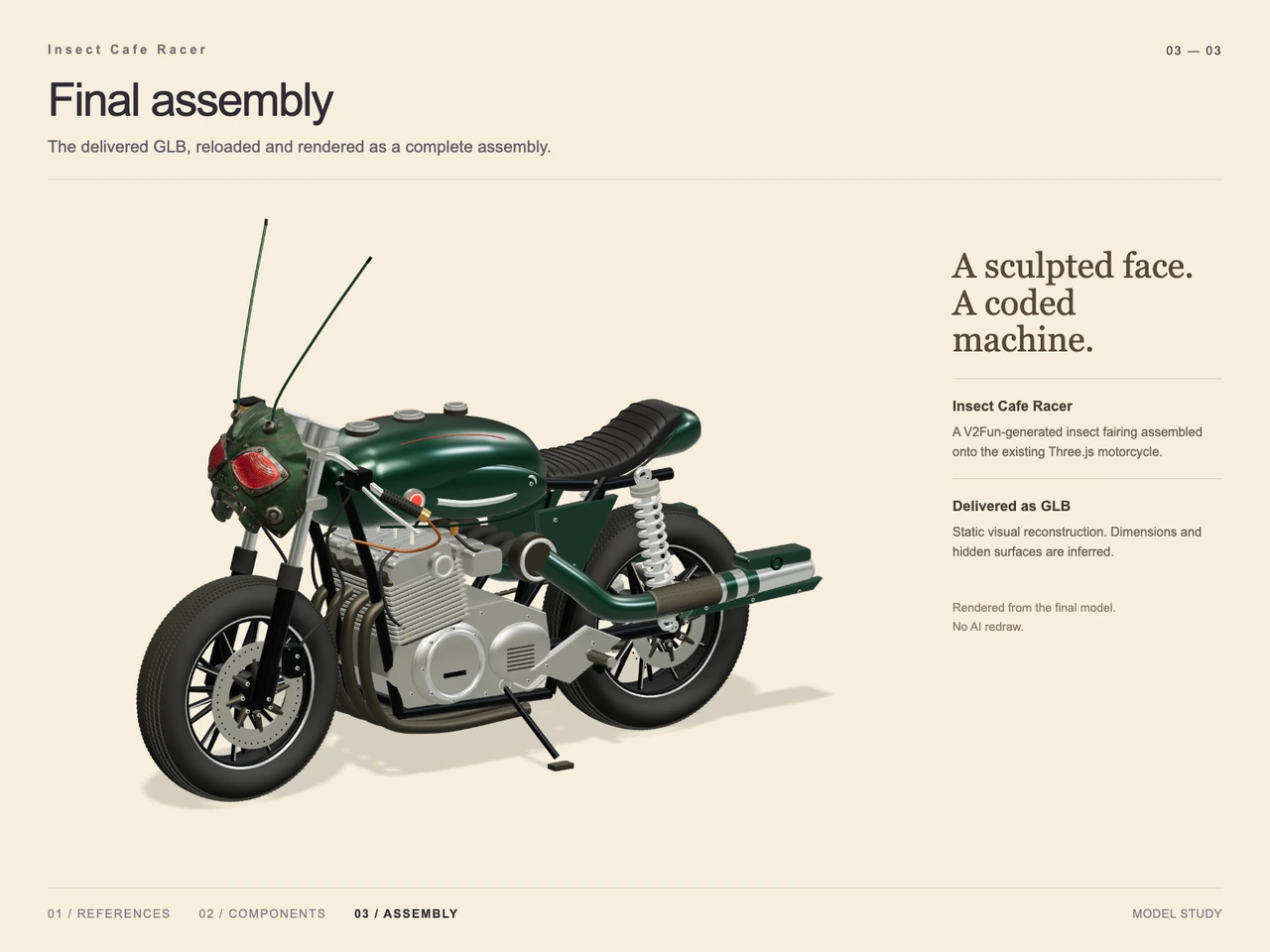
Interactive 3D preview · Insect Cafe Racer 3D Workflow with GPT-6 Astra and V2FunDrag to rotate · Scroll to zoom
Take a Closer Look
-
 01 / Input
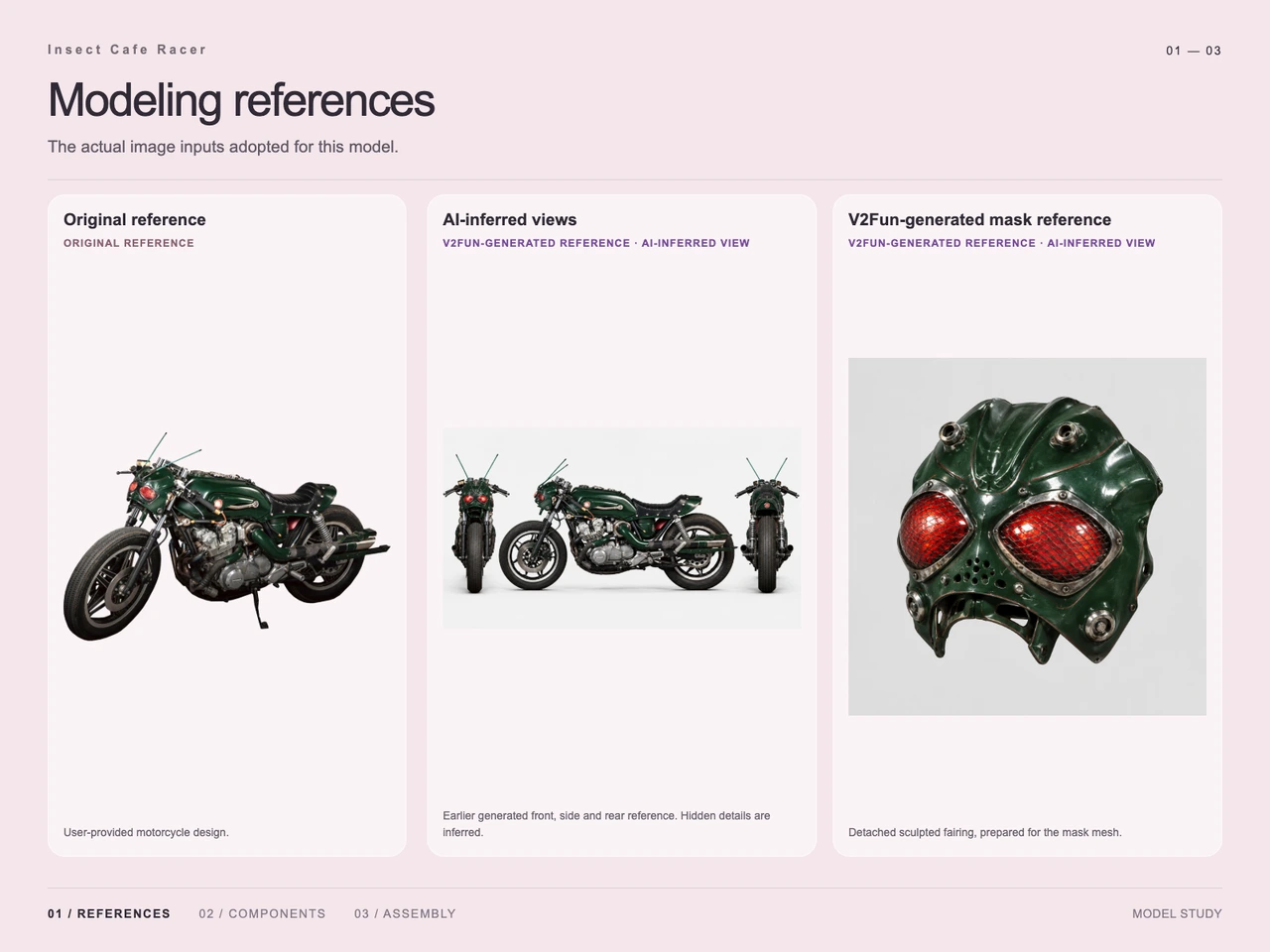
Input · Insect Cafe Racer 3D Workflow with GPT-6 Astra and V2Fun
-
 02 / Process
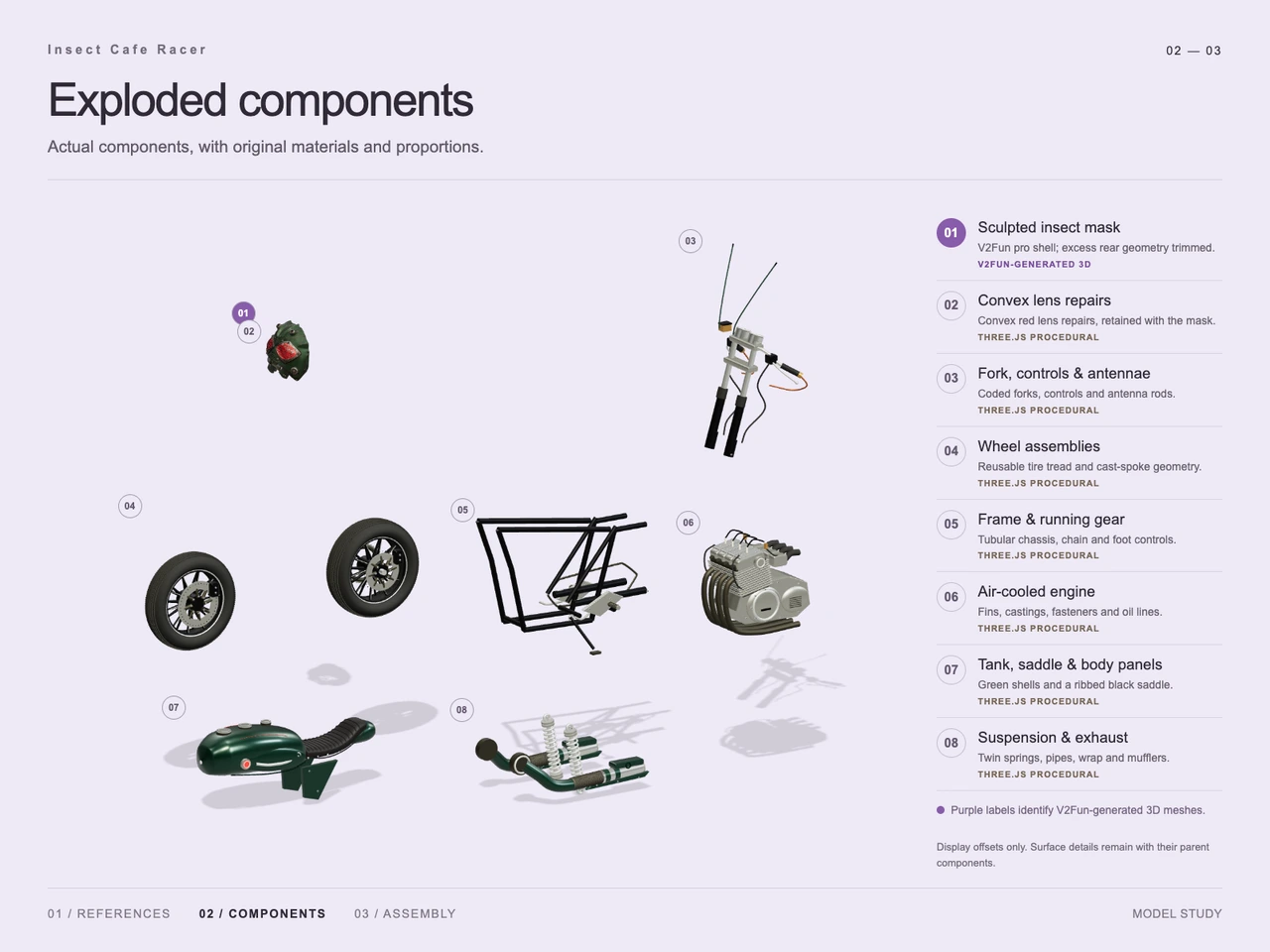
Process · Insect Cafe Racer 3D Workflow with GPT-6 Astra and V2Fun
-
03 / Final
Final · Insect Cafe Racer 3D Workflow with GPT-6 Astra and V2Fun
Overview
This case reconstructs a deep-green cafe racer with a mechanical insect face: red mesh-pattern eyes, tall antennae, and a sculpted front fairing. GPT-6 Astra coordinates reference interpretation, component planning, and assembly. The documented build combines a V2Fun-generated mask with an existing Three.js motorcycle.
The three supplied boards show the modeling references, an exploded component study, and the final assembly. They support a specific division of work: AI generation supplies the irregular insect shell, while procedural geometry supplies the motorcycle structure and local repairs. This case illustrates the broader GPT-6 Astra and V2Fun model collaboration workflow.
Tools Used
- GPT-6 Astra: visual hierarchy analysis, component decomposition, and agent-side assembly and adjustment, as described in the case notes.
- V2Fun: generated reference imagery and the sculpted insect mask mesh.
- Three.js: procedural motorcycle components and convex red lens repairs.
- GLB: the supplied final asset format.
Step 1 — Establish the Reference Set
The input board contains the original motorcycle concept, AI-inferred front, side, and rear views, and a detached mask reference prepared for the fairing mesh. The original establishes the low tank, ribbed black saddle, exposed engine, and insect identity.
The additional views are labeled as inferred. They help describe the intended form, but hidden details remain interpretations. The single-image and multi-view input guide provides related guidance on preparing references and recognizing gaps in visual evidence.
Step 2 — Separate the Sculpted Mask from the Mechanical Build
The exploded study presents eight component groups:
- Sculpted insect mask generated with V2Fun.
- Procedural convex red lens repairs retained with the mask.
- Forks, controls, and antenna rods.
- Wheel assemblies with tire tread and cast-spoke geometry.
- Tubular frame, chain, and foot controls.
- Air-cooled engine with fins, castings, fasteners, and oil lines.
- Green tank and body panels with a ribbed black saddle.
- Suspension and exhaust, including springs, pipes, wrap, and mufflers.
These are presentation groups, not a verified count of individual meshes. The board states that components are offset for display and that surface details remain with their parent components.
Step 3 — Generate and Refine the Insect Fairing
The process board identifies the mask as a V2Fun-generated shell and records trimming excess rear geometry. It also documents convex red lens repairs made procedurally and retained with the mask.
This isolates the visually distinctive sculpted surface from the regular mechanical construction. The relevant generation capability is described on V2Fun's AI 3D model generator page; this case specifically documents its use for the insect fairing.
Step 4 — Assemble and Present the Motorcycle
The generated fairing is fitted to the existing Three.js motorcycle. The final view shows the mask ahead of the silver forks, antennae extending upward, the green tank above the exposed engine, and the black saddle leading toward the rear suspension. Wrapped exhaust pipes run along the side, and a deployed side stand completes the stationary pose.
The final board states that the delivered GLB was reloaded and rendered as a complete assembly. It identifies the image as a render of the final model.
Workflow
Original concept → AI-inferred views and isolated mask reference → V2Fun mask generation → rear-shell trimming and procedural lens repairs → integration with the Three.js motorcycle → GLB export and reload render.
Prompt
English translation of the design intent:
A deep ink-green vintage cafe racer motorcycle facing toward the front-left of the image. A low, elongated fuel tank connects to a black leather seat with horizontal stitching. The front fairing resembles a mechanical insect mask, with two glowing red mesh compound eyes, two slender green antennae extending diagonally upward, and metal ventilation holes below. Include an exposed silver multi-cylinder engine, dense cooling fins, chrome forks, rear coil suspension, a black tubular frame, brake discs, dark multi-spoke wheels, and finely treaded rubber tires. Add copper-colored and black hoses, a round red indicator, exposed bolts, and side exhaust pipes extending rearward with partial heat wrapping and a metal heat shield. Rest the motorcycle on its side stand. Show subtle scratches in glossy dark-green paint and oxidation and wear on metal. Aim for a realistic, highly detailed PBR product render on a pure black background, viewed close-up from a slightly elevated front-left three-quarter angle. Use rim highlights and soft reflections, with no rider, environmental props, extra text, or watermark. Landscape composition, approximately 3:2.
Result
The assembled model retains the recognizable insect face, green bodywork, black ribbed saddle, silver engine, visible springs, and side exhaust. The final presentation uses a pale cream background and a smoother mechanical finish than the weathered concept. The prompt's black-background product-render treatment therefore remains design intent rather than a fully reproduced presentation.
The supplied output is insect-motorcycle-hybrid.glb, with MIME type model/gltf-binary and a file size of 85,688,844 bytes, approximately 85.69 MB. The final board describes a static visual reconstruction with inferred dimensions and hidden surfaces. No case-specific timing or token measurements are supplied.
For context on the delivery format, see the AI 3D export guide for FBX, GLB, OBJ, and USDZ.
Frequently Asked Questions
Which part of the insect cafe racer was generated with V2Fun?
The process board identifies the sculpted insect mask as V2Fun-generated. It labels the lens repairs and the motorcycle's mechanical component groups as Three.js procedural work.
What reference images were used for this motorcycle?
The reference board shows the original motorcycle concept, AI-inferred front, side, and rear views, and a detached insect mask reference. The inferred views do not establish the true shape of hidden surfaces.
What repairs were documented for the insect fairing?
The component study records trimming excess rear geometry from the generated shell and adding procedural convex red lens repairs, which were retained with the mask.
How closely does the final render follow the prompt?
It preserves major identity cues, including the green body, red insect eyes, antennae, ribbed saddle, exposed engine, and side exhaust. The presentation uses a cream background instead of black, and the mechanical surfaces appear smoother than the weathered reference.
What file was delivered, and what does the final image demonstrate?
The supplied metadata lists insect-motorcycle-hybrid.glb at 85,688,844 bytes. The final board states that the GLB was reloaded and rendered as a complete static assembly; dimensions and hidden surfaces remain inferred.
Explore More
-

GPT-6 Astra x V2Fun - From Code Generation to Model Collaboration | V2Fun
See how GPT-6 Astra and V2Fun combine agent reasoning, code generation, and AI 3D foundation models to build complex, structured 3D assets.
View page → -
AI 3D Model Generator Input Guide: Single vs. Multi-View | V2Fun
Learn how to prepare photos, multi-view references, and sketches for an AI 3D Model Generator, then inspect geometry and textures before export.
View page → -
V2Fun - AI 3D Model Generator
Create 3D models from text prompts or images with V2Fun's AI 3D model generator. Generate characters, props, game assets, and 3D-printable models faster.
View page → -
AI 3D Model Generator Export Guide: FBX, GLB, OBJ, or USDZ? | V2Fun
Use an AI 3D Model Generator with the right export format. Compare FBX, GLB, OBJ, and USDZ for Blender, game engines, animation, web, and AR.
View page →