Frostbound Knight 3D Workflow with GPT-6 Astra and V2Fun
Follow a blue-armored knight and ice dragon from miniature reference to four textured components, assembled in Three.js and delivered as a static GLB model.
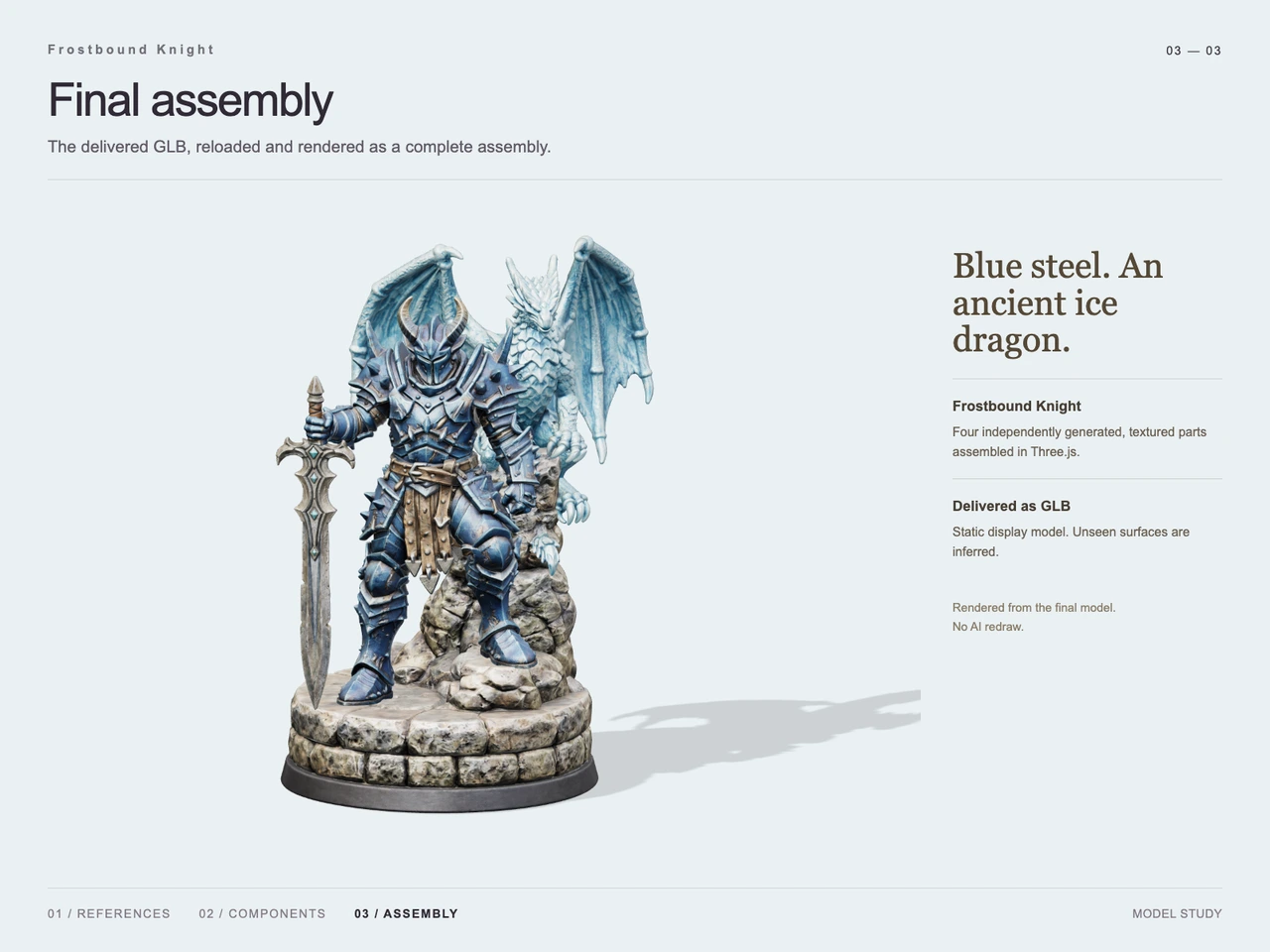
Interactive 3D preview · Frostbound Knight 3D Workflow with GPT-6 Astra and V2FunDrag to rotate · Scroll to zoom
Take a Closer Look
-
 01 / Input
Input · Frostbound Knight 3D Workflow with GPT-6 Astra and V2Fun
-
 02 / Process
Process · Frostbound Knight 3D Workflow with GPT-6 Astra and V2Fun
-
03 / Final
Final · Frostbound Knight 3D Workflow with GPT-6 Astra and V2Fun
Overview
Frostbound Knight translates a fantasy wargaming miniature reference into an assembled digital display model. The design centers on a knight in dark blue steel armor, a downward-pointing greatsword, an ice dragon behind the knight, and a circular stone base with a raised foothold.
The case documents four independently generated, textured parts. GPT-6 Astra handles visual interpretation, component planning, and assembly coordination; V2Fun supplies the complex forms and surface appearance. This follows the division of responsibilities described in the GPT-6 Astra and V2Fun agent workflow.
Tools Used
- GPT-6 Astra: reference interpretation, decomposition, and agent-side assembly coordination, as described in the case notes.
- V2Fun: generated component references and four textured 3D parts.
- Three.js: assembly of the generated parts, documented in the final presentation.
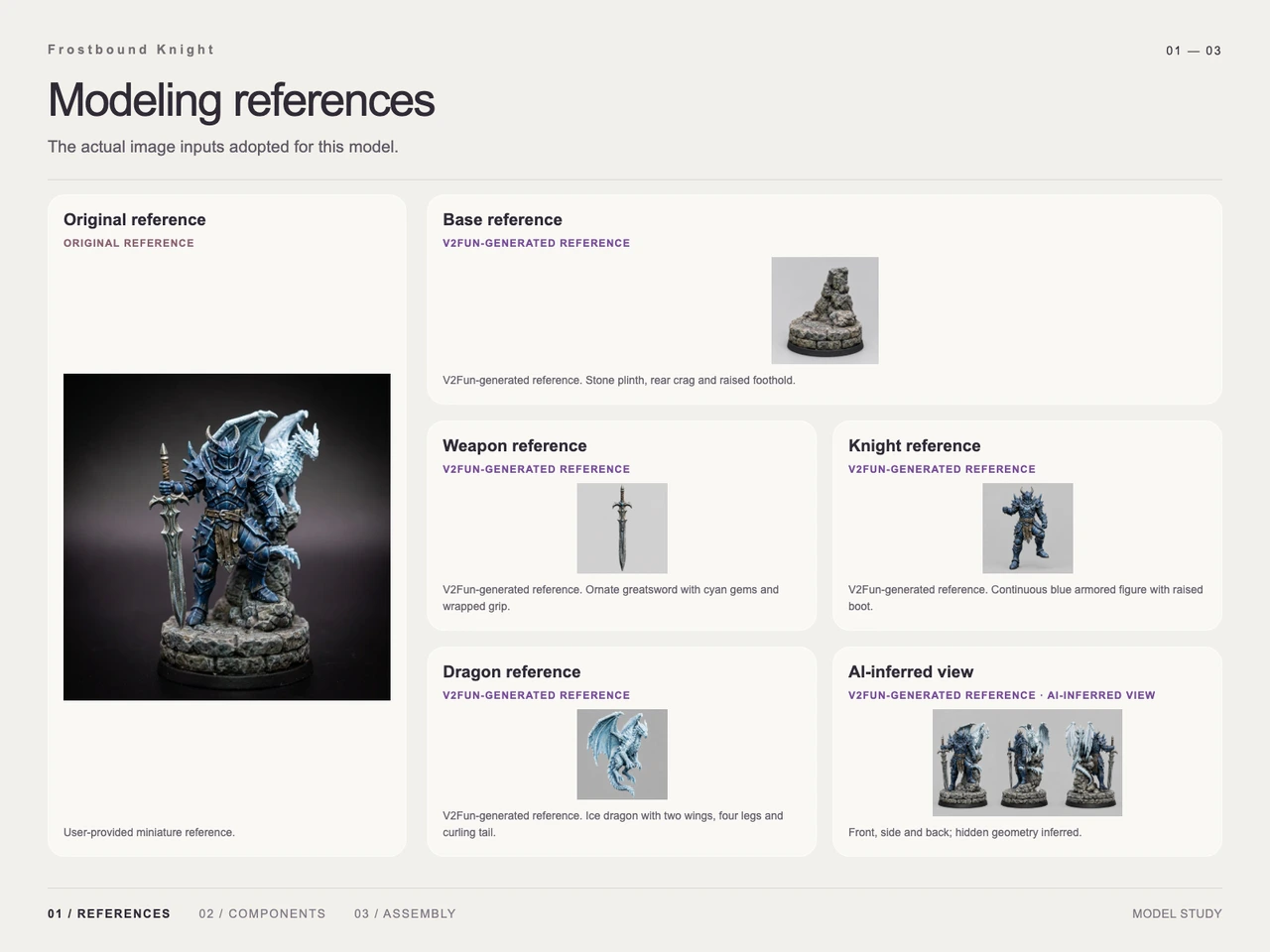
- Visual references: the original miniature image, isolated component studies, and an AI-inferred front, side, and back study.
- GLB: the supplied final deliverable format.
Step 1 — Read the Miniature’s Visual Structure
The reference establishes three strong silhouettes: the horned knight, the long vertical sword, and the dragon’s raised wings. Blue armor and pale dragon scales contrast with brown leather and gray rock. The elevated boot and rear crag define how the figures relate to the base.
The reference sheet also includes generated views of hidden areas. These are interpretations, not additional photographs of the original miniature. The single-image and multi-view input guide provides related context for distinguishing visible evidence from missing surface information.
Step 2 — Prepare Four Component References
The input sheet separates the subject into four modeling targets:
- Base: circular stone plinth, rear crag, and raised foothold.
- Weapon: ornate greatsword with cyan accents and a wrapped grip.
- Knight: a complete armored figure with one boot raised.
- Dragon: a pale blue creature with two wings, four legs, and a curling tail.
Armor plates, leather panels, scales, and rock details remain associated with these main components. The presentation does not document separate generation of every decorative element.
Step 3 — Generate the Textured Parts
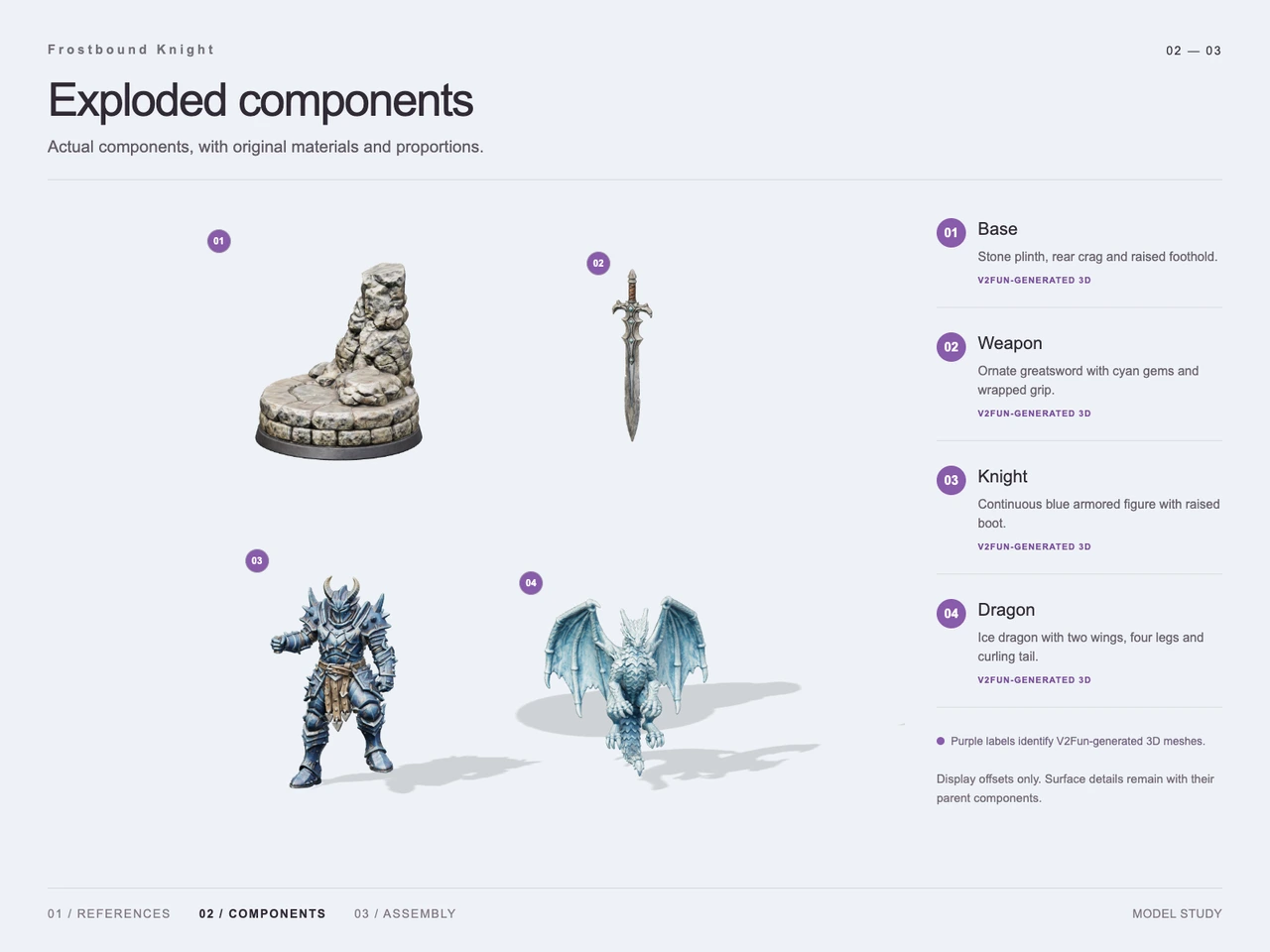
The exploded view shows all four components separately and labels each as V2Fun-generated 3D. The knight carries silver-blue armor edges and brown waist panels; the sword has a branching guard; the dragon shows ribbed wing membranes; and the base has layered, uneven stonework above a dark circular rim.
These visible finishes support the intended painted-miniature appearance. They do not establish texture resolution or individual PBR map quality. For related material considerations, see AI textures versus hand-painted materials. Here, hand-painted describes the desired look, not a documented manual painting step.
Step 4 — Assemble and Present the GLB
The four generated parts are assembled in Three.js. The final view places the sword beside the knight’s gripping hand, its tip at the stone platform, while the raised boot rests on a higher rock. The dragon sits behind the knight with its wings extending above the armored silhouette.
The final presentation states that the delivered GLB was reloaded and rendered as a complete assembly. It identifies the image as a render from the final model and notes that unseen surfaces are inferred.
Workflow
Original miniature reference → visual decomposition → isolated generated references and inferred views → four textured V2Fun components → Three.js assembly → GLB delivery and reload render.
Prompt
English rendering of the supplied design intent:
Create a finely hand-painted fantasy wargaming miniature: a knight in dark blue steel armor stands on a circular rocky base, with one foot on elevated rubble. Give the knight a fully enclosed helmet with two horns, spiked shoulder armor, layered chest armor, armored forearms, knees, and boots, with silver-blue edge highlights and wear. Add a brown belt and hanging leather skirt panels.
The hand on the viewer’s left holds a large sword vertically downward, with its tip touching the base. Use a cold silver blade, a branching pointed guard, and blue gemstones. Let the other hand hang naturally at the side. Place a young ice-white and pale-blue dragon on the higher rock behind the knight to the viewer’s right, with wings raised and spread, detailed scales, horns, spines, wing membranes, and a curved tail.
Build the base from layered broken gray stone above a black circular display stand. Emphasize resin-miniature solidity, dry-brushed highlights, metallic edges, and granular rock texture. Avoid a lifelike human presentation. Use a slightly elevated front product-photography view, shallow depth of field, a dark gray-to-black studio background, and square framing with the complete subject centered, without added text or watermarks.
Result
The final render retains the blue armor, horned helmet, ornate sword, raised-foot stance, pale dragon, and layered circular base. The dragon appears more prominent and frontal than in the original reference, and the final presentation uses a light background. The result therefore preserves the main subject relationships while interpreting proportions and presentation.
Supplied deliverable: frost-knight.glb.
File size: 129,903,956 bytes, approximately 129.90 MB in decimal units. Supplied MIME type: model/gltf-binary.
The documented outcome is a static display assembly. No generation-time or token-saving measurements are supplied for this case. For format context, consult the AI 3D export guide.
Frequently Asked Questions
Which parts were generated separately for Frostbound Knight?
The documented components are the rocky base, greatsword, complete armored knight, and ice dragon. The exploded view labels all four as V2Fun-generated 3D parts.
What did GPT-6 Astra and Three.js contribute?
The case notes assign visual interpretation, decomposition, and assembly coordination to GPT-6 Astra. The final presentation documents assembly of the four textured parts in Three.js.
Were the front, side, and back references photographs of the miniature?
No. The reference sheet labels that study as AI-inferred. It provides interpreted views of hidden geometry rather than independently observed details.
How closely does the final model follow the miniature reference?
It retains the blue armor, horned helmet, downward sword, elevated boot, pale dragon, and circular rock base. The dragon appears larger and more frontal, and the final render uses a light background instead of the requested dark studio setting.
What file was delivered, and what does the final image demonstrate?
The supplied deliverable is frost-knight.glb, sized 129,903,956 bytes with MIME type model/gltf-binary. The final presentation documents a reload and render of the static assembly; it does not establish animation readiness or printability.
Explore More
-
GPT-6 Astra x V2Fun - From Code Generation to Model Collaboration | V2Fun
See how GPT-6 Astra and V2Fun combine agent reasoning, code generation, and AI 3D foundation models to build complex, structured 3D assets.
View page → -
AI 3D Model Generator Input Guide: Single vs. Multi-View | V2Fun
Learn how to prepare photos, multi-view references, and sketches for an AI 3D Model Generator, then inspect geometry and textures before export.
View page → -
AI 3D Creation Platform: AI Textures vs Hand-Painted Materials | V2Fun
See how an AI 3D creation platform supports texture variants, then validate PBR maps, UVs, engine imports, and material quality before production.
View page → -
AI 3D Model Generator Export Guide: FBX, GLB, OBJ, or USDZ? | V2Fun
Use an AI 3D Model Generator with the right export format. Compare FBX, GLB, OBJ, and USDZ for Blender, game engines, animation, web, and AR.
View page →