Chinese Temple 3D Workflow with GPT-6 Astra and V2Fun
Explore a traditional Chinese temple reconstructed from three AI-generated components, fitted stone repairs, and agent-led assembly into a final GLB.
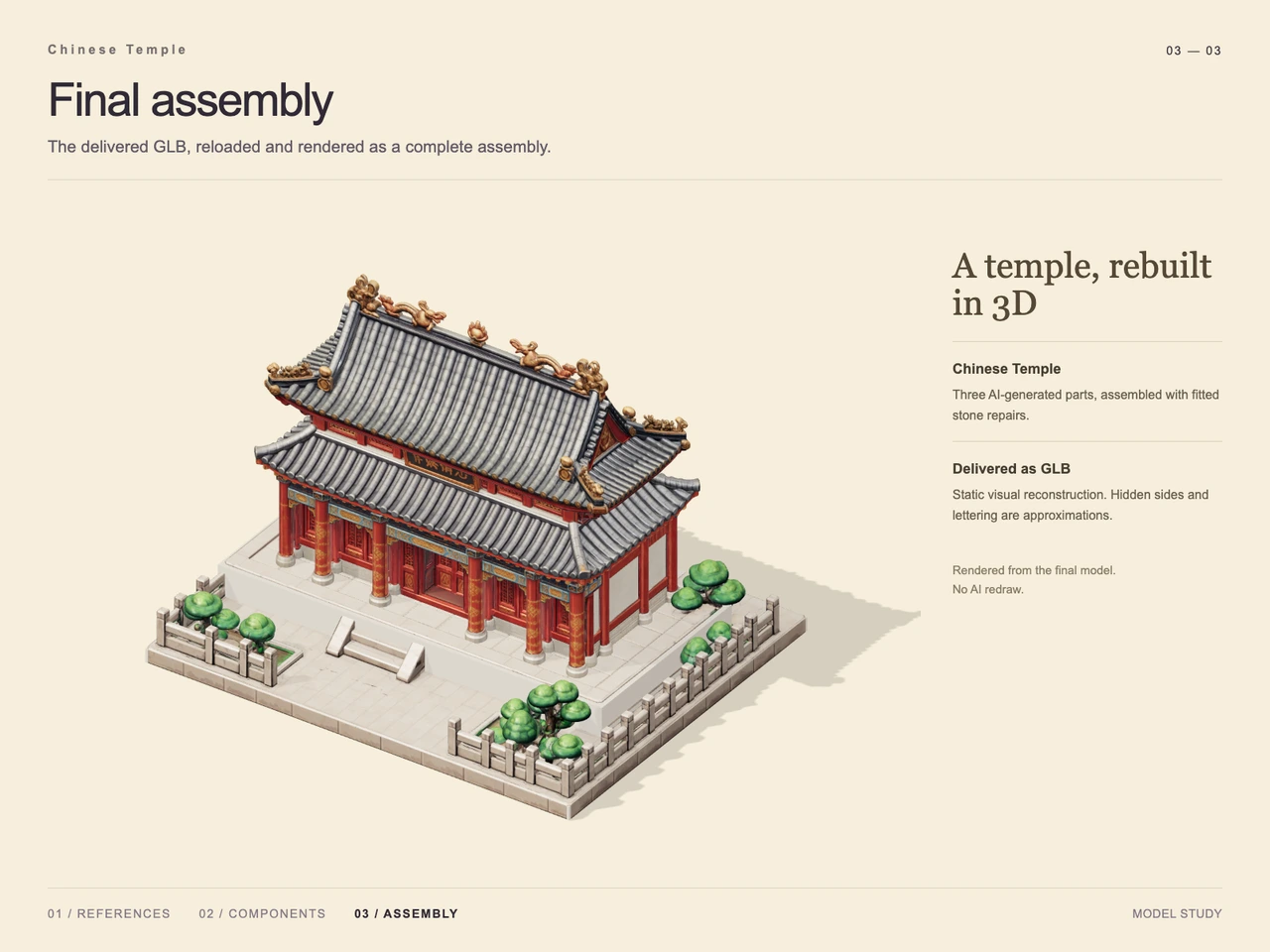
Interactive 3D preview · Chinese Temple 3D Workflow with GPT-6 Astra and V2FunDrag to rotate · Scroll to zoom
Take a Closer Look
-
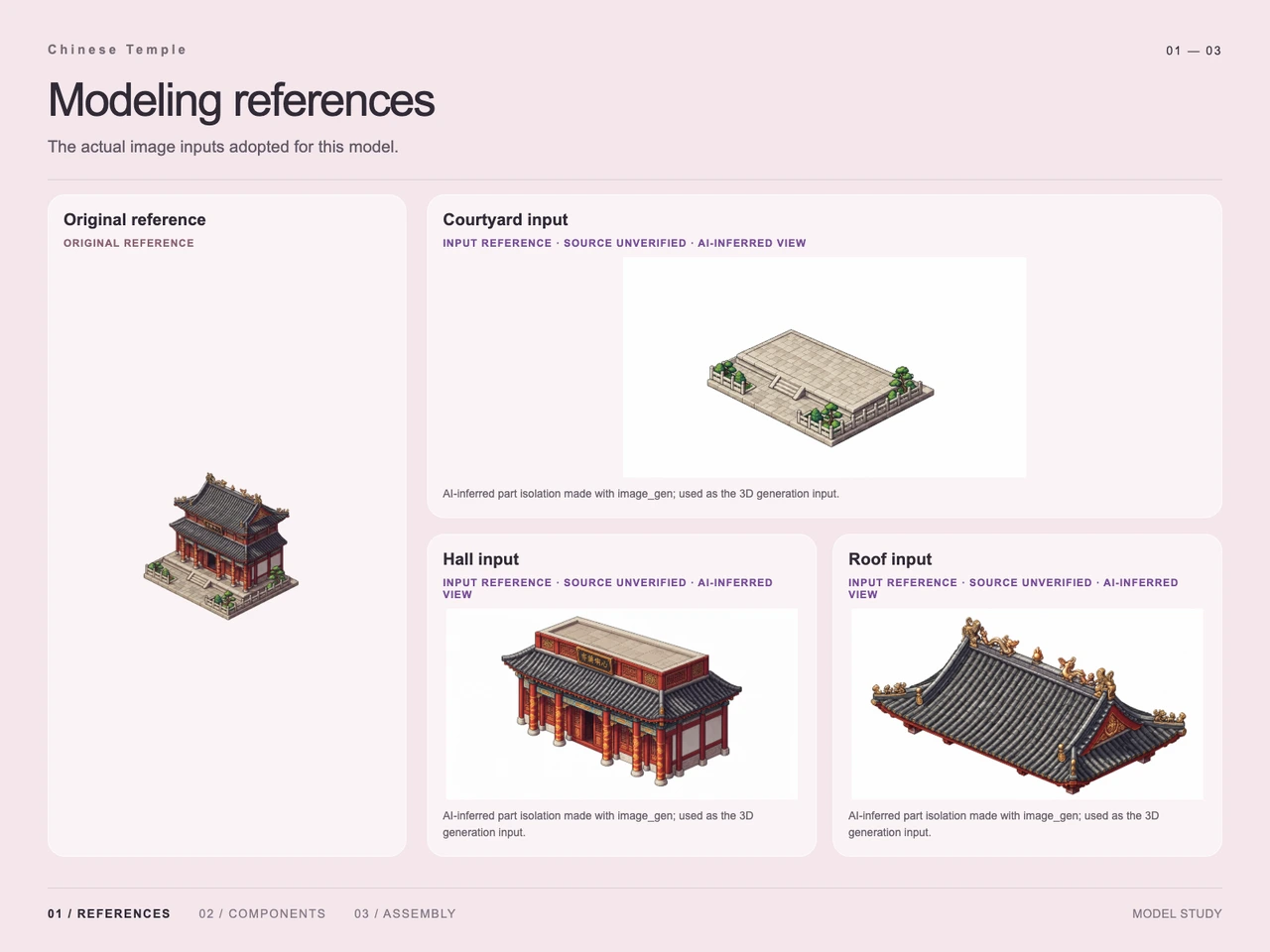 01 / Input
Input · Chinese Temple 3D Workflow with GPT-6 Astra and V2Fun
-
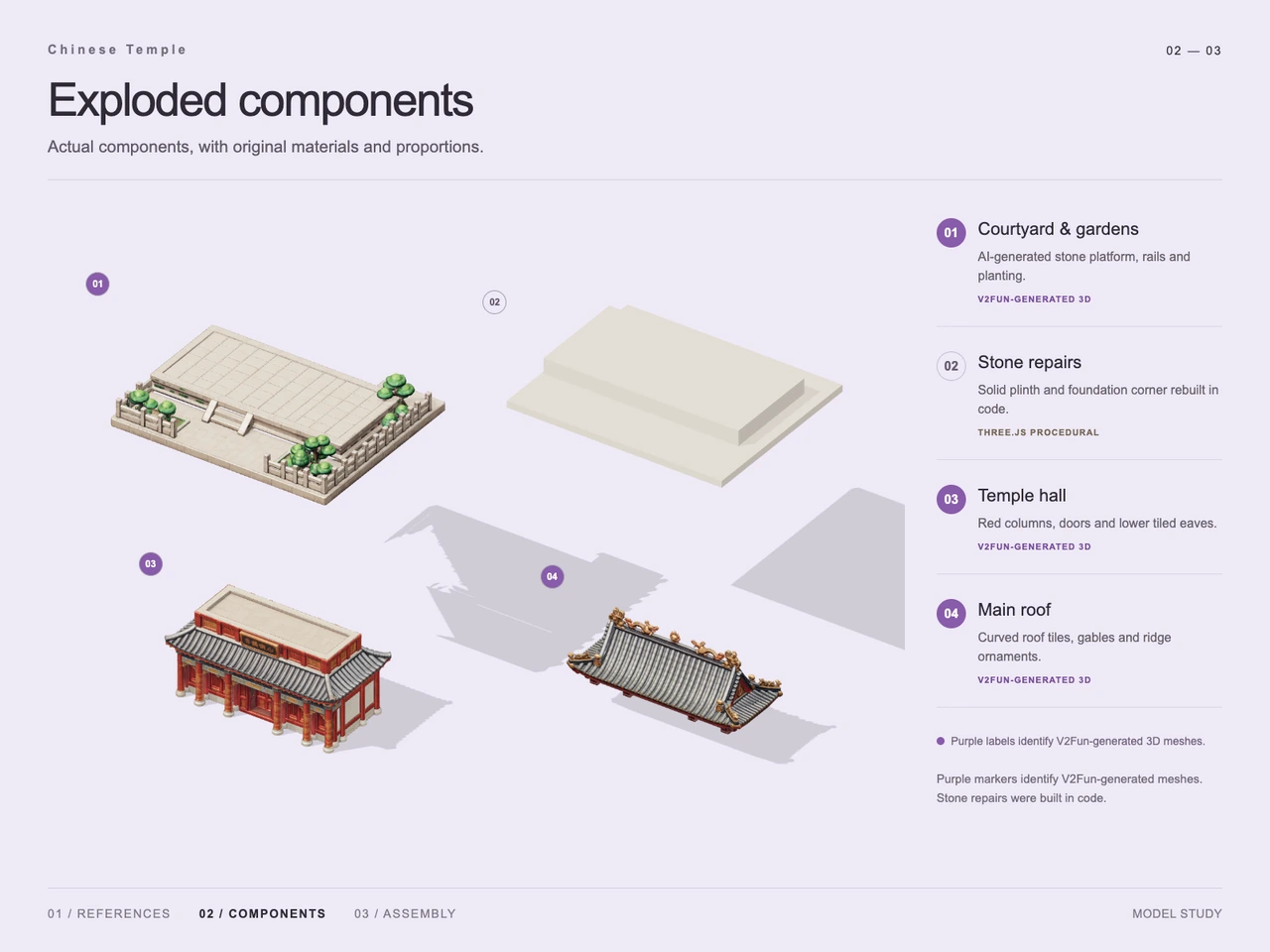 02 / Process
Process · Chinese Temple 3D Workflow with GPT-6 Astra and V2Fun
-
03 / Final
Final · Chinese Temple 3D Workflow with GPT-6 Astra and V2Fun
Overview
This case reconstructs a freestanding traditional Chinese temple with GPT-6 Astra and V2Fun. The design brief emphasizes two tiers of dark gray tiled roofing, upturned eaves, gold ridge ornaments, red columns, and a stone courtyard bordered by railings and greenery.
The supplied study documents three V2Fun-generated components: the courtyard and gardens, temple hall, and main roof. Procedural stone repairs complete the foundation before final assembly. This division follows the broader GPT-6 Astra and V2Fun collaboration workflow, with the case images showing which parts were generated and which were built in code.
Tools Used
- GPT-6 Astra: visual hierarchy analysis, component planning, and agent-side assembly and alignment, as described in the technical notes.
- V2Fun: generation of the courtyard, hall, and main roof components.
- image_gen: AI-inferred component isolation, credited on the reference sheet.
- Three.js: procedural reconstruction of the solid plinth and a foundation corner, identified on the component sheet.
- GLB: the supplied final asset format.
Step 1 — Identify the Architectural Layers
The original reference establishes the complete silhouette and the relationship between the raised hall, broad front platform, central stairs, and surrounding stone rails. The two roof tiers are especially important: the lower tiled eaves belong to the hall component, while the larger upper roof is isolated separately.
The warm red and gold facade contrasts with the cool gray tiles and pale stone base. Small trees and shrubs frame the courtyard without obscuring the central entrance.
Step 2 — Prepare Three Component References
The input sheet pairs the original temple with isolated courtyard, hall, and roof images. Its captions identify these as AI-inferred views made with image_gen and used for 3D generation; their source provenance is marked unverified. They provide component-specific visual guidance, while hidden surfaces remain inferred.
For related reference preparation principles, see the single-image and multi-view input guide. The three isolated parts shown here are separate component inputs, not a documented multi-view capture of the complete temple.
Step 3 — Generate the Detailed Components
The exploded study identifies three V2Fun-generated assets. The courtyard includes paving, rails, and planting. The hall carries red columns, decorated doors, white side panels, and lower tiled eaves. The main roof contains curved tile rows, gables, and gold-colored ridge ornaments.
These are the case's demonstrated uses of V2Fun's AI 3D model generator. The images support their visible appearance, but do not establish texture resolution or individual PBR map quality.
Step 4 — Repair the Stone Base and Assemble
A separate pale stone form in the exploded view is labeled as a procedural repair. The accompanying description specifies a rebuilt solid plinth and foundation corner. This adds a regular structural element alongside the more detailed generated courtyard.
The final assembly places the hall on the raised base and fits the main roof above the lower eaves. The front stairs remain visible between the planted corners, and the stone railings frame the complete building.
Workflow
Original reference → AI-inferred part references → Three V2Fun components → Three.js stone repairs → Agent-led alignment and assembly → GLB export → Documented reload and render.
Prompt
English translation of the design brief:
A freestanding traditional Chinese pavilion building, designed as a detailed isometric pixel-game asset. Two tiers of dark gray tiled roofs have dense, orderly tile rows, upturned corners, and small golden ridge beasts and ornaments. Use vermilion wooden columns, red carved doors and windows, white walls, gold beam decorations, and a central black plaque with gold lettering above the front entrance. Place the building on a light gray square stone base with a broad front platform, central stairs, low perimeter stone railings, and small green trees and shrubs in the side corners. Maintain crisp pixel edges and pixel-by-pixel shading in a retro RPG building-sprite style, with rich detail and a clean silhouette. Contrast warm reds and golds with cool gray roof tiles. Show the front and right side from an elevated, approximately 45-degree isometric viewpoint. Center the complete building and base with ample black space around them. No people, extra scenery, interface, or watermark. Landscape composition, approximately 16:9.
Result
The final presentation shows a complete temple with two roof tiers, gold ridge decoration, a red-and-gold facade, central stairs, stone railings, and planted courtyard corners. It identifies the image as a render of the delivered GLB after reloading, rather than an AI redraw.
The result preserves the main architectural cues, while presenting them as a shaded 3D reconstruction on a light background. Strict pixel-by-pixel styling and the requested black background are not demonstrated in the final render. Hidden sides and lettering are explicitly described as approximations.
Supplied output metadata: chinese-temple.glb, 237,013,860 bytes, approximately 237.01 MB in decimal units; MIME type model/gltf-binary. For format context, see the AI 3D export guide. The documented result is a static visual reconstruction; no generation-time or token-saving measurements are supplied.
Frequently Asked Questions
Which Chinese temple components were generated with V2Fun?
The component study identifies three: the courtyard and gardens, the temple hall with lower tiled eaves, and the separate main roof.
What did Three.js contribute to this temple?
The study credits Three.js procedural code with rebuilding a solid stone plinth and a foundation corner. These repairs were fitted into the final assembly.
Were the isolated component images original architectural views?
No. The input sheet describes them as AI-inferred part-isolation images made with image_gen and marks their source provenance as unverified. They served as generation inputs.
Does the final temple match the pixel-art prompt exactly?
It retains the layered roofs, red-and-gold facade, pale stone courtyard, and greenery. The final image uses shaded 3D rendering on a light background, so strict pixel shading and the requested black background are not demonstrated. Lettering and hidden sides are approximations.
What final file is documented for this case?
The supplied metadata lists chinese-temple.glb at 237,013,860 bytes, with MIME type model/gltf-binary. The final presentation describes a reload and render of the delivered assembly; it does not establish game-engine readiness or measured performance.
Explore More
-

GPT-6 Astra x V2Fun - From Code Generation to Model Collaboration | V2Fun
See how GPT-6 Astra and V2Fun combine agent reasoning, code generation, and AI 3D foundation models to build complex, structured 3D assets.
View page → -
AI 3D Model Generator Input Guide: Single vs. Multi-View | V2Fun
Learn how to prepare photos, multi-view references, and sketches for an AI 3D Model Generator, then inspect geometry and textures before export.
View page → -

V2Fun - AI 3D Model Generator
Create 3D models from text prompts or images with V2Fun's AI 3D model generator. Generate characters, props, game assets, and 3D-printable models faster.
View page → -

AI 3D Model Generator Export Guide: FBX, GLB, OBJ, or USDZ? | V2Fun
Use an AI 3D Model Generator with the right export format. Compare FBX, GLB, OBJ, and USDZ for Blender, game engines, animation, web, and AR.
View page →