Build a Cargo Courier Tricycle with GPT-6 Astra and V2Fun
See how GPT-6 Astra and V2Fun turn a courier-and-cargo-tricycle concept into a component-based 3D asset, combining generated character detail, procedural mechanical parts, assembly calibration, and GLB delivery.
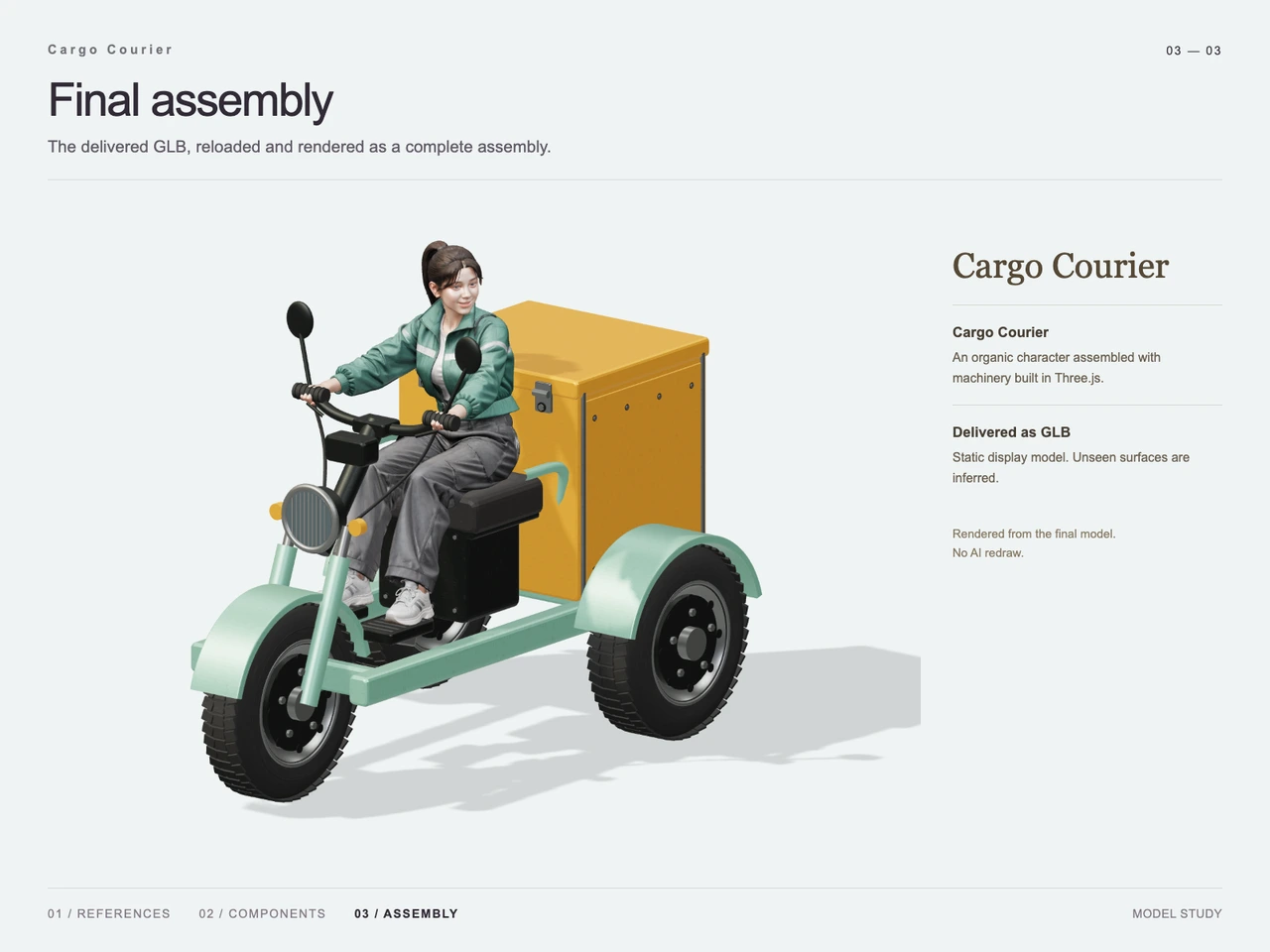
Interactive 3D preview · Build a Cargo Courier Tricycle with GPT-6 Astra and V2FunDrag to rotate · Scroll to zoom
Take a Closer Look
-
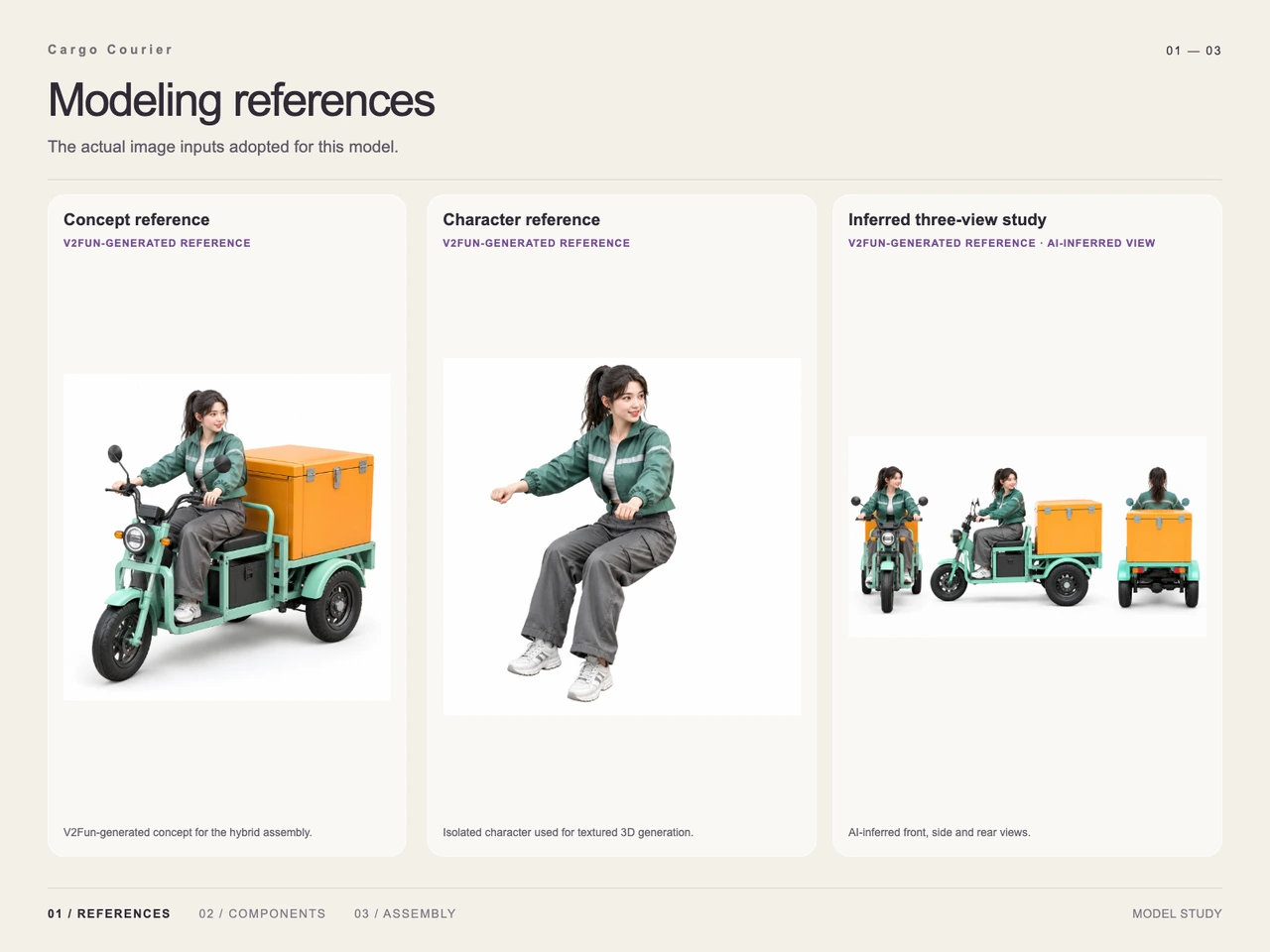 01 / Input
Input · Build a Cargo Courier Tricycle with GPT-6 Astra and V2Fun
-
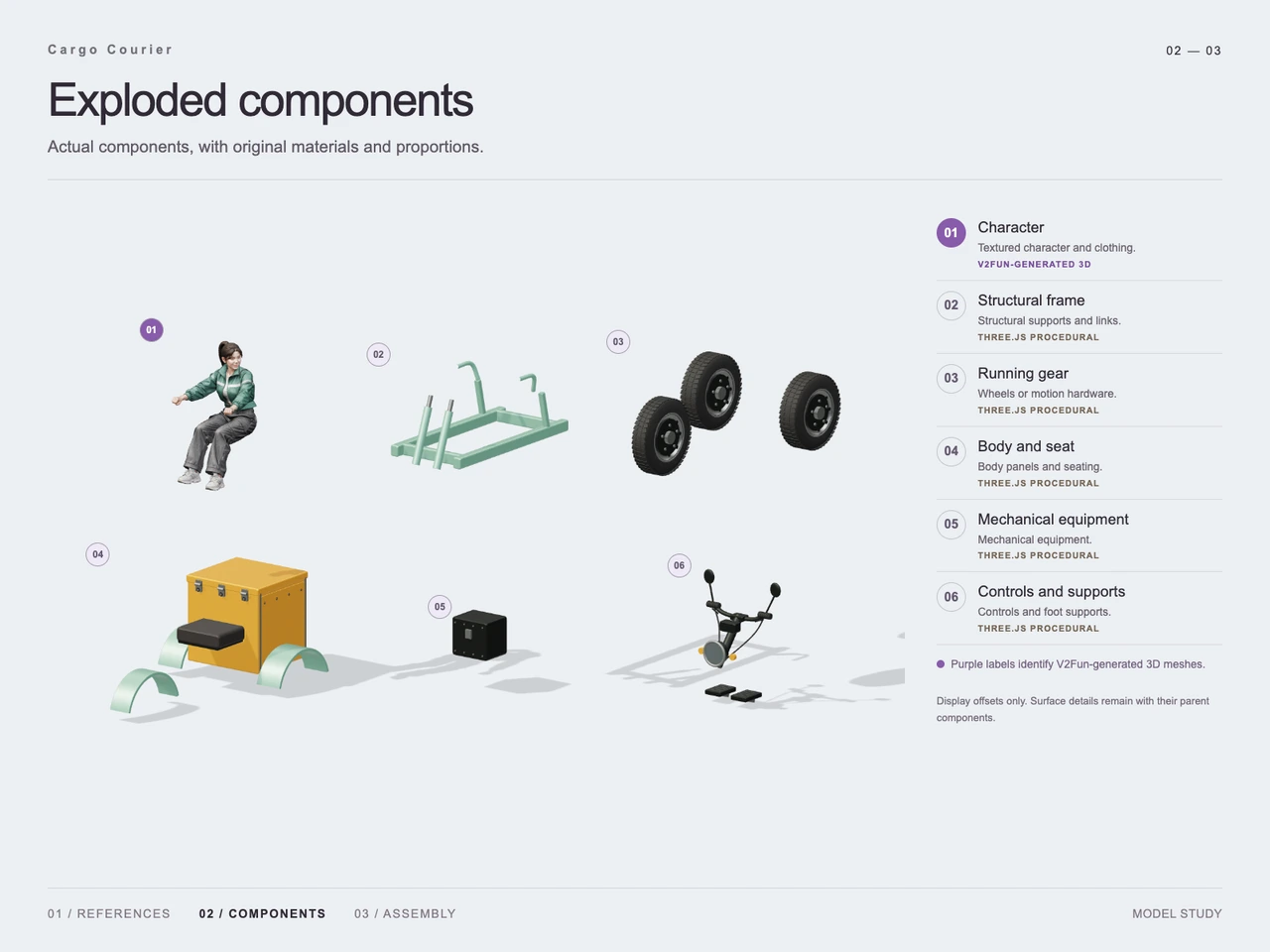 02 / Process
Process · Build a Cargo Courier Tricycle with GPT-6 Astra and V2Fun
-
03 / Final
Final · Build a Cargo Courier Tricycle with GPT-6 Astra and V2Fun
Overview
This case turns a front three-quarter concept of an adult female courier riding a compact electric cargo tricycle into a complete 3D assembly. The reference establishes the key visual relationships: one front steering wheel, two rear wheels, a mint-green square-tube frame, an orange cargo box, a battery enclosure beneath the seat, and the rider’s contact with the handlebars, seat, and foot supports.
Rather than treating the character and vehicle as a single undifferentiated generation task, GPT-6 Astra interprets the hierarchy and plans the assembly. V2Fun handles the detailed character mesh, while regular mechanical forms are constructed procedurally and calibrated around the rider. This division follows the broader GPT-6 Astra and V2Fun model-collaboration workflow.
Tools Used
- GPT-6 Astra: reference interpretation, component planning, spatial relationships, and assembly calibration.
- V2Fun: generation of the textured courier character from the visual reference. The platform’s image-to-3D model generator provides context for this reference-led approach.
- Three.js / procedural construction: regular vehicle elements such as the frame, wheels, body panels, cargo box, battery housing, handlebars, mirrors, fenders, and foot supports.
- Visual references: a complete concept image, an isolated character study, and an AI-inferred front, side, and rear study.
- GLB: the delivered binary glTF asset format; see the GLB, FBX, OBJ, and USDZ export guide for format-selection context.
Step 1 — Read the Complete Concept
GPT-6 Astra first identifies the courier, tricycle, cargo box, color scheme, pose, and required contact points. The full reference keeps the intended silhouette visible and shows how the rider and machinery should read as one independent asset.
Step 2 — Clarify Ambiguous Views
An isolated character reference provides clearer evidence for the ponytail, cropped green jacket, loose gray cargo trousers, seated posture, and hand placement. An inferred three-view study supplies additional front, side, and rear guidance for the tricycle and cargo box. Because those extra views are inferred rather than photographed ground truth, they serve as assembly guidance rather than proof of exact hidden geometry. The single-view versus multi-view input guide explains why additional angles can reduce structural ambiguity.
Step 3 — Decompose the Asset
The demonstrated breakdown contains six groups: character, structural frame, running gear, body and seat, mechanical equipment, and controls and supports. The process image identifies the character as V2Fun-generated and the remaining vehicle groups as procedurally constructed in Three.js.
Step 4 — Generate the Character
V2Fun generates the textured courier as an isolated seated figure. Separating her from the vehicle preserves a clear character silhouette while giving the assembly stage control over her scale, rotation, and placement.
Step 5 — Build the Mechanical Groups
GPT-6 Astra uses regular geometry for the vehicle: square tubes for the frame, circular forms for wheels and lamps, rectangular panels for the cargo box and battery enclosure, and rods or curved tubes for controls and supports. The process view shows these groups separated for inspection; its offsets are illustrative rather than measurements.
Step 6 — Calibrate the Assembly
The generated character and procedural vehicle groups are brought together. Calibration focuses on the visible relationships established by the prompt: both hands meet the handlebars, the rider sits on the seat, her feet align with the supports, the front wheel remains centered beneath the steering assembly, and the rear pair supports the cargo body without obscuring the character.
Workflow
Prompt → Generate concept reference → Isolate character and infer supporting views → Decompose → Generate character with V2Fun → Build regular vehicle parts procedurally → Calibrate contacts and proportions → Assemble → Render → Export GLB
Prompt
Create a complete standalone asset featuring an adult female courier with a ponytail, cropped jacket, and loose cargo trousers seated on a compact electric cargo tricycle. She holds the handlebars with both hands and turns her torso slightly. Use one front steering wheel and two rear wheels supporting a large rectangular cargo box with a visible lid, hinges, and latches. Build the chassis from square tubing and place a removable battery enclosure beneath the seat. Use a mint-green vehicle body and orange cargo box, with realistic proportions, light collectible-style exaggeration, expressive facial features, natural clothing folds, clear part boundaries, and preserved contact at the seat, handlebars, and foot supports. Present a centered front three-quarter view from slightly above on a white background with soft studio lighting, contact shadows, sharp focus, and refined PBR-style materials. Exclude text, numbers, logos, watermarks, complex scenery, motion blur, collages, and exploded views.
Result
The final render shows the courier integrated with a three-wheeled cargo vehicle. The mint frame, orange lidded cargo box, black battery enclosure, seat, handlebars, mirrors, headlamp, fenders, and three wheels remain visually distinct. The rider’s hands, seated posture, and foot placement align with the assembled controls and supports.
Final output: 83-v2-final.glb
File type: model/gltf-binary
File size: 50,326,104 bytes (approximately 50.33 MB)
The supplied evidence confirms a rendered static GLB assembly. It does not establish topology or UV quality, polygon count, exact dimensions, printability, animation readiness, engine readiness, commercial rights, or measured generation performance.
Frequently Asked Questions
How was the cargo courier asset divided for 3D construction?
The demonstrated process separates it into six groups: the character, structural frame, running gear, body and seat, mechanical equipment, and controls and supports.
Which part was generated with V2Fun?
The process image identifies the textured courier character as the V2Fun-generated 3D component. The vehicle groups are labeled as procedurally constructed in Three.js.
Why were additional character and three-view references used?
The isolated character study clarifies clothing and pose, while the inferred front, side, and rear views provide guidance for vehicle depth and hidden-side relationships. The inferred views are guidance, not proof of exact unseen geometry.
How does the workflow preserve the rider’s relationship with the tricycle?
During assembly calibration, the character is positioned so her hands meet the handlebars, her body rests on the seat, and her feet align with the supports while maintaining the intended silhouette.
What file was delivered for this case?
The delivered file is `83-v2-final.glb`, a `model/gltf-binary` asset containing 50,326,104 bytes, or approximately 50.33 MB.
Is this cargo courier model proven ready for games, animation, or 3D printing?
No. The supplied evidence demonstrates a rendered static GLB assembly but does not verify rigging, deformation, topology, UVs, runtime performance, physical dimensions, or printability.
Explore More
-
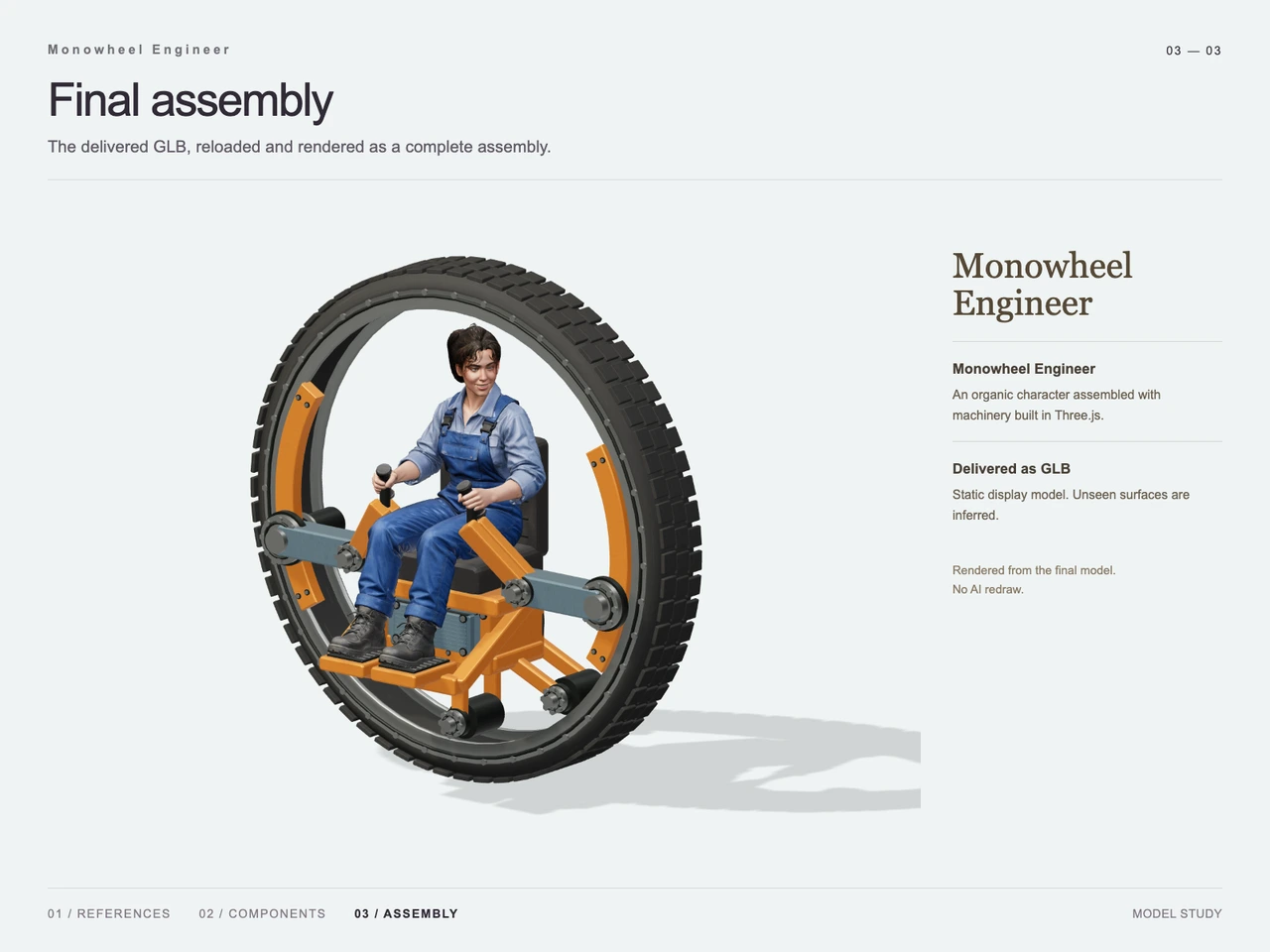
GPT-6 Astra x V2Fun - From Code Generation to Model Collaboration | V2Fun
See how GPT-6 Astra and V2Fun combine agent reasoning, code generation, and AI 3D foundation models to build complex, structured 3D assets.
View page → -
V2Fun - AI 3D Model Generator
Create 3D models from text prompts or images with V2Fun's AI 3D model generator. Generate characters, props, game assets, and 3D-printable models faster.
View page → -
AI 3D Model Generator Input Guide: Single vs. Multi-View | V2Fun
Learn how to prepare photos, multi-view references, and sketches for an AI 3D Model Generator, then inspect geometry and textures before export.
View page → -
AI 3D Model Generator Export Guide: FBX, GLB, OBJ, or USDZ? | V2Fun
Use an AI 3D Model Generator with the right export format. Compare FBX, GLB, OBJ, and USDZ for Blender, game engines, animation, web, and AR.
View page →